
Bank Statement Converter Without Uploading (No Cloud Required)
Key Takeaways
- Some professionals cannot upload client bank statements to cloud services due to regulatory requirements, client agreements, or firm policies.
- The FTC Safeguards Rule, IRS Publication 4557, and state privacy laws impose obligations on how financial data is handled — including during routine conversion tasks.
- Desktop bank statement converters process PDFs entirely on your computer. No data is uploaded, transmitted, or stored on third-party servers.
- Options include LocalExtract (macOS and Windows), MoneyThumb (Windows), and Bank2CSV (Windows). Each has different strengths.
- A "no upload" converter does not mean less capable — it means the same conversion happens on your hardware instead of someone else's server.
This article contains legal and regulatory references for informational purposes only. It is not legal advice. Consult a qualified attorney for guidance specific to your practice.
Disclosure: This article is published by the LocalExtract team. LocalExtract is a desktop bank statement converter that processes files locally. We have a commercial interest in this topic. We strive for factual accuracy and include competing products fairly.
Contents
- Why "No Upload" Matters
- Who Needs a No-Upload Converter?
- Regulatory Requirements
- How No-Upload Converters Work
- Desktop Bank Statement Converters Compared
- LocalExtract: How It Works
- Cloud vs. No-Upload: Feature Trade-Offs
- Common Concerns About Local Processing
- FAQ
- The Bottom Line
Why "No Upload" Matters
Most bank statement converters on the market are cloud-based. You upload a PDF to a website, their servers process it, and you download the result. This workflow is convenient — no software to install, works from any browser.
But it means your bank statement — containing account numbers, routing numbers, transaction histories, balances, and personally identifiable information — travels over the internet and sits on a server you do not own or control. For many professionals, this is not acceptable.
The reasons are not theoretical:
- Financial services data breaches are among the most costly across all industries, according to IBM's annual Cost of a Data Breach report.
- Cloud service breaches can expose data from thousands of users simultaneously — your client's data is only as secure as the provider's weakest point.
- Data retention policies vary widely — from 24 hours to 5 years depending on the provider (see our cloud vs. local converter comparison for a detailed retention policy review).
- Regulatory penalties for mishandling financial data can be significant under the FTC Safeguards Rule, with civil penalties that escalate based on the scope and severity of violations.
A bank statement converter that does not upload files eliminates all of these risks for the conversion step. The same output — CSV, Excel, structured transaction data — is produced on your own machine without any data leaving your control.
Who Needs a No-Upload Converter?
Accountants and Bookkeepers
Accountants handling client bank statements have a professional duty to protect confidentiality. Uploading client financial documents to a third-party cloud service introduces a vendor relationship that must be managed, documented, and audited. Many firms prefer to avoid this entirely for routine conversion tasks.
For accountants, every cloud vendor that touches client data must appear in the firm's Written Information Security Plan (WISP) per IRS Publication 4557. A no-upload converter means one fewer vendor to document. For more on how this affects bookkeeping workflows, see Bank Statement Converters for Accountants.
Legal Professionals
Attorneys and paralegals who work with bank statements during litigation, estate administration, or forensic accounting face strict confidentiality obligations. Attorney-client privilege and work product doctrine can be compromised if client financial documents are uploaded to third-party servers without proper safeguards and consent.
For legal professionals handling financial documents, see our guide on Bank Statement Converters for Legal Professionals.
Regulated Industries
Organizations in healthcare, government, defense, and financial services often operate under policies that restrict or prohibit uploading sensitive documents to external cloud services. Some work in air-gapped environments with no internet access at all.
Privacy-Conscious Individuals
Some users simply do not want their personal financial data — every purchase, every deposit, every balance — sitting on someone else's server. This is a reasonable preference that does not require regulatory justification. For a deeper look at how privacy factors into the paid vs. free tool decision, see our free vs. paid bank statement converter comparison.
Regulatory Requirements
Several regulatory frameworks create obligations that affect how bank statements can be processed:
FTC Safeguards Rule (GLBA)
The FTC Safeguards Rule requires financial institutions — including tax preparers, accountants, and financial advisors — to develop, implement, and maintain a comprehensive information security program. This includes assessing risks associated with third-party service providers that access customer information.
Uploading client bank statements to a cloud converter creates exactly this kind of third-party relationship. The firm must evaluate the provider's security, document the relationship, and ensure appropriate contractual protections. Civil penalties for non-compliance can be substantial, according to the FTC's enforcement guidance.
A no-upload converter eliminates this vendor relationship entirely. The data stays within the firm's existing security perimeter.
IRS Publication 4557 (WISP)
IRS Publication 4557 requires tax professionals to maintain a Written Information Security Plan documenting every system that stores or processes taxpayer data. Cloud-based converters that receive client bank statements must be included. Desktop converters that process locally do not create an external system to document.
State Privacy Laws
California (CCPA/CPRA), Virginia (VCDPA), Colorado (CPA), Connecticut (CTDPA), and a growing number of states impose requirements on businesses processing personal financial data. Uploading client data to a third-party converter may constitute a data "share" under some state definitions, potentially requiring explicit client consent and contractual safeguards.
AICPA Code of Professional Conduct
The American Institute of CPAs requires members to maintain confidentiality of client information. While using a cloud service does not automatically violate this obligation, it creates an additional vector that must be managed and disclosed.
How No-Upload Converters Work
A no-upload (local or desktop) bank statement converter installs a parsing engine on your computer. When you convert a PDF:
- You select the PDF from your local file system.
- The parsing engine (running on your CPU) reads the PDF, identifies the transaction table, and extracts the data.
- The output file (CSV or Excel) is written to your local disk.
- No network request is made at any point during the process.
The entire workflow happens within your operating system's security boundary. The only software touching your data is the converter application itself, running under your user account.
You can verify this claim with any legitimate local converter: disconnect from the internet, run a conversion, and confirm it completes. If it does, the processing is genuinely local.
Desktop Bank Statement Converters Compared
Several desktop tools can convert bank statement PDFs without uploading files. Here is an overview of the options we are aware of:
LocalExtract
- Platform: macOS and Windows
- Processing: 100% on-device, works offline
- Output formats: CSV, Excel
- OCR: Yes (local OCR engine for scanned PDFs)
- Pricing: Free tier (10 pages lifetime), Pro at $10/month or $60/year
- Bank coverage: Major banks worldwide; new formats added on request
- Website: localextract.app
MoneyThumb
- Platform: Windows (PDF2CSV, PDF2QBO, PDF2OFX products)
- Processing: Desktop application, processes locally
- Output formats: CSV, QBO, OFX, QFX (varies by product)
- Pricing: One-time purchase — check moneythumb.com for current pricing
- Bank coverage: Supports many bank formats
- Website: moneythumb.com
For a detailed comparison, see our article LocalExtract vs MoneyThumb.
Bank2CSV
- Platform: Windows
- Processing: Desktop application, processes locally
- Output formats: CSV (and variants like Bank2QBO for QBO format)
- Pricing: Check their website for current pricing
- Bank coverage: Supports various bank formats
- Website: Check search results for current availability
What About Mac Users?
Desktop bank statement converter options on macOS are more limited. Many tools in this space are Windows-only. LocalExtract is one of the few options that runs natively on macOS with full local processing. For more on Mac-specific options, see Bank Statement Converter for Mac.
LocalExtract: How It Works
LocalExtract is a desktop bank statement converter that processes PDFs entirely on your computer. Here is the typical workflow:
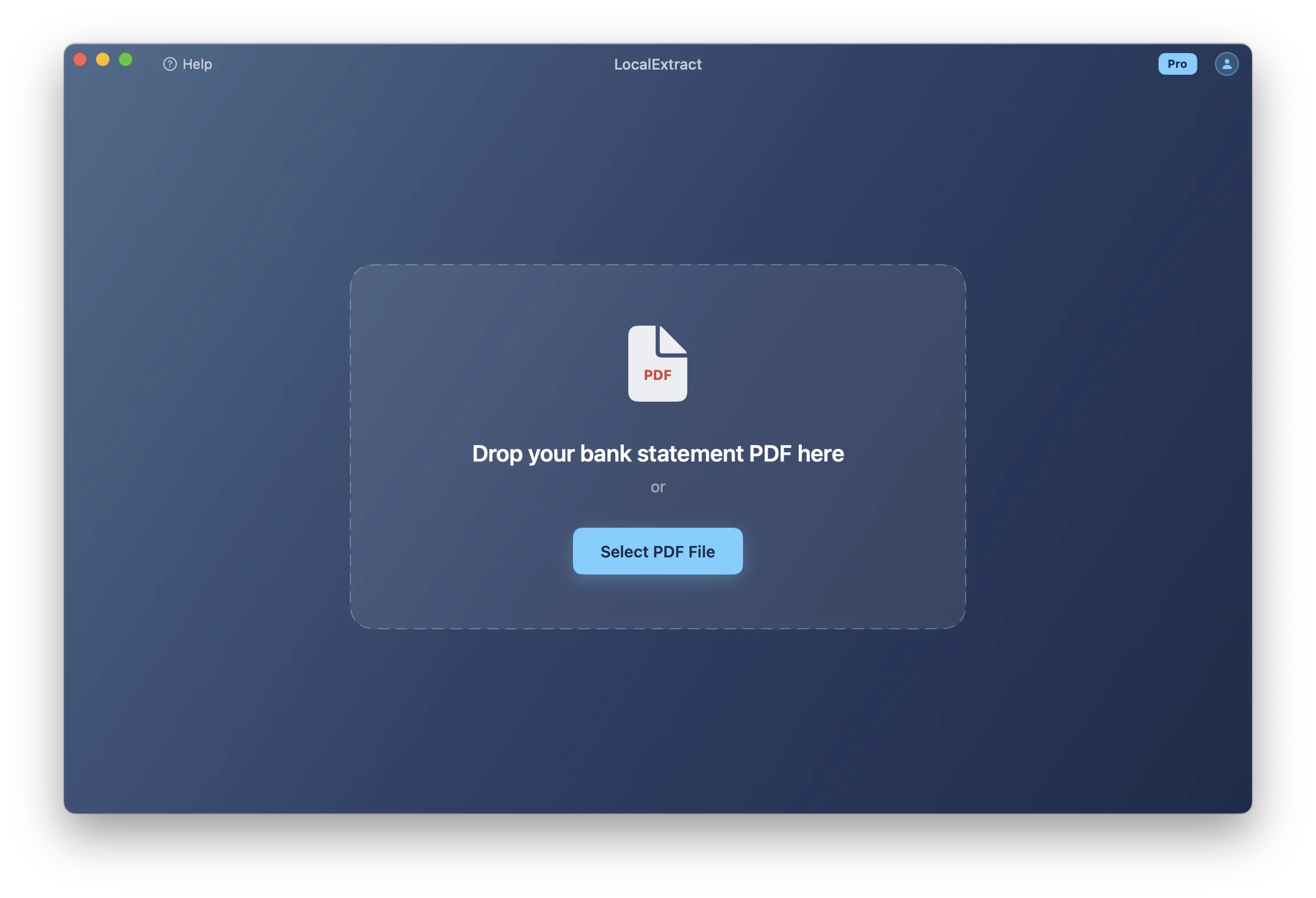
Step 1: Select your PDF. Open LocalExtract and choose a bank statement PDF from your file system. The file stays on your local disk.
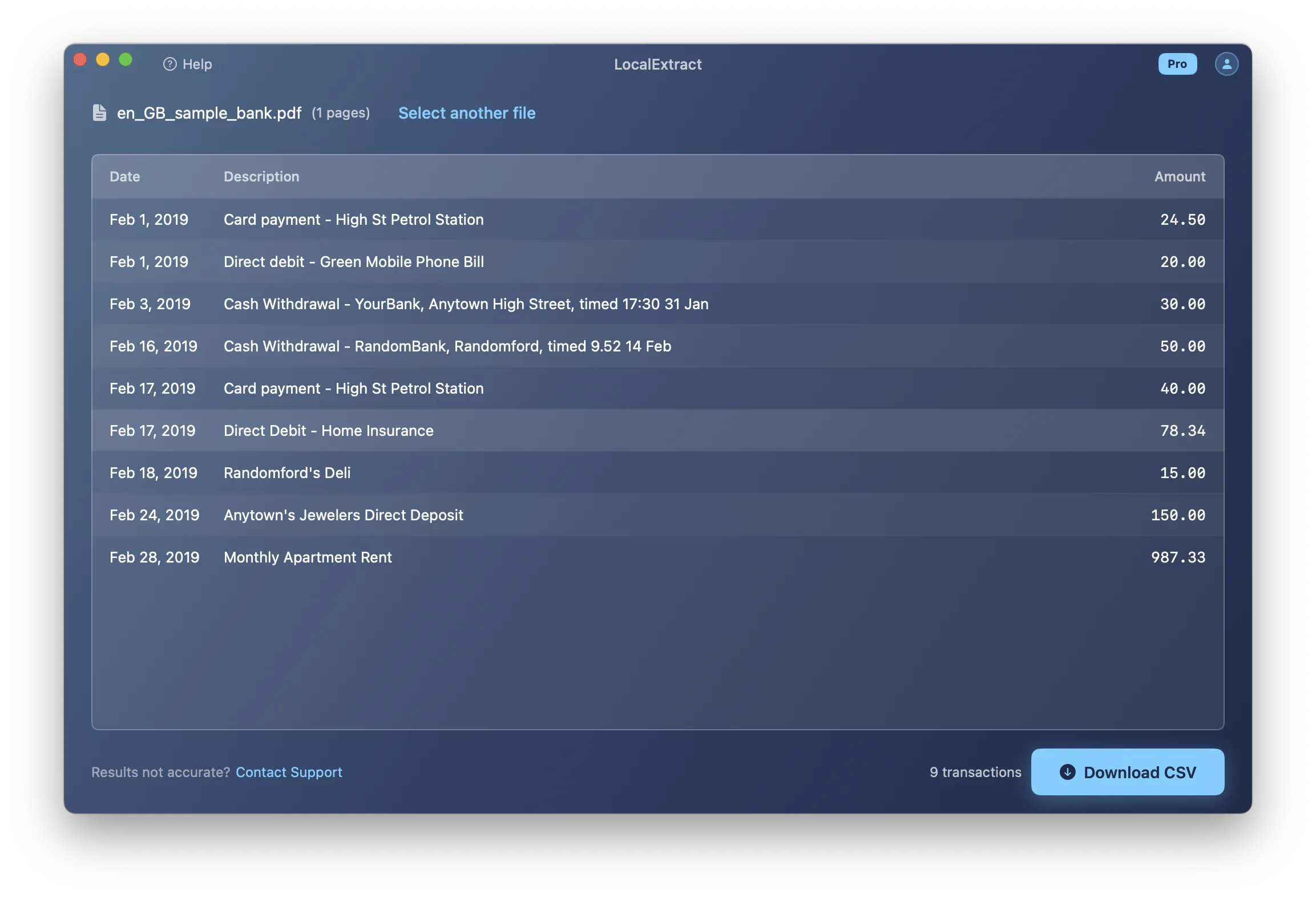
Step 2: Preview the result. LocalExtract's engine parses the PDF and shows you the extracted transactions before you export. You can review the data for accuracy.
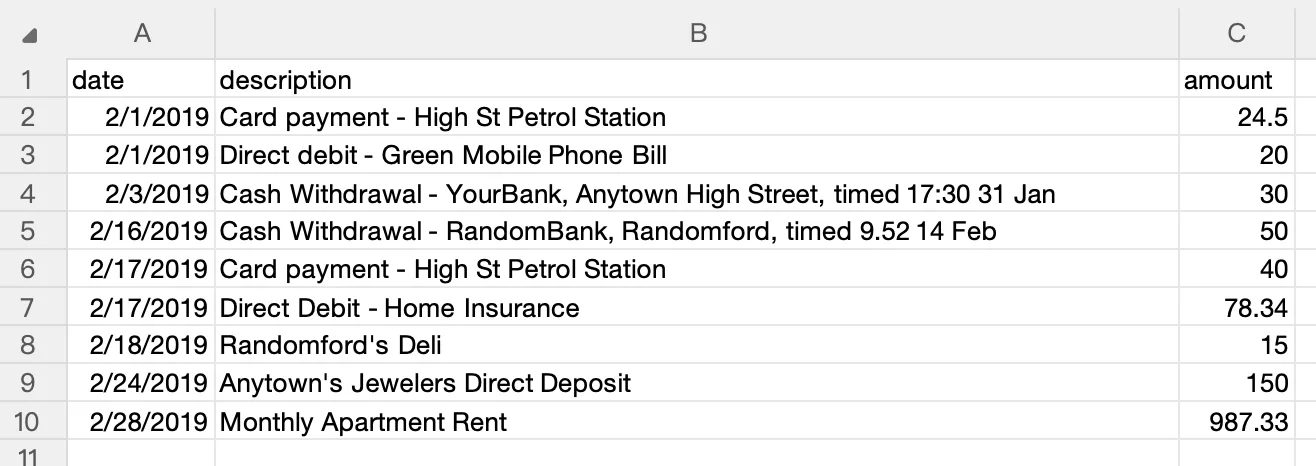
Step 3: Export to CSV or Excel. Save the structured data to your preferred format. The output file is written to your local disk.
The entire process takes milliseconds for text-based PDFs (4ms to 353ms in our benchmarks on Apple M-series hardware). No internet connection is needed. No data leaves your computer.
Pricing: Free tier includes 10 pages lifetime — enough to test with your specific bank statements. Pro plan is $10/month or $60/year for unlimited processing.
Platforms: Available for both macOS and Windows as native desktop applications.
Cloud vs. No-Upload: Feature Trade-Offs
Choosing a no-upload converter does involve trade-offs. Here is an honest comparison:
| Feature | Cloud Converters | No-Upload (Desktop) Converters |
|---|---|---|
| Data privacy | Data processed on third-party servers | Data never leaves your computer |
| Internet required | Yes, always | No |
| Setup | No installation — browser-based | Requires app installation |
| Cross-device access | Any device with a browser | Only the device with the app installed |
| Format coverage | Potentially broader (server-side AI) | Depends on the tool's engine |
| Scanned PDF OCR | Often strong (cloud GPU) | Varies; local OCR available but hardware-dependent |
| Team features | Often included | Typically single-user |
| Processing speed | Includes network round-trip | Direct on-device processing |
| Compliance burden | Must document and audit vendor | No vendor to manage |
| Update delivery | Instant server-side | Requires app update |
Cloud converters have legitimate advantages: no installation, broader format coverage in some cases, and team collaboration features. The trade-off is that every conversion sends sensitive financial data to infrastructure you do not control.
No-upload converters have their own limitations: you need to install software, updates are not instant, and you are limited to the devices where the app is installed. The benefit is that the conversion task — which does not inherently require a server — stays within your own security perimeter.
Common Concerns About Local Processing
"Will accuracy be as good?"
For text-based (digitally generated) PDFs from common banks, local converters can match cloud accuracy. The parsing task — identifying table structures, extracting columns, handling multi-line descriptions — does not inherently require a cloud server. For scanned PDFs, accuracy depends on OCR quality, which can vary between tools regardless of architecture.
"What about bank format coverage?"
Cloud services can update their server-side models without user action, which may give them an edge on unusual or newly encountered formats. Desktop tools require app updates. However, major bank formats (Chase, Bank of America, Wells Fargo, Capital One, Citi, and many others) are well-supported by established local tools.
"Is local processing slower?"
In practice, local processing is often faster because it eliminates network upload and download time. LocalExtract processes text-based PDFs in 4ms to 353ms. The "processing" part of cloud conversion may be similar, but the total time includes uploading your file and downloading the result.
"Do I still need internet for updates?"
Yes — to download app updates and new bank format support. But the actual conversion of your bank statements happens entirely offline. Internet is needed for updates, not for processing.
FAQ
What does "no upload" mean for a bank statement converter? It means the PDF file and its contents never leave your computer. The conversion — reading the PDF, extracting transactions, producing a CSV or Excel file — happens entirely on your device using locally installed software. No data is transmitted over the internet.
Can I verify that a tool truly processes locally? Yes. Disconnect from the internet (turn off Wi-Fi, unplug Ethernet), then run a conversion. If it completes successfully, the processing is genuinely local. If it fails, the tool requires a server connection.
Are no-upload converters less accurate than cloud ones? Not necessarily. Accuracy depends on the parsing engine, not the architecture. For text-based PDFs from common banks, local tools can match cloud accuracy. For scanned PDFs, accuracy depends on the OCR engine quality, which varies across all tools.
Which no-upload converter should I choose? It depends on your platform and needs. LocalExtract runs on both macOS and Windows. MoneyThumb offers Windows-only tools with additional output formats like QBO. See the comparison section above or our best desktop converter roundup for a more detailed breakdown. If you are an accountant evaluating options for client work, our bank statement converter for accountants guide covers additional selection criteria.
Do I need a no-upload converter if my cloud converter has a privacy policy? A privacy policy describes what a provider does with your data — it does not prevent the data from being on their servers. If your concern is that client bank statement data should not exist on third-party infrastructure at all, a privacy policy does not address that. Only local processing eliminates the data exposure.
Is LocalExtract free? LocalExtract offers a free tier with 10 pages lifetime. This is enough to test whether it handles your specific bank formats. The Pro plan ($10/month or $60/year) provides unlimited processing.
Looking Ahead
The trend toward local and on-device processing is accelerating. Apple's on-device intelligence features, the growing capabilities of edge computing, and increasing regulatory scrutiny of cloud data handling are all pushing software design toward keeping sensitive data on the user's machine. For bank statement conversion specifically, advances in on-device OCR models (such as PP-OCRv5 running via ONNX Runtime) mean that even scanned document processing no longer requires cloud GPU infrastructure. As privacy regulations expand at both the federal and state level, "no upload" is likely to shift from a niche preference to a mainstream expectation for tools that handle financial documents. For a broader view of how digitization is evolving, see our guide on how to digitize bank statements.
The Bottom Line
Not every bank statement conversion needs to involve uploading sensitive financial data to someone else's server. For accountants managing client confidentiality, lawyers protecting privileged information, firms complying with the FTC Safeguards Rule, or anyone who simply prefers to keep their financial data local — desktop converters that process without uploading are a practical, available option.
The core conversion task — reading a PDF, identifying a transaction table, extracting structured data — does not inherently require a cloud server. It is a computational task that modern hardware handles in milliseconds.
Cloud converters offer legitimate advantages in convenience, cross-device access, and sometimes broader format coverage. But they require sending account numbers, transaction histories, and balances to third-party servers for a task that can be performed locally.
If "no upload" is a requirement for your workflow — whether due to regulation, client agreements, firm policy, or personal preference — desktop bank statement converters exist that deliver the same output without the data exposure. LocalExtract is one option. Evaluate it alongside others to find the best fit for your specific needs.
Disclosure: This article is published by the LocalExtract team. LocalExtract converts bank statement PDFs to CSV and Excel entirely on your device — no uploads, no cloud processing, no third-party access. Free tier: 10 pages. Pro: $10/month or $60/year. Available for macOS and Windows. Download free.

LocalExtract Team
We build LocalExtract, an on-device bank statement converter for macOS and Windows. Our team includes software engineers and financial workflows specialists focused on private, accurate PDF data extraction. Questions or corrections? Contact us or see our editorial policy.
Related Articles
Ready to convert your bank statements?
100% on-device. Your documents never leave your computer.
By downloading, you agree to our Terms and Privacy Policy.