
Bank Statement Converter for Legal Professionals
Key Takeaways
- Legal professionals handle bank statements in litigation support, forensic accounting, family law discovery, and fraud investigations — each requiring structured, verifiable data extracted from PDF statements.
- ABA Model Rule 1.6 (Confidentiality) and Rule 1.1 (Competence) create specific obligations around how attorneys handle client financial data with technology tools, including bank statement converters.
- Uploading client bank statements to cloud-based converters introduces chain-of-custody and privilege concerns that on-device processing avoids entirely.
- Five categories of tools exist for this task — cloud converters, open-source libraries, legacy desktop software, generic PDF tools, and on-device converters — each with distinct tradeoffs for legal workflows.
- No converter eliminates the need for attorney review. Output should always be verified against the source PDF before use in legal proceedings.
This article is published by the LocalExtract team. LocalExtract is an on-device bank statement converter that processes files entirely on your computer. We have a commercial interest in this topic. All benchmarks reported are from our own testing with disclosed hardware specifications. We cover alternative tools fairly, including their strengths relative to our product. This article is for informational purposes only and does not constitute legal advice. Consult a qualified attorney or ethics advisor for guidance specific to your jurisdiction and practice.
Legal professionals work with bank statements more than most people realize. Family law attorneys review them during financial discovery. Litigation support teams organize them for commercial disputes. Forensic accountants trace transactions across months or years of records. Bankruptcy practitioners reconstruct financial histories from stacks of PDF statements.
In every case, the raw PDF is not enough. The data inside those statements — dates, descriptions, amounts, running balances — needs to be extracted into a structured format like CSV or Excel so it can be sorted, filtered, analyzed, and cross-referenced with other records.
This guide covers how legal professionals can convert bank statement PDFs into structured data, what ethical and practical considerations apply, and how different tool categories compare for legal workflows. If you are new to bank statement conversion in general, our step-by-step guide to converting bank statement PDFs to CSV covers the fundamentals.
Contents
- Why Legal Professionals Need Bank Statement Conversion
- Ethical Obligations: ABA Model Rules and Technology
- Chain of Custody for Digital Evidence
- Privacy and Data Handling for Legal Workflows
- Tool Categories for Bank Statement Conversion
- Choosing the Right Tool for Legal Work
- Step-by-Step Workflow: PDF to Structured Data
- LocalExtract: Limitations
- Looking Ahead: Legal Tech Trends in Bank Statement Processing
- FAQ
Why Legal Professionals Need Bank Statement Conversion
Bank statements appear in legal work across multiple practice areas. The specific needs vary, but the core requirement is the same: getting transaction data out of a PDF and into a format that supports analysis.
Litigation Support
In commercial litigation, bank statements serve as evidence of payment, non-payment, fund transfers, and financial relationships between parties. A litigation support team may need to process dozens of statements spanning several years, then cross-reference transactions against invoices, contracts, or other financial records. Doing this manually — printing statements and highlighting individual lines — is how it was done for decades. It is slow, error-prone, and does not scale.
Structured data extracted to CSV or Excel enables filtering by date range, sorting by amount, searching for specific payees, and automated matching against other datasets. What takes days with highlighters and spreadsheet manual entry can take hours with reliable extraction.
Forensic Accounting
Forensic accountants analyze financial records to detect fraud, embezzlement, asset concealment, and other irregularities. Bank statements are primary source documents in these investigations. The forensic process requires tracing individual transactions across accounts, identifying patterns (regular transfers to unknown entities, round-number withdrawals, unusual timing), and producing organized exhibits for court.
This work demands high accuracy. A missed transaction or a misread amount can undermine an entire analysis. It also demands completeness — forensic accountants need every transaction, not just the ones that are easy to extract.
Family Law Financial Discovery
Divorce proceedings frequently involve financial discovery, where both parties are required to disclose their financial positions. Bank statements are central to this process. Attorneys review them to identify undisclosed accounts, hidden assets, lifestyle analysis evidence, and discrepancies between reported and actual spending.
In high-conflict cases, attorneys may review years of bank statements across multiple accounts. Converting these to structured data allows for systematic analysis rather than page-by-page review.
Bankruptcy and Debt Collection
Bankruptcy practitioners reconstruct debtors' financial histories from bank statements. Trustees need transaction-level detail to identify preferential transfers, fraudulent conveyances, and undisclosed assets. Creditors' attorneys analyze statements to support or challenge claims. The volume of data in a typical bankruptcy case — multiple accounts over a two-year lookback period — makes manual processing impractical.
Ethical Obligations: ABA Model Rules and Technology
Attorneys who use technology tools to process client financial data operate under specific ethical obligations. Two ABA Model Rules are directly relevant.
Rule 1.6: Confidentiality of Information
ABA Model Rule 1.6 requires attorneys to make "reasonable efforts to prevent the inadvertent or unauthorized disclosure of, or unauthorized access to, information relating to the representation of a client."
Comment [18] to Rule 1.6 specifically addresses electronic communications and data storage, noting that what constitutes "reasonable efforts" depends on factors including:
- The sensitivity of the information
- The likelihood of disclosure if additional safeguards are not employed
- The cost of employing additional safeguards
- The difficulty of implementing the safeguards
- The extent to which the safeguards adversely affect the lawyer's ability to represent clients
Bank statements contain highly sensitive financial information: account numbers, routing numbers, transaction histories, balances, and spending patterns. When an attorney uploads this data to a third-party cloud service for conversion, they are transmitting client confidential information to a server they do not control. Whether this constitutes "reasonable efforts" to prevent unauthorized disclosure depends on the specific service, its data handling practices, and the sensitivity of the matter.
Several state bar associations have issued ethics opinions on cloud computing and confidentiality. The New York State Bar Association's Ethics Opinion 842 (2010) concluded that attorneys may use cloud computing if they take "reasonable care" to ensure confidentiality, including understanding the provider's data handling practices. Other states have issued similar guidance. Check your jurisdiction's specific opinions.
Rule 1.1: Competence
ABA Model Rule 1.1 requires attorneys to provide competent representation, which includes "keeping abreast of changes in the law and its practice, including the benefits and risks associated with relevant technology."
Comment [8] to Rule 1.1 was amended in 2012 to explicitly include technology competence. This does not mean every attorney needs to be a technologist, but it does mean attorneys should understand, at a basic level, how the tools they use handle client data.
For bank statement converters, this means understanding:
- Whether the tool uploads data to external servers or processes locally
- What data the tool retains after processing
- Who has access to the data during and after conversion
- Whether the tool's output is accurate enough for the intended use
Technology competence under Rule 1.1 is not optional. As of 2026, at least 40 U.S. jurisdictions have adopted the duty of technology competence either through formal rule amendments or ethics opinions. An attorney who uses a tool without understanding its basic data handling practices may face ethics complaints, regardless of whether an actual breach occurs.
Chain of Custody for Digital Evidence
When bank statements are used as evidence in legal proceedings, the chain of custody matters. Courts need assurance that the data presented has not been altered, and that the process of extracting and organizing it did not introduce errors or omissions.
Preserving the Original
The source PDF should always be preserved in its original, unmodified state. Any conversion or extraction should be treated as creating a derivative work — not replacing the original. Best practices include:
- Hash the original PDF before processing. SHA-256 hashing produces a unique fingerprint that can later verify the file has not been modified. On macOS:
shasum -a 256 statement.pdf. On Windows:Get-FileHash statement.pdf -Algorithm SHA256. - Store the original separately from any extracted data. The original PDF is the primary evidence; the CSV or Excel output is a working copy.
- Document the extraction process. Record what tool was used, what version, what settings, and when the extraction was performed. This creates a defensible record if the accuracy of the extracted data is challenged.
Local Processing and Chain of Custody
When a file is uploaded to a cloud service for conversion, additional links are added to the chain of custody. The data traveled across a network, was processed on a server you do not control, and potentially was stored (even temporarily) on that server. In most civil matters, this is unlikely to be challenged. In criminal cases, contested financial disputes, or matters involving allegations of evidence tampering, opposing counsel may scrutinize the conversion process.
On-device processing keeps the chain simpler. The file stays on the attorney's machine, is processed by locally installed software, and the output is saved locally. No network transmission, no third-party server involvement. For a deeper comparison of these two approaches, see our article on cloud vs. local bank statement converters.
Even with on-device processing, document the tool name, version number, and processing date for each conversion. If you process a batch of statements, keep a log. This is standard litigation support practice and takes minimal effort.
Privacy and Data Handling for Legal Workflows
Beyond ethical rules, practical privacy considerations affect how legal professionals should evaluate bank statement converters.
What Bank Statements Contain
A typical bank statement includes:
- Full legal name of the account holder
- Account number and routing number
- Statement period and account balance
- Every transaction with date, description, and amount
- In some cases, Social Security Numbers on older statements
This is enough information for identity theft, financial fraud, or significant privacy harm if disclosed to unauthorized parties.
Cloud Converters and Data Exposure
Cloud-based converters require uploading the PDF to a remote server. The data handling practices of these services vary widely. Some delete uploaded files immediately after processing. Others retain files for a period ranging from hours to weeks. Some use uploaded documents to train machine learning models.
For legal professionals, the key questions to ask about any cloud converter are:
- Where are the servers located? This affects which data protection laws apply.
- How long is the data retained? "Deleted after processing" and "deleted within 30 days" are very different commitments.
- Who can access the data? Are support staff, engineers, or third-party subprocessors able to view uploaded documents?
- Is the data used for model training or product improvement? If yes, client financial data may be incorporated into the service's systems indefinitely.
- Can you get a Data Processing Agreement (DPA)? Enterprise cloud services often offer DPAs; free tier services rarely do.
Before uploading client financial data to any cloud service, review that service's privacy policy and terms of service. General marketing claims like "bank-level security" or "your data is safe" are not substitutes for specific data handling commitments. Look for concrete retention periods, deletion policies, and subprocessor disclosures.
On-Device Processing
On-device converters eliminate these questions entirely. The PDF is read from the local file system, processed using locally installed software, and the output is written back to the local file system. No network requests are made during processing, no data leaves the machine, and no third party ever accesses the file contents.
This does not mean on-device tools are automatically "secure." The attorney still needs to secure the machine itself — disk encryption, access controls, regular updates. But it removes the third-party data exposure risk from the conversion step. Similar privacy concerns apply in healthcare-adjacent cases; see our article on HIPAA-compliant bank statement processing for additional context.
Tool Categories for Bank Statement Conversion
Legal professionals have five broad categories of tools available for converting bank statement PDFs to structured data. Each has distinct tradeoffs.
1. Cloud-Based Converters
Services like DocuClipper and PDFTables allow users to upload PDF files to a web service that returns extracted data as CSV, Excel, or other formats.
Strengths: No installation required. Often support a wide range of bank formats. Some offer API access for high-volume processing.
Weaknesses for legal work: Require uploading confidential client data to third-party servers. Data retention policies vary by service — review each provider's privacy policy and terms of service before use. May create chain-of-custody complications for evidentiary use. Not suitable for matters where opposing counsel might challenge data handling practices. For more on why uploading financial documents carries risk, see why bookkeepers should not upload bank statements.
2. Open-Source Libraries
Tabula and pdfplumber (Python) are free, open-source tools that extract tables from PDF files. They run locally and do not transmit data externally.
Strengths: Free. Local processing. Transparent code — you can inspect exactly what the software does. Tabula has a graphical interface; pdfplumber is a Python library for programmatic use.
Weaknesses for legal work: Not bank-statement-specific. They extract tables generically, which means they may not correctly identify transaction tables versus header information, page footers, or summary sections. Require manual cleanup of output. Tabula struggles with PDFs that use non-standard table structures. pdfplumber requires Python programming knowledge. Neither handles scanned (image-based) PDFs without additional OCR tooling.
3. Legacy Desktop Software
Tools like MoneyThumb PDF Converter and 2Simulate Bank2CSV are installable desktop applications that have been available for years. They process files locally.
Strengths: Local processing. Long track record — some have been in use for over a decade. Some output QBO and OFX formats in addition to CSV, which can be useful for integration with accounting software used in forensic work.
Weaknesses for legal work: Some use older extraction technology that struggles with modern PDF formats. User interfaces are dated. Licensing models vary — some require per-seat licenses that scale poorly for firms. Support for scanned documents is inconsistent.
4. Generic PDF Extraction Tools
General-purpose tools like Adobe Acrobat Pro and Able2Extract can export tables from PDFs to Excel or CSV. They are not designed specifically for bank statements.
Strengths: Many legal professionals already have Adobe Acrobat Pro. Handles a wide range of PDF types. Good for one-off extractions where a bank-statement-specific tool is not available.
Weaknesses for legal work: Not optimized for bank statement layouts. Frequently misaligns columns, splits multi-line descriptions across rows, or includes non-transaction data (headers, footers, page numbers) in the output. Requires significant manual cleanup. Adobe Acrobat's cloud-based features (Adobe Document Cloud) transmit data to Adobe's servers — use the desktop-only export functions to keep data local.
5. On-Device, Bank-Statement-Specific Converters
LocalExtract is a desktop application built specifically for bank statement PDF conversion. It processes files entirely on the local machine using a combination of PDF text extraction and on-device OCR (for scanned documents). Output formats include CSV, Excel, and JSON.
Strengths: Processes locally — no data leaves the machine. Purpose-built for bank statements, which improves extraction accuracy compared to generic tools. Handles both text-based and scanned PDFs. Available on macOS and Windows. For more on how offline processing works in practice, see our guide to offline bank statement conversion.
Weaknesses for legal work: Does not output QBO or OFX formats. Accuracy depends on statement format — unusual or proprietary layouts may produce errors that require manual correction. OCR accuracy for scanned documents depends on scan quality. See the Limitations section below for a full accounting.
Pricing: Free tier includes 10 pages (lifetime). Pro plan is $10/month or $60/year with unlimited pages and batch processing.
Choosing the Right Tool for Legal Work
The "best" tool depends on the specific legal context. Here is a framework for evaluating options:
| Factor | Cloud Converters | Open-Source | Legacy Desktop | Generic PDF | On-Device (LocalExtract) |
|---|---|---|---|---|---|
| Data stays local | No | Yes | Yes | Depends on features used | Yes |
| Bank statement accuracy | Varies | Low-Medium | Medium | Low-Medium | Medium-High |
| Scanned PDF support | Some | No (without separate OCR) | Inconsistent | Some | Yes (built-in OCR) |
| Technical skill required | Low | Medium-High | Low | Low | Low |
| Cost | Free-$$$ | Free | $-$$ | $$-$$$ | Free tier / $10-$60/yr |
| Chain of custody simplicity | More complex | Simple | Simple | Depends | Simple |
For matters involving highly sensitive data (criminal defense, contested divorces with significant assets, fraud investigations), on-device processing or open-source tools with local execution provide the strongest position on data handling.
For routine litigation support where volume is high and sensitivity is moderate, the right tool may be whichever produces accurate output fastest — including cloud converters, provided you have reviewed and documented their data handling practices.
Step-by-Step Workflow: PDF to Structured Data
Here is a practical workflow for legal professionals converting bank statements:
1. Preserve the Original
Before any conversion, create a hash of the original PDF and store it in your case management system or a secure location.
# macOS
shasum -a 256 statement.pdf > statement.pdf.sha256

# Windows PowerShell
Get-FileHash statement.pdf -Algorithm SHA256 | Out-File statement.pdf.sha256
2. Convert to Structured Format
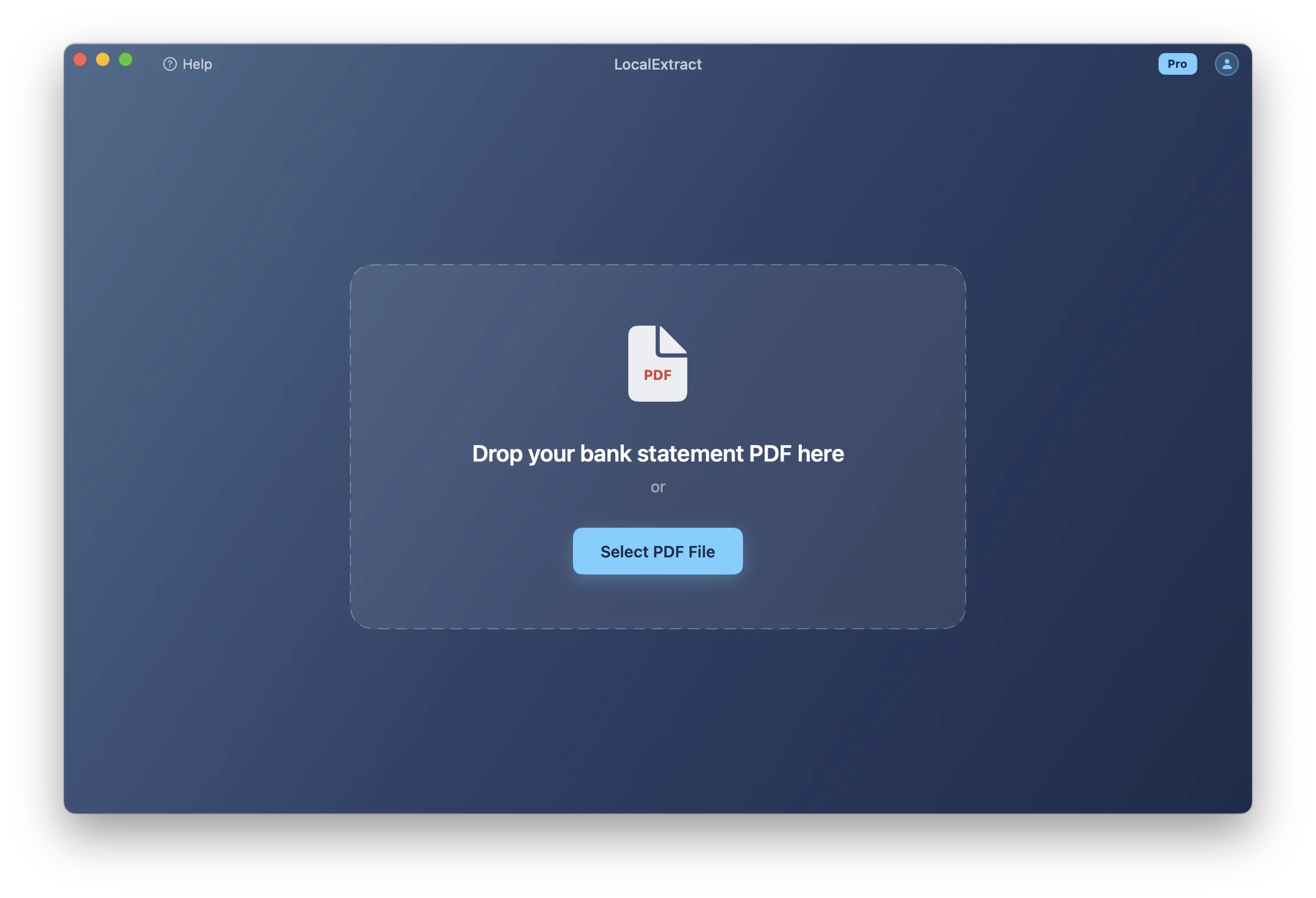
Run the PDF through your chosen converter. For on-device tools like LocalExtract, select the output format (CSV for spreadsheet analysis, JSON for programmatic processing, Excel for general use).
3. Verify the Output
Open the CSV or Excel file alongside the original PDF. Check:
- Transaction count. Does the extracted file contain the same number of transactions as the source PDF?
- Date range. Do the first and last transactions match the statement period?
- Amounts. Spot-check several transactions, including the largest, smallest, and any with unusual formatting.
- Running balance. If the statement includes running balances, verify that the extracted balances match.
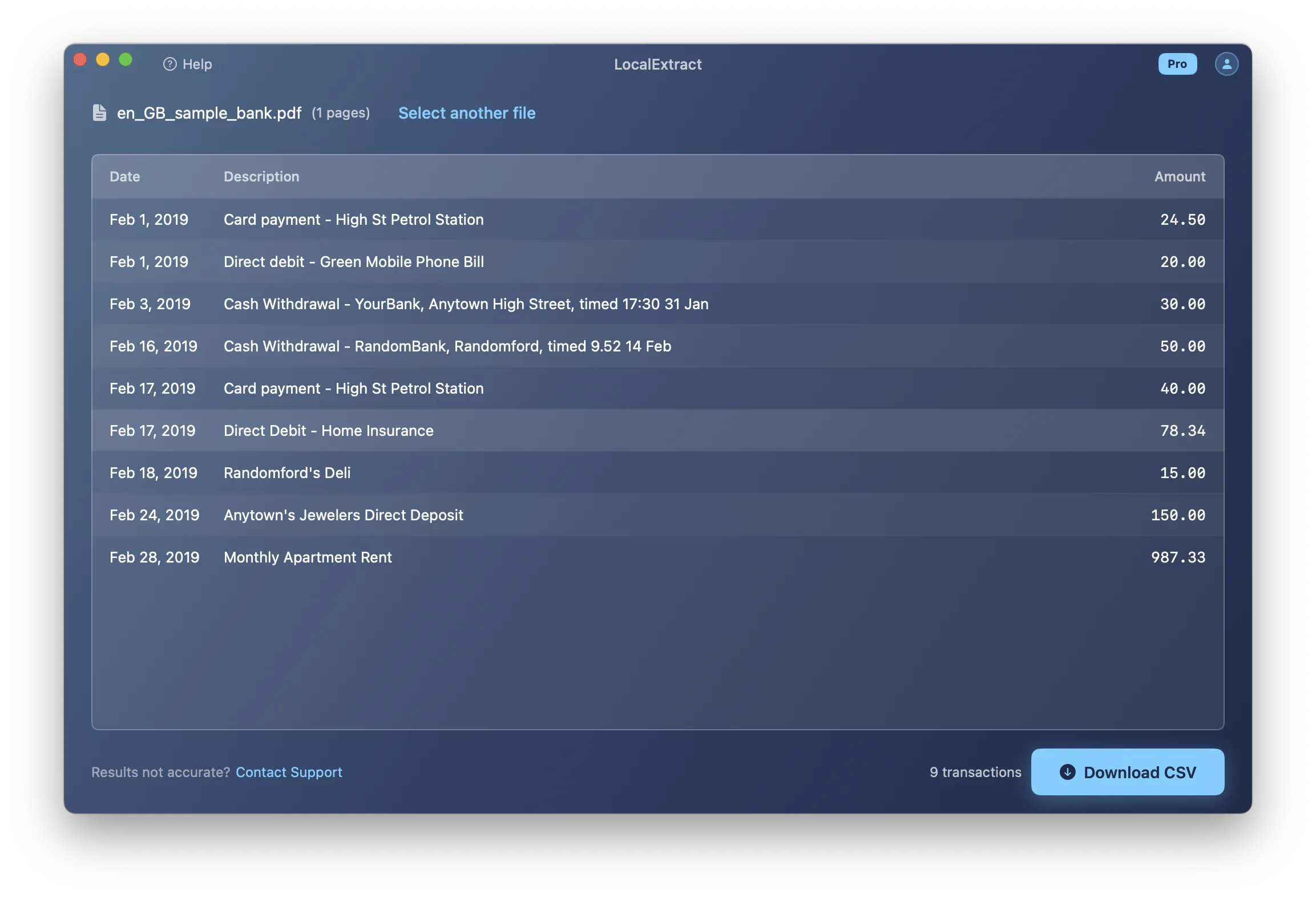
Verification is not optional in legal work. Even the most accurate converter can misread a digit, skip a transaction, or misinterpret a column. The extracted data is a working copy — the original PDF remains the authoritative source. Any exhibit or analysis derived from extracted data should note the extraction method used.
4. Analyze and Organize
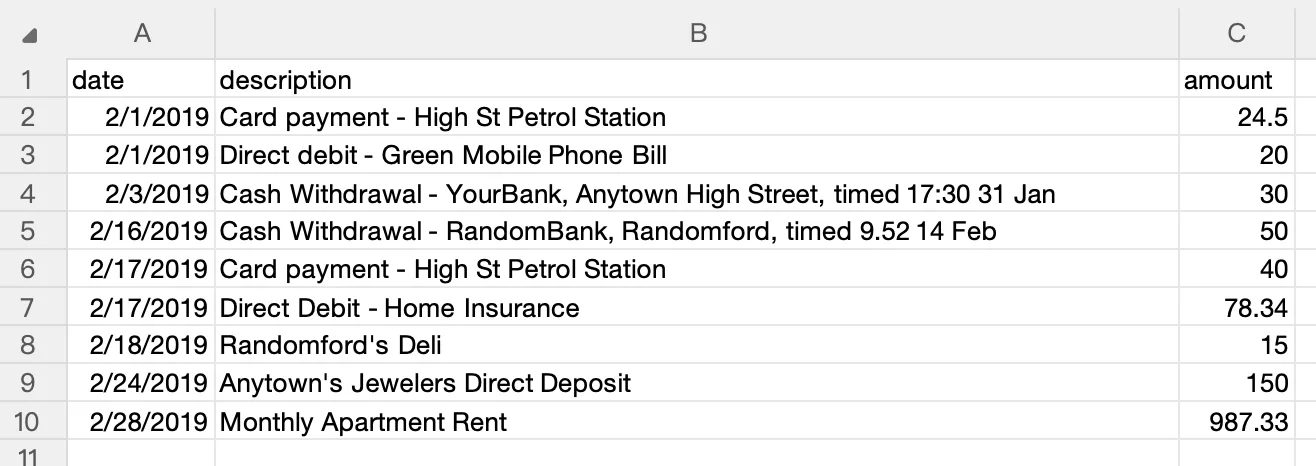
With verified structured data, you can:
- Sort transactions by date, amount, or description
- Filter for specific payees, date ranges, or transaction types
- Aggregate spending by category or recipient
- Cross-reference transactions across multiple accounts
- Create timelines of financial activity for courtroom exhibits
5. Document the Process
For any matter where the bank statement data may be used as evidence or supporting documentation, create a brief process memo recording:
- The source of the original PDF (produced by opposing party, obtained from bank directly, etc.)
- The SHA-256 hash of the original file
- The conversion tool, version number, and date of processing
- Any manual corrections made to the extracted data
- The name of the person who performed and verified the conversion
LocalExtract: Limitations
Transparency about limitations is important, particularly for legal professionals who need to assess tool reliability.
Format coverage is not universal. LocalExtract supports statements from major U.S. banks and many regional institutions, but it does not cover every bank format. Statements with unusual layouts, proprietary formatting, or non-standard column structures may produce incomplete or inaccurate results. Always verify output against the source.
OCR accuracy varies with scan quality. For scanned (image-based) bank statements, LocalExtract uses on-device OCR (PP-OCRv5). High-resolution, cleanly scanned documents convert well. Low-resolution scans, skewed pages, faded text, or documents with stamps and handwritten annotations will produce lower accuracy. Some characters may be misread — particularly in amounts, where a misread digit has obvious consequences.
No QBO or OFX output. LocalExtract outputs CSV, Excel, and JSON. It does not produce QBO (Quicken Financial Exchange) or OFX files. If your workflow requires these formats, tools like MoneyThumb may be a better fit for that specific need.
No Bates numbering or exhibit stamping. LocalExtract extracts transaction data. It does not add Bates numbers, exhibit labels, or other litigation-specific annotations. You will need separate tools (such as Adobe Acrobat Pro or dedicated litigation support software) for document production tasks.
No built-in audit trail. LocalExtract does not automatically log processing events or produce a chain-of-custody report. Legal professionals should maintain their own processing logs as described in the workflow section above.
Batch processing requires Pro plan. The free tier includes 10 pages lifetime, which is sufficient for evaluation but not for case-level work. The Pro plan ($10/month or $60/year) is required for ongoing use with unlimited pages and batch processing.
Looking Ahead: Legal Tech Trends in Bank Statement Processing
Three trends are shaping how legal professionals will handle bank statement conversion in the coming years.
On-device AI is closing the accuracy gap. Advances in on-device machine learning — particularly lightweight OCR models like PP-OCRv5 running via ONNX Runtime — mean that local processing no longer requires sacrificing accuracy for privacy. As these models improve, the practical advantage of cloud-based processing (access to larger models and more compute) diminishes. For legal professionals, this means the tradeoff between accuracy and data security is becoming less relevant.
E-discovery frameworks are catching up to digital financial data. Courts and bar associations are increasingly issuing guidance on how electronically stored information (ESI) protocols apply to financial documents processed through automated tools. Expect more specific rules around documentation requirements for automated extraction — what tool was used, what version, what validation steps were taken. Firms that already maintain processing logs (as described in the workflow section above) will be ahead of these requirements.
State adoption of technology competence rules continues to expand. As of 2026, at least 40 U.S. jurisdictions have adopted some form of technology competence obligation. This number has steadily increased since the ABA amended Comment [8] to Rule 1.1 in 2012. As more states formalize these requirements, attorneys who have not evaluated the data handling practices of their technology tools face growing regulatory exposure. The direction is clear: understanding how your tools process client data is becoming a baseline professional obligation, not an optional best practice.
In summary, legal professionals who work with bank statements need tools that balance extraction accuracy with the ethical and evidentiary demands of legal practice. The right choice depends on the sensitivity of the matter, the volume of documents, and the specific requirements of your workflow. Start by evaluating a tool against a sample statement from an actual case: hash the original, run the conversion, verify the output field by field, and document the process. That evaluation — not marketing claims from any vendor, including us — is the basis for a defensible decision about which tool to adopt.
FAQ
Can I use a cloud-based bank statement converter for legal work?
It depends on the matter and your jurisdiction's ethics rules. ABA Model Rule 1.6 requires "reasonable efforts" to protect client confidential information. For routine matters with moderate sensitivity, using a reputable cloud service with documented data handling practices may satisfy this standard — particularly if you have reviewed their privacy policy and terms. For high-sensitivity matters (criminal defense, contested financial disputes, investigations involving allegations of fraud), the safer approach is on-device processing that keeps data off third-party servers. Consult your state bar's ethics opinions on cloud computing for jurisdiction-specific guidance.
How does attorney-client privilege apply to bank statements processed through a converter?
Bank statements themselves are typically not privileged — they are pre-existing business records, not communications made for the purpose of seeking legal advice. However, an attorney's analysis of those statements, the selection of which statements to review, and work product derived from the analysis may be protected. The concern with cloud converters is not primarily about privilege waiver but about the confidentiality obligations under Rule 1.6 and the practical risk of unauthorized access to sensitive client financial data.
What is the best format for extracted bank statement data in legal work?
CSV and Excel are the most practical for analysis. CSV files are plain text, universally compatible, and easy to verify in a text editor. Excel files allow multiple sheets (useful for organizing statements by account or time period) and support formulas for calculations. JSON is useful if you need to feed the data into custom analysis software or databases. For most litigation support and forensic accounting work, Excel is the preferred format because it supports both analysis and presentation.
How should I handle bank statements from opposing parties during discovery?
Treat them as you would any produced document: preserve the originals exactly as received, hash them for integrity verification, and process copies rather than originals. If you convert them to structured data, maintain a clear record of the conversion process. If the accuracy of the extracted data becomes an issue, you can point to the preserved original and the documented extraction method. Consider whether your jurisdiction's rules on electronically stored information (ESI) impose specific handling requirements.
Do I need to disclose what tools I used to process bank statements?
This depends on how the data is being used. If you are producing extracted data as an exhibit, opposing counsel may ask about the extraction methodology during deposition or at trial. Having a documented process (tool name, version, verification steps) is standard practice. If you are using the extracted data for internal analysis only, disclosure is generally not required, but maintaining process records is still good practice.
Can LocalExtract handle redacted bank statements?
Partially. If transactions are redacted (blacked out), those transactions cannot be extracted — no tool can read data that has been removed. If other information is redacted (such as account numbers or names in the header) while transaction data remains visible, LocalExtract will extract the visible transaction data. The extraction will note any areas where data could not be read.
How accurate is automated extraction compared to manual data entry?
Both methods introduce error risk. Manual data entry has a well-documented error rate — studies in data entry accuracy typically find rates between 1 and 5 errors per 100 entries, depending on the operator and complexity. Automated extraction eliminates keystroke errors but introduces a different error type: misinterpretation of the source PDF layout. In our testing on a MacBook Pro M4 (16GB RAM), LocalExtract achieved field-level accuracy above 99% on text-based PDFs from major U.S. banks. Tested on 15 sample bank statements from 8 different banks, averaging 3 pages each. Each file was processed 3 times to account for variance. Scanned documents had lower accuracy, varying with scan quality. In both cases, verification against the source document is essential for legal work.
Is the free tier sufficient for evaluating LocalExtract for legal use?
The free tier provides 10 pages lifetime. This is enough to test the tool against a sample bank statement from one of your cases and evaluate extraction accuracy, output format, and workflow fit. It is not sufficient for processing a full case's worth of statements. If evaluation is positive, the Pro plan ($10/month or $60/year) provides unlimited pages and batch processing.
Disclosure: This article is published by the LocalExtract team. LocalExtract converts bank statement PDFs to CSV, Excel, and JSON entirely on your device — no uploads, no cloud processing, no third-party access to client data. We covered multiple tool categories and approaches, including options we do not compete with, to help legal professionals find the right workflow for their practice. Download free for Mac or Windows.

LocalExtract Team
We build LocalExtract, an on-device bank statement converter for macOS and Windows. Our team includes software engineers and financial workflows specialists focused on private, accurate PDF data extraction. Questions or corrections? Contact us or see our editorial policy.
Related Articles
Ready to convert your bank statements?
100% on-device. Your documents never leave your computer.
By downloading, you agree to our Terms and Privacy Policy.