
Moneydance QIF duplicate transfers: inspect names, dates and FX
Updated · 4 min read
Two transfer entries after a Moneydance QIF migration do not automatically mean that one is disposable. First identify the source application, the two accounts and the dates on both legs. The Microsoft Money preparation route has an exact-name condition; it does not promise to repair a date mismatch or a foreign-currency transfer.
The desktop apps export date, description, and amount as CSV. Open CSV in Excel to save an XLSX workbook. Statement support varies: verify the result against your own PDF.
Choose the source-specific QIF branch
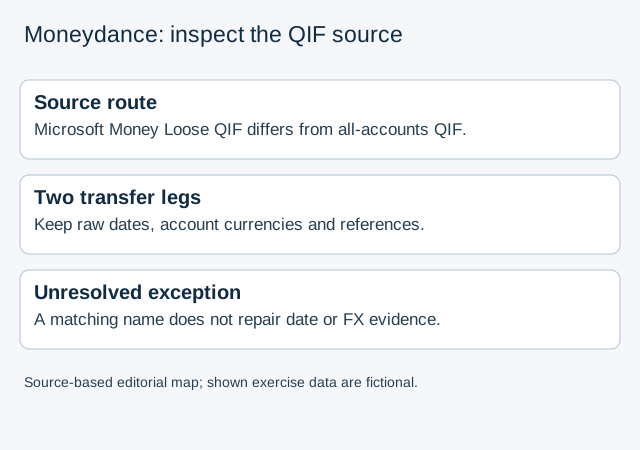
The Infinite Kind’s Microsoft Money guide, updated August 24, 2023, describes Loose QIF, separate account exports and Moneydance accounts prepared with the same spelling and correct currencies. Its investment cash and investment holdings use separate source files. Record those file roles rather than assuming that similarly named files contain the same population.
The general QIF guide, updated October 12, 2023, discusses an all-accounts file where the source application provides that option. These are different source routes. Do not combine an instruction for a single all-accounts export with Microsoft Money’s separate-account procedure.
For an OFX/QFX bank download, use the Moneydance source-account mapping guide. Remembered OFX routing is not the QIF transfer problem examined here.
Inspect without deleting either leg
- Preserve the original QIF files and existing migration notes. Record the source application, each source account’s exact name and currency, the corresponding destination account and whether the file represents investment cash or securities.
- Open a copy in a text editor for inspection. Read the actual date and decimal notation; the source file’s date convention can differ from the date display preference in Moneydance. Do not overwrite the original to make a date look familiar.
- Locate both suspected transfer legs and retain their source-file references, raw dates, signed amounts, account currencies and destination accounts. Establish which accounts the transfer actually connects before treating the pair as a duplicate.
- Compare the dates. The QIF problems guide, updated September 27, 2023, says Moneydance cannot match the two sides when their dates differ. A name correction alone cannot resolve that condition.
- For a cross-currency transfer, retain both original currency amounts and independent transfer evidence. The same guide explains that QIF lacks currency/exchange-rate information for that migration and describes resulting matching problems. A rate used by the import is not proof of the historical rate.
These source dates identify the documentation being used, not a certified installed Moneydance build. The inspection produces a bounded list of unresolved causes. It is not a deletion, reimport, account-creation or balance-adjustment procedure.
A name match leaves date and currency questions open
The inspection example data are fictional, not a vendor export or an executed migration:
| Leg | Source account | Raw date | Amount and account currency | Established fact |
|---|---|---|---|---|
| A | Current | 03/04/2025 | −100 USD | Date convention not yet established |
| B | Savings | 04/03/2025 | +100 USD | Same amount does not settle the date question |
| C | EUR reserve | 2025-04-03 | +90 EUR | A possible foreign-currency leg, relationship unproved |
If both source files use day/month/year, A means April 3 and B means March 4. If the convention is unknown, keep both raw strings unresolved. Do not choose a convention merely to align the rows. C cannot be matched to A by inventing an exchange rate from 100 and 90; first establish the actual transfer relationship and historical currency evidence.
A separate opening-balance issue can coexist with a duplicate-looking transfer. The problems guide discusses missing initial balances, but a plausible final balance does not identify which transfer leg, if any, is redundant. Keep opening-balance evidence separate from transfer identity rather than deleting a row until the total looks right.
Hand off a precise exception
For each unresolved pair, send the authorised reviewer the original file identities, source/destination account map, date conventions, both transfer references and the missing fact: account identity, date interpretation or currency/rate evidence. Record the installed build separately. Leave the entries intact while that fact is unresolved; a copied account name or an equal amount is insufficient approval for repair.
For independent bank-PDF evidence, LocalExtract processes one PDF at a time locally and exports date,description,amount CSV for review. It does not produce QIF, migrate accounts or repair Moneydance transfers. Keep the original statement and inspect extracted values before using them as supporting evidence.
For the broader statement-versus-ledger comparison, continue with the reconciliation guide. This page’s result is the source-specific QIF exception record, not a second general reconciliation workflow.
Documentation checked October 17, 2026.
LocalExtract Team
We build LocalExtract, a desktop bank statement converter. Questions or corrections? Contact · Editorial policy