
Akaunting bank imports overlap payments: identify the input route
Updated · 3 min read
When bank imports overlap payments already recorded in Akaunting, first identify which import route is in use. The general Transactions spreadsheet, the MT940/OFX app and Bank Feeds are different inputs. This is a route-and-evidence checklist for an authorized bookkeeper, not a claim that an extra extension will resolve a particular account's overlap.
The desktop apps export date, description, and amount as CSV. Open CSV in Excel to save an XLSX workbook. Statement support varies: verify the result against your own PDF.
Separate three documented routes
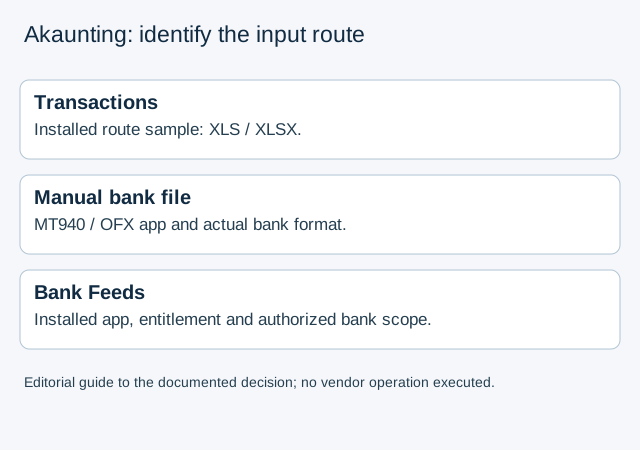
| Route | Documented entry | Input to inspect |
|---|---|---|
| General transactions | Banking → Transactions → Import or the ellipses menu | Download that route's sample; the guide describes XLS/XLSX and transaction fields |
| Manual bank file | Banking → MT940/OFX Import | An actual MT940/OFX file and the relevant installed app/account |
| Bank Feeds | Installed Bank Feeds app, then Banking → Bank Feeds | Provider/bank connection and its authorized account population |
The general transaction guide requests fields such as transaction type, payment date, currency code/rate, account, category and payment method. A bank CSV containing only date, description and amount is not already that completed sample. Opening CSV in Excel and saving XLSX changes the container, not the missing business information.
The manual bank-file guide instead points to an MT940/OFX app and selection of the bank account before upload. Renaming CSV to OFX or MT940 does not create either format. Ask the bank for the actual file where available and confirm the installed route before preparing an import.
Record Cloud, On-Premise and installed apps
The Bank Feeds help describes installing that app before connecting a bank; the app page also describes an On-Premise option. Neither page proves the app is installed, licensed or available for this particular bank and organisation.
Record deployment type, version, enabled app, entitlement and account before interpreting an absent menu as a missing file extension. This review does not require changing a subscription, installing software or entering bank credentials. Leave an unknown entitlement unresolved and ask the authorized administrator to identify it.
Keep prior payments separate from imported observations
A fictional record P1 already represents a payment in the books. A proposed bank file also contains a row describing event E1. Before importing, establish whether P1 and E1 refer to the same actual event and how the selected route handles an existing payment. Equal amounts or matching descriptions do not establish either fact.
The reconciliation guide describes a date-range review and matching bank transactions with Akaunting records. It does not, by itself, document lossless overlap matching for every manual file or installed app. Do not create another payment, buy an extension or replay the whole file merely because the records appear to overlap.
The editorial route register keeps the fictional bank observation, existing payment and uninspected configuration separate. Its unknown states are not a deduplication result or an accepted Akaunting import format.
If only a PDF source is available, LocalExtract prepares CSV locally, one PDF at a time with date,description,amount. It does not export native MT940/OFX, choose Akaunting categories or synchronize payments. Use the overlapping CSV review guide for source-record comparison without assuming bank references are unique.
Official public help and app page checked October 17, 2026. Several help pages retain 2023 update dates; confirm the actual product and app state rather than assuming a current installation matches every screenshot or menu.
LocalExtract Team
We build LocalExtract, a desktop bank statement converter. Questions or corrections? Contact · Editorial policy