
Great Southern Bank AU: eStatements, joint access and timing
Updated · 2 min read
The desktop apps export date, description, and amount as CSV. Open CSV in Excel to save an XLSX workbook. Statement support varies: verify the result against your own PDF.
Search the statement list with the right holder access
- Sign in to Australian Online Banking and open Accounts → eStatements.
- Set Date Range, then choose Show eStatements.
- Find the statement date and use Actions → view.
- Open the PDF (Portable Document Format) and check its account and issued period.
The help page requires the primary account holder, unless a joint owner has requested eStatement access. If another joint holder can see the document but you cannot, resolve that access arrangement with the bank rather than repeatedly widening the date range. It is a permission condition for this service, not evidence that the statement never existed. Holder-access conditions.
Separate an archive search from statement production
Great Southern's eStatement service page describes access as far back as seven years. This is the statement archive, not a promise that a recent-transaction screen shows seven years or that every closed product remains accessible.
For a newly due biannual statement, the how-to page allows up to nine business days during peak processing. Changing the search period does not create a statement still being produced. Check whether you are looking for an existing issued document or waiting for the latest six-monthly issue before troubleshooting the viewer.
| Needed result | Bank route | Decision |
|---|---|---|
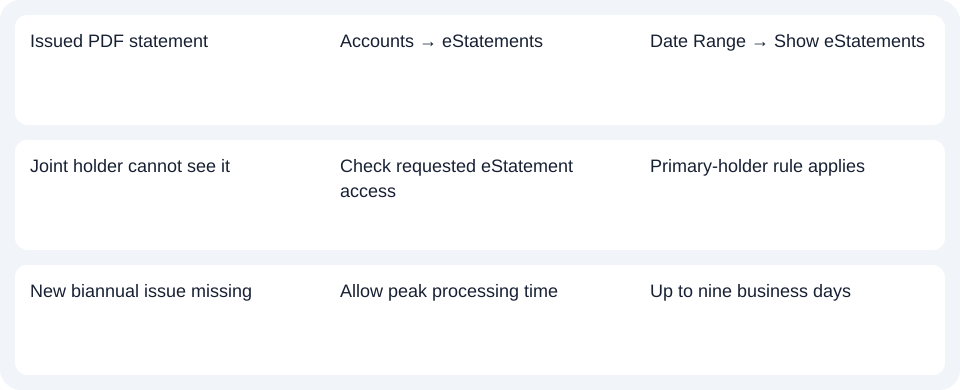
| Issued PDF statement | Accounts → eStatements | Date Range → Show eStatements |
| Joint holder cannot see it | Check requested eStatement access | Primary-holder rule applies |
| New biannual issue missing | Allow peak processing time | Up to nine business days |
Keep the Australian personal and transaction-export tasks separate
These instructions concern the Australian personal service. Business+ controls and the unrelated US Great Southern Bank do not establish this menu. The Australian Online Banking FAQ also discusses exporting transactions; that feature alone does not establish a particular CSV format or column layout.
Use the issued PDF when the statement itself is required, checking holder rights and production timing. Use the record planner to record your chosen route and the outstanding document period. The shared CSV guide covers spreadsheet preparation afterward. LocalExtract processes one PDF locally at a time into date,description,amount CSV (Comma-Separated Values); Excel can save XLSX. Verify the rows against the original. Downloads.
Official sources checked October 14, 2026.
LocalExtract Team
We build LocalExtract, a desktop bank statement converter. Questions or corrections? Contact · Editorial policy