
Suncorp statements: older records before the ANZ move
Updated · 2 min read
The desktop apps export date, description, and amount as CSV. Open CSV in Excel to save an XLSX workbook. Statement support varies: verify the result against your own PDF.
Find the statement through Suncorp first
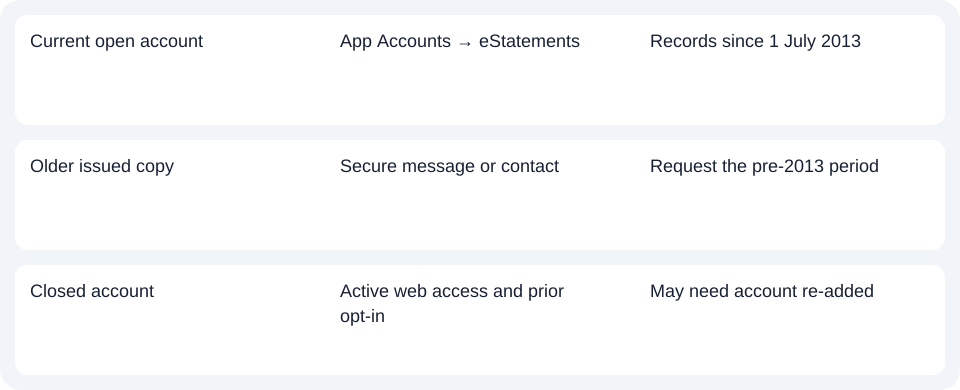
Select the account in the app and open eStatements, or select the required statement from the web list. For an issued copy before 1 July 2013, the FAQ directs you to secure messaging or official contact and states that these copies are supplied free.
Identify the date boundary before requesting a duplicate: a pre-2013 document and a missing recent online record require different follow-up.
Check the conditions for a closed account
For a closed account's records since July 2013, eStatements must have been enabled when the account closed and Internet Banking must still be active. You may need to add the account again through Manage Accounts and Cards. Access is limited to accounts you are authorised to see. Closed-account availability.
| Needed result or situation | Bank route or condition | Decision |
|---|---|---|
| Current open account | App Accounts → eStatements | Records since 1 July 2013 |
| Older issued copy | Secure message or contact | Request the pre-2013 period |
| Closed account | Active web access and prior opt-in | May need account re-added |
Keep migration timing separate from today's procedure
Suncorp's September 2026 announcement says customers will move to ANZ products, services and platforms by June 2027. The move hub describes preparation and customer notices. This does not mean every Suncorp customer already uses ANZ's statement menu.
Keep needed originals and follow the notice for your own move. The announced destination alone does not establish how every legacy statement will appear after migration.
For Suncorp, use the current eStatements route until your migration notice says otherwise; check closed-account visibility before requesting a copy.
Use the record planner to record your chosen route and the outstanding document period.
For an obtained PDF (Portable Document Format), see the CSV (Comma-Separated Values) guide. LocalExtract processes one PDF locally to date,description,amount CSV; XLSX (Excel workbook format) is saved in Excel. Check the output. Downloads.
Official sources checked October 14, 2026.
LocalExtract Team
We build LocalExtract, a desktop bank statement converter. Questions or corrections? Contact · Editorial policy