
Standard Chartered Singapore: statements or older advices?
Updated · 2 min read
The desktop apps export date, description, and amount as CSV. Open CSV in Excel to save an XLSX workbook. Statement support varies: verify the result against your own PDF.
Choose the issued monthly record
The digital-services FAQ describes this mobile sequence:
- Sign in to SC Mobile and open Services at the bottom right.
- Select View eStatements.
- Choose Current Statement or Past Statements.
- Tap the download button beside the required document.
SC's separate statement guide uses View eStatements/eAdvices and Latest Statement/Advices for related controls. Match the document and period shown in your app; these published label variations do not identify different account archives.
An eStatement is an issued account record; an eAdvice is a notice about a particular event. The statement FAQ says statements update monthly. For more recent transactions, use Account History in Online Banking. Downloading last month's statement again cannot add activity that belongs to the next cycle.
Switch channels when older advices are hidden
SC documents a mobile display limit of 100 eAdvices, Portfolio Reports and Securities eDocuments. For older documents in those categories, sign in to Online Banking → eStatements & eAdvices. This is a count of specified documents; it is neither a 100-month promise nor a stated cap on monthly account eStatements. Availability by document type.
| Needed result or situation | Bank route or condition | Decision |
|---|---|---|
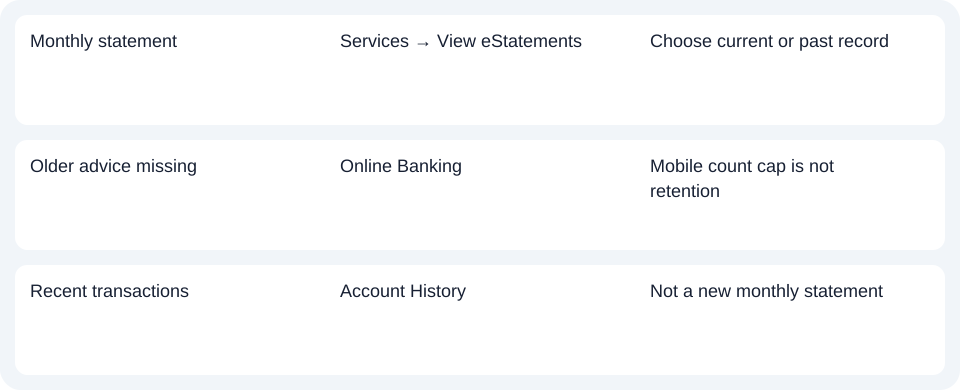
| Monthly statement | Services → View eStatements | Choose current or past record |
| Older advice missing | Online Banking | Mobile count cap is not retention |
| Recent transactions | Account History | Not a new monthly statement |
Portfolio and securities categories appear only when you hold the relevant products. Establish which record you are seeking before treating a missing category as an account-statement download error. A personal account statement, portfolio report and securities document answer different record requests.
Keep the document choice with your request
For the Standard Chartered Singapore statement, use eStatements and the needed month; use the web for older advices rather than Account History.
The record planner separates monthly records, older advices and recent activity. Record the category and period so a web search continues the same task instead of changing the requested document.
For a PDF (Portable Document Format) that needs spreadsheet preparation, use the CSV (Comma-Separated Values) guide. LocalExtract processes one PDF locally at a time and exports date,description,amount CSV; XLSX (Excel workbook format) is saved through Excel. Verify the extracted rows. Download options.
Official sources checked October 14, 2026.
LocalExtract Team
We build LocalExtract, a desktop bank statement converter. Questions or corrections? Contact · Editorial policy