
Revolut UK and Ireland: currency statements and UK payment records
Updated · 3 min read
The desktop apps export date, description, and amount as CSV. Open CSV in Excel to save an XLSX workbook. Statement support varies: verify the result against your own PDF.
Generate the statement for the required currency
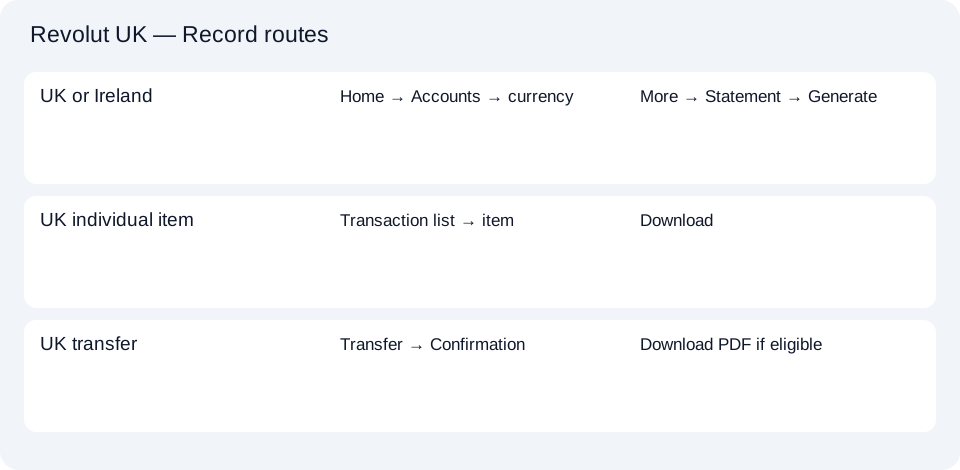
The UK currency-statement instructions and separately checked Irish currency-statement instructions give this mobile-app route:
- Open Home, then Accounts below the balance.
- Select the currency you need.
- Open More (…) → Statement.
- Set the timeframe, choose PDF or Excel, then select Generate.
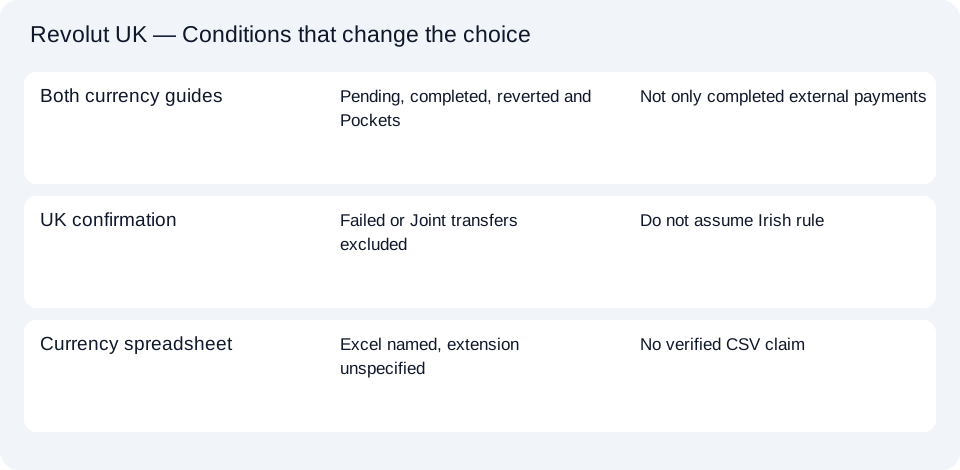
PDF means Portable Document Format. Revolut labels the other option “Excel”; its help does not specify an extension, so this is not a verified CSV (comma-separated values) download instruction. Use the native Excel option for spreadsheet work when it supplies the record you need.
The currency statement includes account details, a balance summary, pending, completed and reverted transactions, and Personal and Group Pocket transactions. Consequently, do not treat every listed row as a completed external payment. Currency selection and status coverage are part of interpreting this document, not merely its filename.
UK: download one transaction instead of a period
Revolut’s individual-transaction help covers card payments, top-ups, transfers and currency exchanges. In the transaction list, select the item and tap Download. The resulting record includes holder/account information and the transaction’s date, description and amount.
Revolut cannot group an arbitrary selection of transactions into one such document. Choose separate records for selected items, or the currency-and-timeframe statement for a continuous period. For a paid-plan charge, the same help says a transaction statement can show the fee paid, but a paid-plan subscription invoice is not available. Do not label that substitute an invoice.
UK: use a transfer confirmation when the recipient needs it
The personal transfer-confirmation instructions specify Home → transfer in the transaction list → Confirmation → Download. Save or share the PDF.
This confirmation uses the app’s language and includes available reference numbers. For international SWIFT transfers, Revolut includes the MT-103, a payment-message document. However, this confirmation is unavailable for failed transfers or transfers from Joint accounts. An individual-record download instruction does not override that narrower confirmation limit.
| UK request | Appropriate Revolut document |
|---|---|
| Activity over a period in one currency | Currency statement: PDF or Excel |
| Evidence of one card payment or top-up | Individual transaction statement |
| Transfer reference for the recipient | Transfer confirmation, subject to eligibility |
Revolut’s document help says statements and confirmations are generated electronically, without hard copies or stamps. If a recipient asks for a stamp, clarify acceptable evidence with them before requesting another identical download.
Ireland: keep the shared currency scope clear
The Irish currency help independently confirms the selected-currency PDF/Excel generator and inclusion of pending, completed, reverted and Pocket activity. It also describes electronic documents without hard copies or stamps. These are the shared document facts; they do not establish identical legal entities or every product condition across the UK and Ireland.
The UK transfer-confirmation exclusions above should not be read as freshly verified Irish rules. When your Irish request concerns a single payment rather than a currency period, consult the corresponding Irish help for that product instead of extending the UK section by assumption.
Use the Revolut document-choice planner to record the market and required evidence. The shared CSV guide covers spreadsheet cleanup; keep currency and transaction status visible rather than combining unlike records into an unexplained total.
For UK or Irish currency-period records, select the currency and generate the statement. For UK single-payment evidence, use the separately scoped transaction or transfer route and check its eligibility.
LocalExtract processes one PDF locally into date,description,amount CSV. Excel can save that CSV as XLSX. Check the extracted rows against the source. Download options and limits.
Official sources checked October 14, 2026. This guide brings the bank’s document and export choices together.
LocalExtract Team
We build LocalExtract, a desktop bank statement converter. Questions or corrections? Contact · Editorial policy