
Citi Singapore: statements, advices and older PDFs
Updated · 2 min read
The desktop apps export date, description, and amount as CSV. Open CSV in Excel to save an XLSX workbook. Statement support varies: verify the result against your own PDF.
Open the record belonging to the right account
An e-Statement is the periodic account record; an e-Advice is a separate notice about an account event. Citi’s mobile illustration starts with account selection, so choose the account whose record you need before opening its statement list.
- Sign in to Citi Mobile.
- Select the relevant account.
- Open View all statements, then PDF.
- When the PDF (Portable Document Format) opens, use the reader’s save or print control if you need a local copy.
The app route comes from the current illustrated guide; the statement FAQ confirms saving or printing through the PDF reader. Saving a document preserves the issued record. It does not export editable transaction rows.
Match the history window to the document
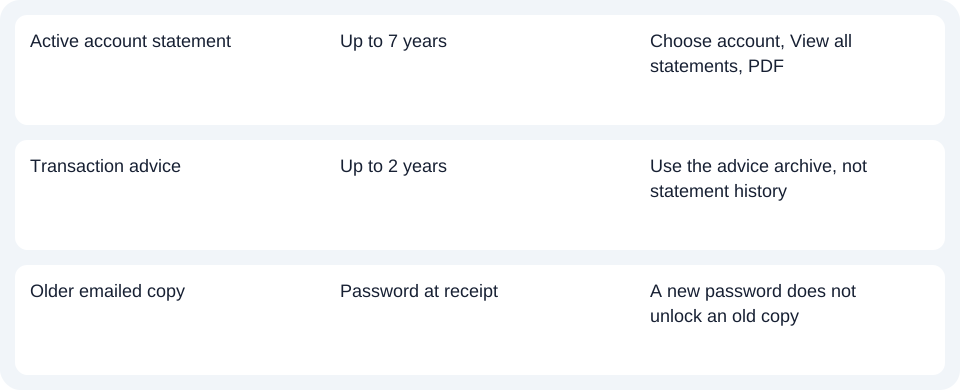
Citi’s current terms of access allow up to seven years of statements and two years of advices for active accounts, including records before electronic enrollment. Do not treat the seven-year statement window as an advice archive or as a promise of access after account closure. History and enrollment FAQ.
Deal with enrollment and older emailed copies
The electronic-service FAQ distinguishes two starting points: after successful enrollment the next statement is electronic, while advice activation can take up to 24 hours. That advice activation interval does not tell you when a monthly statement will be issued. Check the relevant account record rather than waiting for an advice activation period to generate a statement.
For an emailed document, use the password that applied when that copy arrived. Changing the electronic-document password affects later deliveries; it does not rewrite the encryption of an earlier attachment. The current statement FAQ states this for statements, and the advice FAQ states it for advices. If a downloaded copy will not open, first establish whether it is an old emailed attachment or a document just retrieved through authenticated banking.
Download the record planner to note the account, document choice and retrieval route.
For spreadsheet work after obtaining the record, use the shared CSV guide. LocalExtract handles one PDF at a time locally and exports CSV with date,description,amount; Excel can save that CSV as XLSX. Verify extracted rows against the PDF. Downloads and limits.
Official sources checked October 14, 2026.
LocalExtract Team
We build LocalExtract, a desktop bank statement converter. Questions or corrections? Contact · Editorial policy