
Bank of Ireland: bank and card eStatements or native CSV
Updated · 4 min read
The desktop apps export date, description, and amount as CSV. Open CSV in Excel to save an XLSX workbook. Statement support varies: verify the result against your own PDF.
Check card-specific eStatements before using account history rules
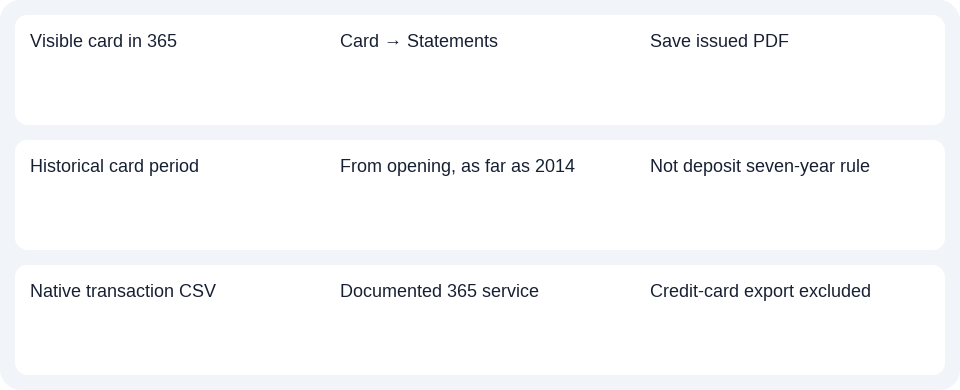
For a credit card visible in your 365 profile, sign in to 365 online or the Bank of Ireland app, select the card and open Statements. Choose the issued eStatement and use the offered PDF saving or printing controls. The bank's card-copy help describes history from the card's opening as far back as 2014. That card-specific description is different from the general account seven-year rule below.
A card not currently visible in your profile is outside the electronic availability described by the bank's card-copy FAQ. Do not silently select another account to stand in for it. The 365 export FAQ explicitly excludes credit-card transaction export from its documented service. For that task, retain the issued card PDF instead of assuming the account CSV menu applies to cards.
The year 2014 is an earliest stated historical boundary, not proof that every customer has a card record for every intervening year or that a closed card stays visible in 365.
Open and save the issued eStatement
The eStatement FAQ, updated June 2025 describes access in the app and 365 online:
- Sign in and select the account.
- On its transaction screen, open Statements.
- Select the required eStatement and open or save it.
The saving help, dated May 2021, explains saving the PDF (Portable Document Format) through the device or browser. That older explanation establishes the document type; it is not a promise that every current device uses an identical final save control. The current FAQ supplies the browser fallback when app access is troublesome.
Separate open-account history from closed-account copies
The current eStatement FAQ describes seven years of general account eStatements for an open account; the card-specific history described above is separate. After closure, statements can be ordered as duplicates for seven years. The second provision is a request service, not a guarantee that the closed account remains visible in your login.
If you already know which periods you need, save those available documents while the account is accessible. If it has closed, use the bank’s duplicate-request assistance and specify the account and periods through its official channel. Do not apply another Irish bank’s app-retention or closure rules to this service.
Choose the native CSV for eligible transaction work
The transaction-export FAQ, dated October 2021 directs users in 365 online to select the account and choose Export your transaction history, then follow the export instructions. It explicitly describes CSV, a text-table format suitable for spreadsheet import.
That same FAQ says credit-card transaction export is unavailable in the service it describes. This restriction should stay attached to this documented route; it is not evidence about every possible future card feature. The help does not provide a current universal export range or column schema.
For spreadsheet work, take the available native CSV when it meets the task. For a request requiring the bank-issued statement, retain the eStatement PDF instead of relabelling the CSV as an original statement.
| Account situation | Record route | Important distinction |
|---|---|---|
| Open account | Statements in app or 365 | Seven-year eStatement visibility |
| Closed account | Duplicate request | Not retained login visibility |
| Eligible transaction analysis | 365 CSV export | Documented service excludes card transactions |
The record planner covers a visible card statement, an older card period and the documented card restriction on native CSV. For import settings, use the shared CSV and accounting guide.
Use Statements for the issued Bank of Ireland PDF, the documented 365 CSV for eligible transaction work, and the duplicate-request route after closure. The seven-year copy provision is not continued online access.
LocalExtract processes one PDF locally into date,description,amount CSV. Excel can save that CSV as XLSX. Check the extracted rows against the source. Download options and limits.
Official sources checked October 14, 2026.
LocalExtract Team
We build LocalExtract, a desktop bank statement converter. Questions or corrections? Contact · Editorial policy