
PTSB eStatements: save PDFs and check the growing archive
Updated · 3 min read
The desktop apps export date, description, and amount as CSV. Open CSV in Excel to save an XLSX workbook. Statement support varies: verify the result against your own PDF.
Download in the app or Open24
PTSB’s eStatement instructions give these routes after the account is registered for eStatements:
- App: open eStatements, choose the account, then the download icon for the required statement. Open the PDF and select its save destination. The app may request the storage permission needed for saving.
- Open24: choose the account, then View more transactions → Statements → View eStatements. Complete the bank’s verification and select View; the PDF opens separately.
Use the registered device and verification process requested by the bank. A PDF is a document file; the verification step controls access to it and is not part of conversion.
Interpret the archive’s seven-year maximum correctly
The terms effective 29 September 2026, Open24 clause 14(d), say history has been accumulating beyond the former 24-month period since February 2023, toward a maximum of seven years.
This does not mean every customer can already retrieve a complete seven years in October 2026. Look at the statements actually available for the account and their issue dates. A maximum target and the archive accumulated so far are different quantities.
The older online-banking FAQ still contains shorter 15/24-month descriptions. For the policy above, use the explicitly dated current terms; do not combine all three figures into a supposed universal download window.
Finish saving before closing the account
PTSB’s account-closing guidance warns that eStatements will no longer be accessible once the account closes. Download required records first. The condition for retaining access through another account described by TSB in the UK is not a verified exception for Irish PTSB.
Do not assume the transaction-list format
App clause 15(r) of the same current terms describes downloading a chosen transaction list. It does not name CSV (comma-separated values), XLSX or another extension, or give the detailed current export controls. Inspect the offered file before deciding how to import it. That list also does not replace the issued eStatement when the original document is required.
| Situation | PTSB route or rule | Action |
|---|---|---|
| Existing eStatement | App or Open24 PDF | Download and save |
| Older period missing | Archive accumulating since February 2023 | Check actual available dates |
| Account closing | Access will end | Complete downloads beforehand |
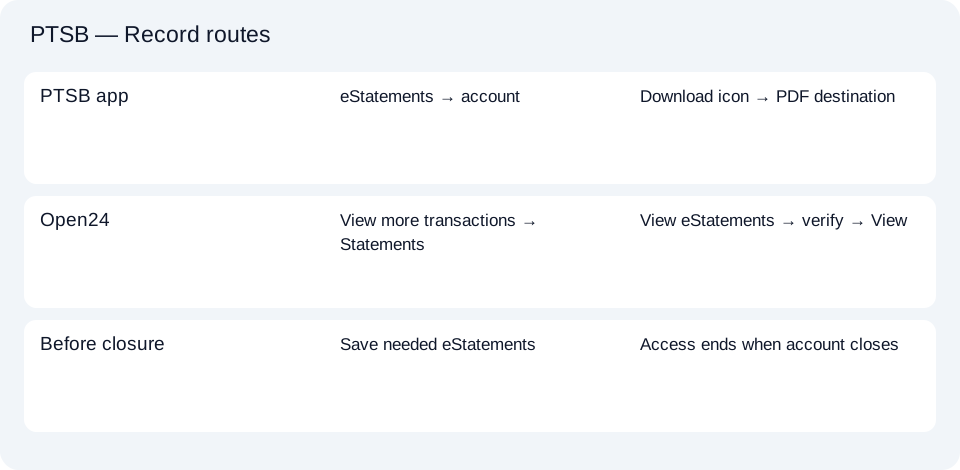
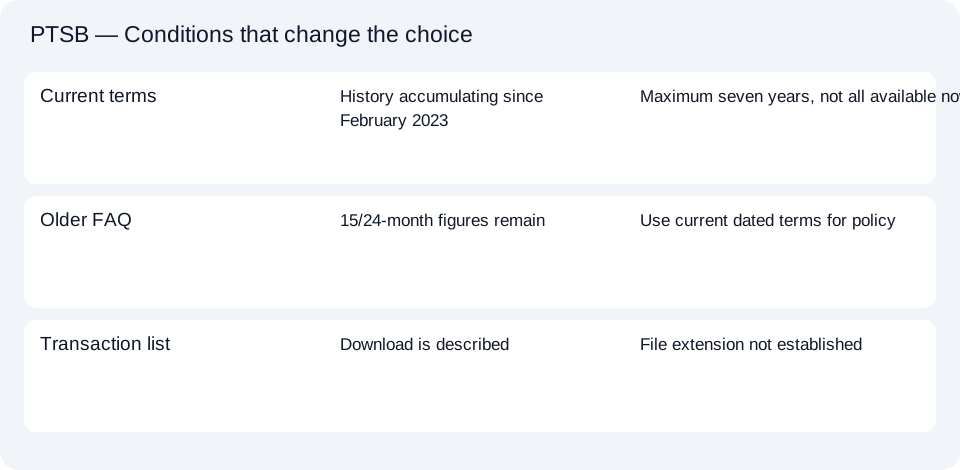
The PTSB retrieval planner keeps archive interpretation and closure preparation separate. The common CSV guide explains subsequent spreadsheet checks.
Save the PTSB PDF from eStatements while the account remains open. Judge older availability by the archive accumulated since February 2023, without treating its seven-year maximum as seven complete years already present.
LocalExtract processes one PDF locally into date,description,amount CSV. Excel can save that CSV as XLSX. Check the extracted rows against the source. Download options and limits.
Official sources checked October 14, 2026. This guide brings the bank’s document and export choices together.
LocalExtract Team
We build LocalExtract, a desktop bank statement converter. Questions or corrections? Contact · Editorial policy