
People First Bank: app statements and Online Banking CSV
Updated · 3 min read
The desktop apps export date, description, and amount as CSV. Open CSV in Excel to save an XLSX workbook. Statement support varies: verify the result against your own PDF.
Use the current app's statement list
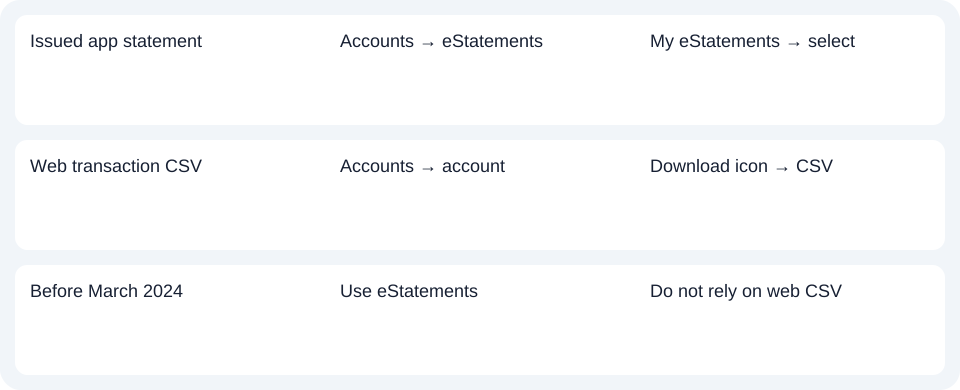
Sign in to the People First Bank App, open Accounts, then eStatements → My eStatements. Select the relevant statement after filtering if necessary. The FAQ confirms PDF (Portable Document Format) viewing and saving; the final save location depends on the device. It describes up to 24 months of eStatements, rather than a seven-year self-service archive. Access and history.
Digital Banking registration automatically subscribes customers to eStatements. If you previously opted out, the FAQ directs you to call 13 11 82 to subscribe again. An opted-out customer should resolve that preference rather than treating repeated searches as enrollment.
Check which migration has actually happened
People First's login page states that the People's Choice App and Internet Banking permanently closed on September 17, 2026. Former users need to register for People First's current platform; old People's Choice screenshots do not establish today's entry.
Heritage's merger guidance separately says its customers can continue their existing banking until notified. Group ownership is not evidence that every Heritage customer has already moved. Check your platform and migration notice before following the current People First App route.
| Needed result | Bank route | Decision |
|---|---|---|
| Current People First App | Accounts → eStatements | My eStatements → select record |
| Older People’s Choice login | Closed September 17, 2026 | Register for People First |
| Legacy Heritage customer | Follow your current bank notice | Do not assume migration completed |
Treat delivery as an all-account choice
The eStatement FAQ says electronic versus paper delivery is selected for all accounts, rather than mixed account by account. Consider that effect before changing preferences to investigate one missing record. The current app list is the documented route here; the FAQ uses differing website menu descriptions, so this guide does not combine them into a single invented web path. Delivery preferences.
Download native CSV from Online Banking
For an activity spreadsheet, use Online Banking rather than assuming the app's eStatement menu also exports CSV:
- Open Accounts and select the account whose transactions you need.
- Apply any relevant search filters first.
- Choose the download icon at the top right of the transaction list, then select the CSV download.
The Online Banking FAQ directs transactions before March 2024 to eStatements. A wider web search is not a substitute for that earlier record source.
The export is a snapshot that may include uncleared or pending transactions. The FAQ describes pending entries as uncompleted / pending and cleared entries as complete / billed. Check those states before treating every exported entry as completed activity. The bank identifies the Account Statement as the complete official record; a convenience CSV should not replace it when the issued document is required. CSV scope and status explanations.
Joint holders use the accounts visible in their own profile. Sharing a joint account does not give one holder access to the other person's Online Banking. This CSV route does not establish app CSV controls, exact column order or post-closure archive access.
Confirm the platform, then choose the issued PDF or the activity snapshot that fits the period. Use the record planner to record your chosen route and the outstanding document period. The CSV guide covers spreadsheet preparation. For a PDF-only record, LocalExtract processes one file locally at a time and exports date,description,amount CSV. Save XLSX in Excel and check the result. Downloads.
Official sources checked October 14, 2026.
LocalExtract Team
We build LocalExtract, a desktop bank statement converter. Questions or corrections? Contact · Editorial policy