
HSBC Singapore: statements and missing card records
Updated · 2 min read
The desktop apps export date, description, and amount as CSV. Open CSV in Excel to save an XLSX workbook. Statement support varies: verify the result against your own PDF.
Save a banking or card statement
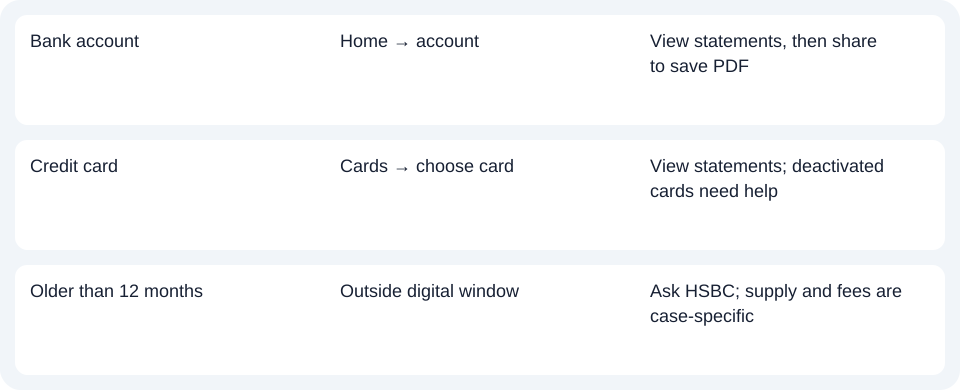
For a Singapore personal banking account, sign in, select the account on Home and open View statements. For a credit card, open Cards, swipe to the particular card and choose View statements. The account and card paths are separate; selecting a replacement card is not a way to recover a blocked card’s documents.
With the statement open, use the share icon at the upper right to download its PDF, meaning Portable Document Format. HSBC’s app FAQ explains that Android may request file/media access because the statement opens through a PDF viewer; iPhone viewing works inside the app. The actual save destination depends on your device.
Check availability before troubleshooting the download
The digital window is 12 months. HSBC’s statement page excludes deactivated cards, including lost, stolen, cancelled or blocked cards, from digital retrieval. For those records or an older period, contact HSBC through in-app chat or its official hotline. Email or paper delivery is considered case by case and may involve a fee; an online search does not guarantee a replacement.
Understand delivery changes before switching preferences
HSBC’s June 2026 update ended encrypted email statements and advices for current/savings accounts, investment accounts, mortgages and loans. Digital banking or paper delivery replaces that channel. Credit-card email statements remain an exception. Joint-AND customers receive statements by post; do not assume the ordinary app instructions apply to that mandate. Current delivery update.
Before changing a banking account to paper delivery, save the electronic records you need. The app FAQ says banking eStatements then cease to be viewable, while credit-card eStatements remain accessible. A delivery preference change is therefore not a harmless way to make an absent banking statement reappear.
Download the record planner to note the account, document choice and retrieval route.
Once you have the right document, the CSV format guide covers spreadsheet preparation. LocalExtract processes one PDF locally at a time and exports date,description,amount CSV. Excel can save it as XLSX; compare the extracted rows with the original. Download options.
Official sources checked October 14, 2026.
LocalExtract Team
We build LocalExtract, a desktop bank statement converter. Questions or corrections? Contact · Editorial policy