
Greater Bank: issued statements or a browser interim record
Updated · 3 min read
The desktop apps export date, description, and amount as CSV. Open CSV in Excel to save an XLSX workbook. Statement support varies: verify the result against your own PDF.
Retrieve the issued statement by account and year
In Greater's app or browser banking, open Manage → Accounts → Statements. Select the account and year, then choose View beside the required statement. The PDF (Portable Document Format) can be saved or printed. Check the statement's issue period rather than assuming a search for a year generates a new record covering that whole year. Issued statement instructions.
This guide concerns Greater Bank, not an interchangeable Newcastle Permanent platform. Newcastle Permanent publishes its own account help. Shared group ownership does not make Greater's menus, PDF controls or interim rules evidence for Newcastle customers.
Create an interim record using the right browser controls
For more recent activity, Greater's FAQ gives these browser routes after account selection:
- Desktop: choose Print under Search transactions, beside Export; print or save the record as PDF.
- iPhone: use Safari, then Share → Options → PDF → Done, and share the result.
- Android: browser three dots → Share → Print → Save as PDF.
Greater specifically excludes Chrome and Firefox from its iPhone interim instructions. Changing to Safari addresses that documented restriction; repeating an unsupported browser path does not. A browser-created interim PDF and the issued cycle statement are different records. Interim instructions and device conditions.
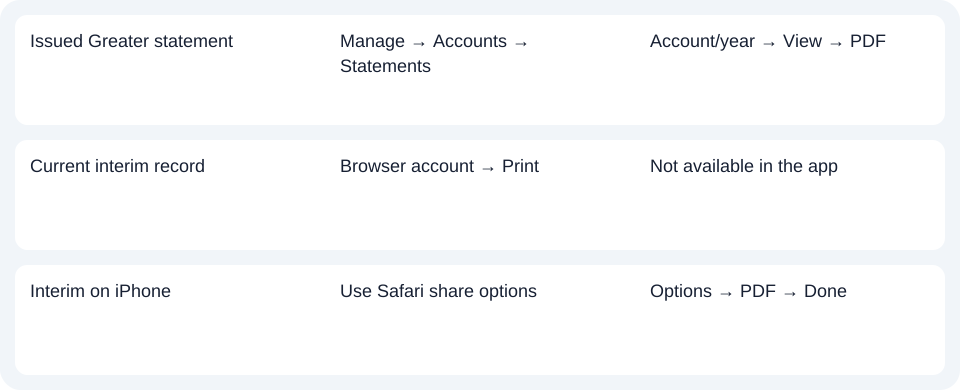
| Needed result | Bank route | Decision |
|---|---|---|
| Issued Greater statement | Manage → Accounts → Statements | Account/year → View → PDF |
| Current interim record | Browser account → Print | Not available in the app |
| Interim on iPhone | Use Safari share options | Options → PDF → Done |
Use mailed copies for the appropriate request
The same FAQ says a statement can be mailed on request and a fee may apply. It does not establish a universal price, maximum archive or immediate fulfillment. Check what record is available before ordering. The Export control mentioned near desktop printing does not by itself prove a CSV format, so use the native options actually offered instead of assuming an extension.
For Greater, use Statements for the issued PDF and a supported browser for an interim record. Use the record planner to record your chosen route and the outstanding document period. For spreadsheet work, see the CSV guide. LocalExtract processes one PDF locally to date,description,amount CSV (Comma-Separated Values); Excel saves XLSX. Review the source period and extracted rows. Downloads.
Official sources checked October 14, 2026.
LocalExtract Team
We build LocalExtract, a desktop bank statement converter. Questions or corrections? Contact · Editorial policy