
How much did we pay a supplier this year? Separate refunds and unpaid bills
Updated · 5 min read
“How much did we pay this supplier?” can mean gross bank payments, payments net of refunds, or invoices settled. Define the measure before totaling. Unpaid bills are not cash paid, and a supplier statement is not a bank-payment list.
The desktop apps export date, description, and amount as CSV. Open CSV in Excel to save an XLSX workbook. Statement support varies: verify the result against your own PDF.
Build the answer from three separate registers
- Retain unique bank events with evidenced supplier, posted date, currency, direction and amount. Select the cash-year boundary; keep unknown supplier and other currencies outside the confirmed EUR result.
- Maintain invoice/refund allocations as a separate relationship table. Sum cash at bank-event level before joining; several allocations must not repeat the event amount.
- Report gross payments, refunds received and net cash separately. Keep the actual refund date even when its invoice/project belongs to another year.
- Track a partial-refund agreement separately from its received events. Agreement less observed receipts is an unobserved remainder, not automatically a legally overdue debt.
- Compare AP and supplier statements at the same cutoff with their own opening balances. Explain differences only with identified bills, credits or recognized payment evidence; unresolved differences remain open.
SUMIFS can total already classified rows using several criteria. It cannot establish supplier identity or a refund relationship. Exclude unresolved identity from a confirmed total and report that excluded population separately. Do not combine currencies without a separately documented conversion method.
Confirmed EUR cash-year filter
| Criterion | Value |
|---|---|
supplier_evidenced | S1 |
currency | EUR |
posted | 2026-01-01 ≤ date < 2027-01-01 |
direction | paid / refund |
Use the same supported supplier, currency and posted-date criteria for both totals; change only direction from paid to refund. The executed check reads the fictional ISO date strings shown in these files. An Excel equivalent needs real date cells and aligned ranges; no Excel formula execution is claimed.
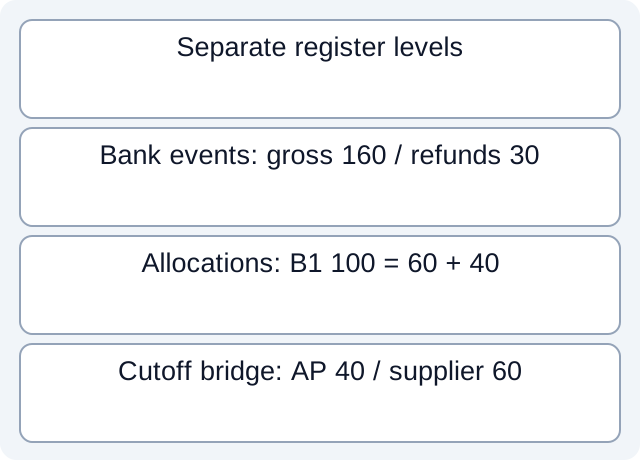
What the downloaded teaching files demonstrate
We read three kinds of fictional tables: unique bank events, allocation relationships and a same-cutoff AP/supplier bridge, with a separate partial-refund observation file. The evidenced S1 EUR 2026 events give gross 160, refunds 30 and net 130. U1’s unknown supplier 20 EUR and G1’s 50 GBP are excluded and reported separately. B1=100 allocated 60+40 becomes 200 if the full bank amount is repeated after the join; it remains one 100 event. For the separate refund agreement 40, R2=10 and R3=20 leave 10 not observed. In the cutoff bridge AP40 versus supplier 60 is explained only because the scenario explicitly shows credit C2=20 absent from the supplier record.
Fictional CSV: tp-170-allocations · Fictional CSV: tp-170-bank-events · Fictional CSV: tp-170-same-cutoff-bridge · Fictional CSV: tp-170-separate-refund-observations
Executed worksheet results. These local checks read only constructed files. They do not test vendor accounts, bank receipt, actual fee rates, imports or native report formats.
Keep three cash figures and a separate payable figure
If R1 is only a partial refund, preserve its own event and any unresolved remainder; do not close the original invoice merely because money returned. For a refund arriving next year or for an earlier project, retain both the original-project link and its actual bank date. Moving it into the original cash month rewrites history.
Do not treat different reports as interchangeable
Xero’s contact reports distinguish Contact Cash Activity—spend/receive-money transactions—from Supplier Bill Activity, which includes bills, credits, prepayments and overpayments. The former is not guaranteed to include every supplier bill payment; the latter is not annual bank cash. Allocations and the prepayment inclusion setting also affect how its balance is read.
When the supplier statement disagrees with accounts payable, record each source’s opening balance and cutoff first. List missing bills/credits, payment timing and allocation evidence separately. A bank payment not yet recognized on the supplier statement is a difference to investigate, not permission to delete a bill. Retain an unresolved difference where no document explains it. The worksheet organizes evidence; it does not determine expense recognition, tax or a right of offset.
Partial refunds and the supplier statement
A separate invented refund agreement calls for 40 EUR. Received events R2=10 EUR and R3=20 EUR total 30 EUR, leaving 10 EUR not evidenced as received. This is the agreement-minus-observations calculation, not a conclusion that 10 is legally overdue. Preserve both event IDs; a second observation of R2 must not add another 10.
For a separate same-cutoff supplier-statement check, both sides explicitly start at 100 EUR. Their source records are:
| Evidence identity | AP movement EUR | Supplier-statement movement EUR | Difference to investigate |
|---|---|---|---|
| Bill I2 | +60 | +60 | None in this stipulated case |
| Credit C2 | −20 | Missing | Request recognition/support for C2 |
| Bank event B3, allocated to I2/earlier bills | −100 | −100 | Both sources explicitly acknowledge it |
| Closing balance | 40 | 60 | 20 corresponds to the missing credit observation |
This relationship is given by the scenario, not inferred from equal amounts. If C2 lacks its actual source or the cutoffs differ, the 20 remains unexplained; do not create a credit or change a supplier balance merely to remove it.
For a bank source available only as PDF, download LocalExtract. It processes one PDF locally into date,description,amount CSV; check the extracted rows against the issued statement before using them.
Related guide: Power Query bank totals: retain the rows behind each group.
Documentation for the added task checked October 17, 2026.
LocalExtract Team
We build LocalExtract, a desktop bank statement converter. Questions or corrections? Contact · Editorial policy