
PO, goods receipt, invoice and bank payment: check four evidence layers
Updated · 3 min read
A bank payment does not prove that ordered goods arrived or that an invoice was approved. Keep purchase order, goods receipt, invoice and payment as four evidence layers with their own identifiers and units. Link them at purchase-line level before comparing totals.
The desktop apps export date, description, and amount as CSV. Open CSV in Excel to save an XLSX workbook. Statement support varies: verify the result against your own PDF.
Review the line relationship before judging a difference
- Identify the PO line, unit price and ordered quantity. Keep the actual policy/tolerance separate from this worksheet.
- Collect receipt lines independently and link them by purchase-line identity. A payment or invoice is not evidence of delivered quantity.
- Compare invoice quantity to supported receipt quantity and invoice price to the relevant purchase order; record each unresolved difference.
- Link actual bank events to invoices only through supported allocations. Keep the original bank-event table separate when one payment covers several invoices.
- Hand off quantity/price differences and cash-allocation status as different findings. Do not use the worksheet to approve procurement, post entries or determine tax treatment.
Microsoft Dynamics’ three-way matching policies compare invoice/PO prices and invoice/product-receipt quantities. Configuration and tolerances affect the software’s decision. The documentation’s example percentages are not universal allowed errors.
This article adds bank-payment evidence to an author-designed review worksheet. It does not claim every accounting system has an official “four-way matching” feature. Keep PO line, receipt line, invoice line and payment event IDs separate; an invoice header alone may cover several purchase lines.
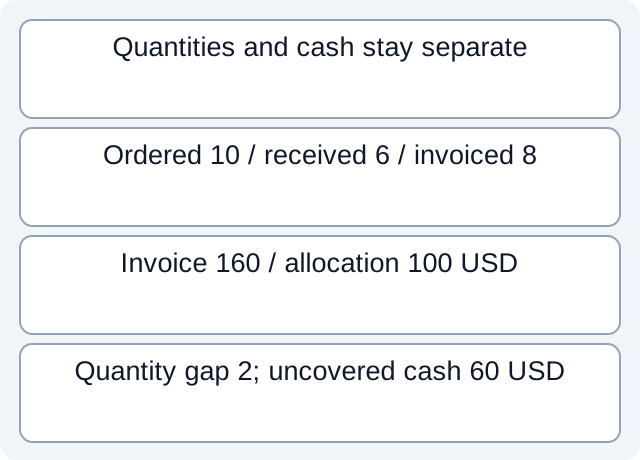
What the downloaded teaching files demonstrate
Reading the fictional purchase-line CSV gives ordered 10 at 20 USD, received 6, invoiced 8 and allocated payment 100. The quantity gap is 2 units; the invoice is 160 USD and 60 is not covered by the observed allocation. Dividing 100 by 20 does not establish five received units. A separate allocation CSV splits B2=80 USD across I2=30 and I3=50: summing the repeated bank column yields 160, while unique bank events and the allocation sum each give 80. These are worksheet calculations, not an executed Dynamics matching or approval.
Fictional CSV: tp-240-purchase-line · Fictional CSV: tp-240-separate-payment-allocations
Executed worksheet results. These local checks read only constructed files. They do not test vendor accounts, bank receipt, actual fee rates, imports or native report formats.
Preserve quantities and money at their own levels
Neither difference proves supplier breach, a bad invoice or an overdue debt. Another receipt, credit, timing explanation or allocation may exist. Do not infer receipt 8 because 8 units were billed, or receipt 5 because 100 was paid at a unit price 20. Payment allocation and received quantity are different facts.
Keep partial relationships visible
With several receipts or invoices, preserve each relationship rather than repeating the entire bank debit on every joined row. Record additional fees as their own documented components; do not force them into goods quantity. Where a payment spans invoices, allocate only from actual remittance evidence and retain the unresolved amount.
Hand the reviewer line-level references, source versions, quantity/price differences and payment status. This worksheet does not approve procurement, execute a posting, set the organization’s tolerance or determine tax/asset classification. Unknown delivery or approval stays unknown even when the bank amount matches.
Review worksheet
| Synthetic evidence | Quantity / amount | Open comparison |
|---|---|---|
| PO L1 | 10 ×20 USD | Ordered, not received |
| Receipt R1 | 6 units | Invoice 8 exceeds this by 2 |
| Invoice I1 | 8 ×20 =160 USD | Does not prove delivery |
| Payment allocation | 100 USD | 60 USD not covered by observed allocation |
For a bank source available only as PDF, download LocalExtract. It processes one PDF locally into date,description,amount CSV; check the extracted rows against the issued statement before using them.
Related guide: Power Query Merge repeats bank amounts: check invoice matches.
Documentation for the added task checked October 17, 2026.
LocalExtract Team
We build LocalExtract, a desktop bank statement converter. Questions or corrections? Contact · Editorial policy