
Eventbrite event paid in parts: connect each payout to the bank
Updated · 3 min read
When one Eventbrite event has several payouts, Event ID alone is not the bank-match key. Retain each Payout ID, its summary and its transaction itemization before checking the bank. This route concerns Eventbrite Payment Processing, not an unrelated payment gateway’s deposits.
The desktop apps export date, description, and amount as CSV. Open CSV in Excel to save an XLSX workbook. Statement support varies: verify the result against your own PDF.
Work one event across two payouts
- Confirm the organization, access and Eventbrite Payment Processing scope. Keep the event identifier; it identifies the event, not each bank credit.
- Export the payout summary for each Payout ID. Export the event itemization separately and retain its Order/Adjustment identities; retrieve the generated files from Exports.
- Group itemized net components by Payout ID before comparing with the summary. Do not add the summary to its own underlying items.
- Compare each payout with independent bank evidence using currency, destination and available reference. Record unsupported links as unknown; equal amounts do not resolve identity.
The payout summary contains Payout ID, Event ID, type, initiated/expected arrival, method, status, reserve and paid amount. Retain the event itemization as a separate level: it adds Order ID, Adjustment ID, transaction type/date and fee/tax components. Do not treat the summary amount as another sale to add to its itemized components.
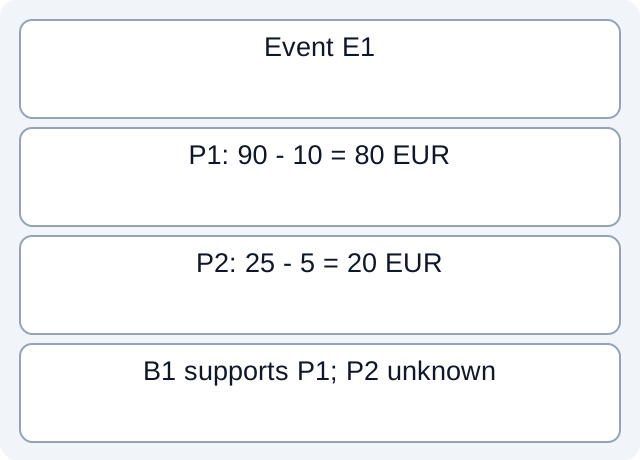
What the downloaded teaching files demonstrate
The downloadable fictional membership file contains O1=90 and A1=−10 for P1, and O2=25 and A2=−5 for P2, all under E1. We actually read those CSV rows and grouped them: P1=80 EUR and P2=20 EUR. A separate bank evidence file explicitly links B1=80 to P1; B2 is another 80 with no supported payout link. Including B2 would invent another P1 receipt. P2 stays unobserved, rather than automatically overdue.
Fictional CSV: tp-230-bank-evidence · Fictional CSV: tp-230-membership
Executed worksheet results. These local checks read only constructed files. They do not test vendor accounts, bank receipt, actual fee rates, imports or native report formats.
| Object | EUR | Evidence boundary |
|---|---|---|
| P1 | 80 | B1 relationship stipulated |
| P2 | 20 | Bank receipt unknown |
| B2 | 80 | Same amount; payout unknown |
Keep optional fields conditional
Consolidated payouts for recurring events are available only in certain regions. Trace ID is US-only; scheduled reserve applies to scheduled payouts. An absent field is not automatically missing data or evidence of a failed payment. Eventbrite’s payout amount explanation discusses reserves, refunds and charges/credits; it does not make every event’s schedule identical.
Close each payout separately
Record the actual currency, destination, Payout ID and bank reference beside each observation. Expected arrival is not observed receipt. Keep reserves, adjustments and unmatched payments explicit; do not assign a universal reserve percentage or force all of an event’s bank movement into one month. The downloadable register is a teaching review sheet, not an Eventbrite export or proof of event settlement.
For a bank source available only as PDF, download LocalExtract. It processes one PDF locally into date,description,amount CSV; check the extracted rows against the issued statement before using them.
Related guide: Bank statement reconciliation: balances, matches and exceptions.
Documentation for the added task checked October 17, 2026.
LocalExtract Team
We build LocalExtract, a desktop bank statement converter. Questions or corrections? Contact · Editorial policy