
Dolibarr bank CSV or journal entries: choose the import object
Updated · 3 min read
Before preparing a bank file for Dolibarr, identify the import dataset and the object it creates. A three-column bank movement is not already a coded journal entry. This guide is for the person preparing an authorized import review, using the core 24.0.1 source as a reference, not an executed installation test.
The desktop apps export date, description, and amount as CSV. Open CSV in Excel to save an XLSX workbook. Statement support varies: verify the result against your own PDF.
Choose the dataset before changing the CSV
The core Imports guide describes enabling the module through an administrator, then Tools → New import, choosing a predefined dataset and selecting a CSV/Excel format. Download the blank example for the selected dataset from the actual installation before mapping your own fields.
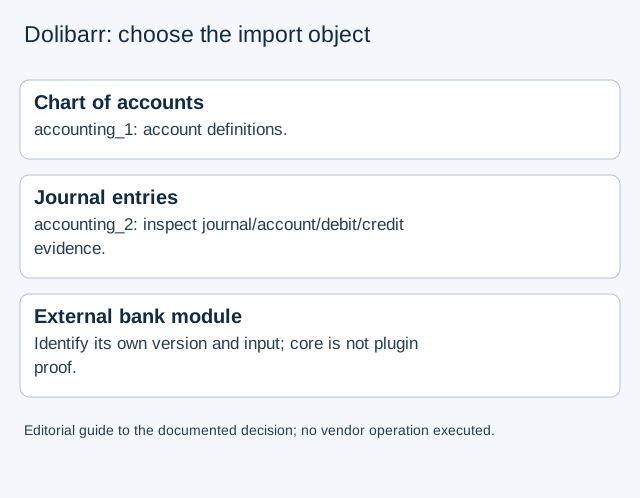
The 24.0.1 accounting module source distinguishes the technical datasets accounting_1 and accounting_2. The first concerns the chart of accounts; the second is ImportAccountingEntries, targeting accounting_bookkeeping. These are technical identifiers, not a promise that every installation displays the same menu label.
| Selected object | Evidence needed before mapping |
|---|---|
| Chart of accounts | Account definitions, rather than one row per bank movement |
| Accounting entries | Journal/account destinations and debit/credit information, not only a bank description and signed amount |
| External bank-import module | Exact installed module/version and its own documented target and input format |
The inspected journal profile includes accounting fields and a date pattern corresponding to YYYY-MM-DD. Do not expand that observation into a universal Dolibarr bank-CSV schema or copy this article as an accepted import template.
Keep core Imports and external bank modules separate
The bank-import/reconciliation wiki page describes an external module. Its features do not automatically belong to core Imports. Conversely, finding no generic-import profile declaration in the inspected 24.0.1 bank-module file does not prove that every Dolibarr version or installed extension lacks bank import.
Record the installed version, enabled module, chosen dataset and downloaded sample together. If the administrator cannot identify the destination object, stop before uploading or enabling another module to test a guess.
Review mapping and simulation without treating them as posting proof
- Preserve the source file and name the intended object and accounting period.
- Compare the actual installation's blank sample with available fields and any separately authorized accounting coding.
- Check separator, header range, dates and numerical interpretation in the import wizard.
- Use the documented simulation stage and inspect its report before a final import; the source describes this stage, but we have not run it.
- Record any previous execution and unresolved destination fields. A readable file or a simulation message alone does not prove correct accounting, deduplication or external-module compatibility.
The object-comparison teaching data compare an explicitly fictional date,description,amount bank row with a journal-field checklist. Missing coding means the row is not already a coded journal; it does not prove that an authorized mapping or later preparation is impossible. The file is not a Dolibarr native sample or validator.
LocalExtract prepares three CSV fields from one PDF locally. It does not generate a Dolibarr chart, coded journal or automatic synchronization. Use the CSV format guide for common delimiter/date questions once the destination object is established.
Official wiki and pinned 24.0.1 source checked October 17, 2026. The core wiki has older editing history; installed modules, permissions, country and chart configuration still govern the real review.
LocalExtract Team
We build LocalExtract, a desktop bank statement converter. Questions or corrections? Contact · Editorial policy