
How to Convert Charles Schwab Statements to Excel or CSV
Key Takeaways
- Charles Schwab provides transaction history downloads and tax documents through its online portal, but official monthly statement PDFs require a conversion tool to get data into Excel or CSV format.
- Schwab brokerage statements are among the most complex to convert, with investment transaction types (buys, sells, dividends, interest, transfers, reinvestments) and multi-section layouts that trip up generic PDF extractors.
- Five methods exist for converting Schwab statements: native export, manual copy-paste, Tabula (open-source), cloud converters, and on-device converters — each with distinct trade-offs in accuracy, privacy, and cost.
- Always verify converted data against the original statement totals, regardless of which tool you use.
Disclosure: This article is published by the company that builds LocalExtract, an on-device bank statement converter. We have a commercial interest in this topic. LocalExtract is presented as one option among several. We encourage you to test any tool against your own Schwab statements and verify claims independently.
Charles Schwab is one of the largest brokerage firms and banking institutions in the United States, serving millions of individual investors, traders, and retirement account holders. Following its acquisition of TD Ameritrade, Schwab's client base has grown further, making it one of the most commonly encountered financial institutions in bookkeeping and tax preparation. If you manage investments, prepare taxes, or handle financial planning for clients with Schwab accounts, you have likely needed to get Schwab statement data into a spreadsheet.
This guide covers the main methods for converting Charles Schwab statement PDFs to Excel or CSV — what works, what doesn't, and the trade-offs of each approach.
Contents
- Why Convert Schwab Statements to Excel or CSV?
- What Schwab Statement Formats Does LocalExtract Support?
- How to Convert Schwab Statements — Step by Step
- What We Found in Testing
- Alternative Methods
- What the Output Looks Like
- Tips for Working with Schwab Statements
- FAQ
- Getting Started
- Conclusion
Why Convert Schwab Statements to Excel or CSV?
There are several common reasons you might need Charles Schwab statement data in spreadsheet form:
- Tax preparation — tracking cost basis, capital gains, dividend income, and interest across investment accounts requires structured data. While Schwab provides 1099 forms, the monthly statements contain transaction-level detail needed for basis adjustments and wash sale tracking
- Portfolio analysis — analyzing buy/sell activity, dividend reinvestment patterns, and asset allocation changes over time requires sortable, filterable data
- Bookkeeping and reconciliation — matching Schwab transactions against your financial records, especially for trust accounts, estate accounts, or business investment accounts. For more on this use case, see bank statement converters for small business
- Audit preparation — auditors, estate attorneys, and fiduciaries may request transaction data in a spreadsheet format they can independently verify
- Fee analysis — Schwab charges various fees (margin interest, wire transfer fees, foreign transaction fees) that are easier to track and sum in a spreadsheet
- Multi-account consolidation — combining transactions from Schwab brokerage, Schwab Bank checking, Schwab IRA, and other accounts into a single master spreadsheet
- Historical analysis — analyzing investment activity across months or years, tracking dividend income trends, or reconstructing transaction history for financial planning. For a primer on statement conversion concepts, see what is a bank statement converter
Charles Schwab's online portal provides transaction history downloads and various reporting tools, but official monthly statement PDFs — the comprehensive documents available in your account — can only be downloaded as PDF files. If you need the full statement layout with account summaries, position details, and transaction history in spreadsheet format, you need a way to convert that PDF.
What Schwab Statement Formats Does LocalExtract Support?
Before choosing a conversion method, it helps to understand what Charles Schwab statement PDFs look like. Schwab issues digital PDF statements for several account types, and the layouts differ significantly across products.
Charles Schwab Brokerage Account Statements (individual, joint, trust, custodial, etc.) are the most complex and typically include:
- An account summary with beginning market value, net deposits/withdrawals, change in investment value, and ending market value
- A cash and cash alternatives section showing money market fund balance, settled and unsettled cash
- A portfolio detail section listing each holding with shares, price, and market value
- A transaction detail section organized chronologically with date, action (buy, sell, dividend, reinvestment, transfer, etc.), description, quantity, price, and amount
- A realized gain/loss summary (on some statements)
- Income summary showing dividends and interest received during the period
Charles Schwab Bank Statements (Schwab Bank checking, previously Schwab Bank High Yield Investor Checking) follow a simpler layout:
- An account summary with beginning balance, deposits, withdrawals, fees, interest, and ending balance
- Transaction details organized chronologically with date, description, and amount
- Check images or check detail section (if checks were written)
- Direct deposit and ACH transaction details
Schwab IRA and Retirement Account Statements (Traditional IRA, Roth IRA, SEP IRA, Solo 401k) follow the brokerage statement format but may include:
- Contribution and distribution tracking
- Required Minimum Distribution (RMD) information for applicable accounts
- Year-to-date contribution summaries
Schwab Intelligent Portfolios Statements (robo-advisor accounts) include:
- Automated rebalancing transaction details
- Tax-loss harvesting activity
- Portfolio allocation changes
All Schwab statement PDFs downloaded from the online portal are text-based (not scanned images), meaning the data is embedded as selectable text. Text-based PDFs are faster and more accurate to convert than scanned documents requiring OCR. You can verify this: open the PDF and try selecting text with your cursor. If the text highlights, it is text-based.
How to Convert Schwab Statements — Step by Step
Here is the complete process for converting a Charles Schwab statement PDF to Excel or CSV using LocalExtract, an on-device converter.
Step 1: Download Your Schwab Statement PDF
- Log in to your Charles Schwab account at schwab.com
- Navigate to "Statements" from the Accounts menu (or Service > Statements)
- Select the account and statement period you need
- Download the PDF to your computer
Schwab retains downloadable statements in the online portal for several years. For brokerage accounts, statements typically go back to the account's inception. If you need statements that are no longer available online, contact Schwab customer service.
Step 2: Open LocalExtract
Launch LocalExtract on your Mac or Windows PC. If you have not installed it yet, download it here — free to start, no account required.
Step 3: Import the Schwab Statement
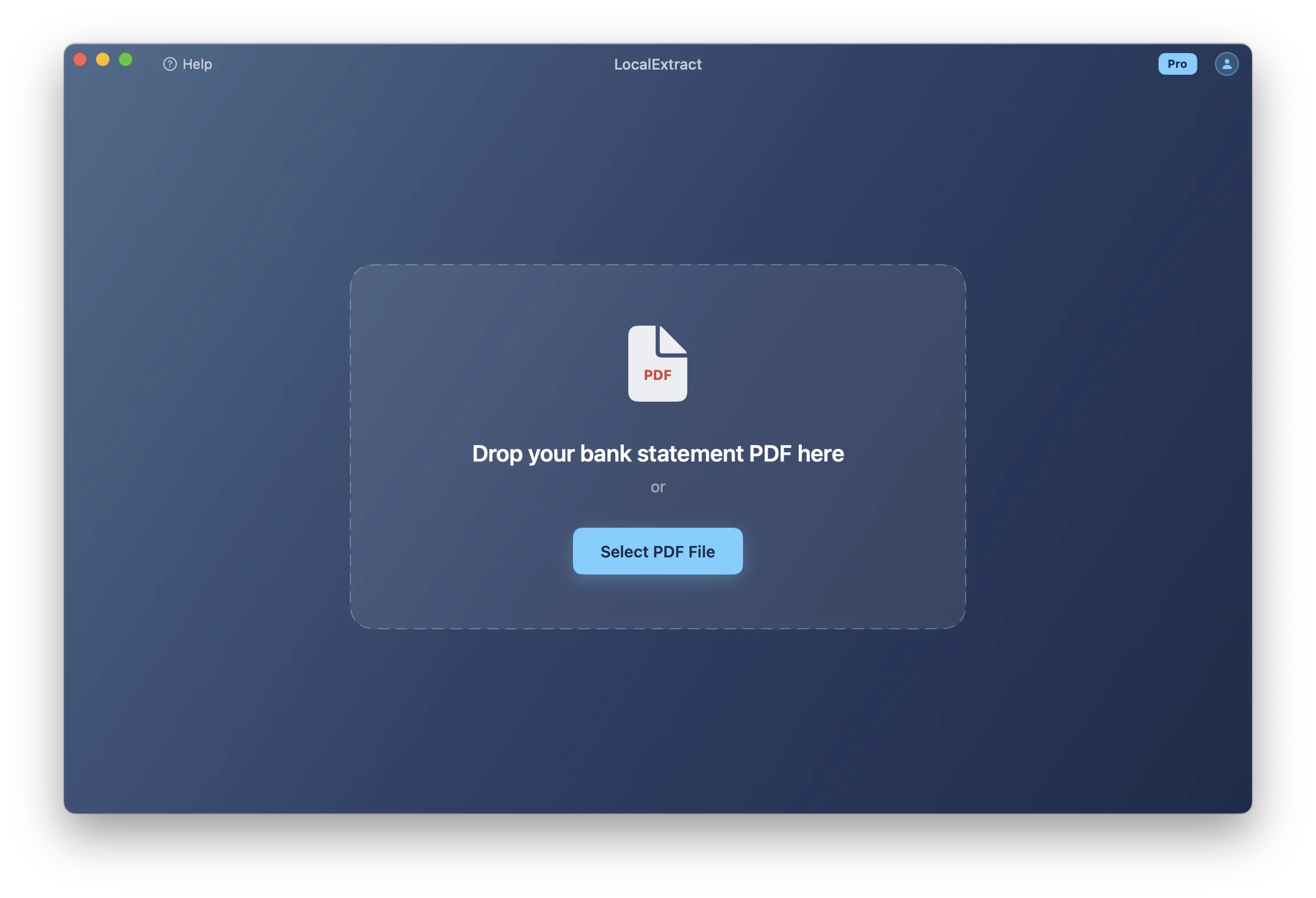
Drag and drop the Schwab PDF into the LocalExtract window, or click "Select PDF" to browse. The engine detects the account format automatically — no need to select "Charles Schwab" from a dropdown or configure any settings.
Step 4: Review the Extracted Data
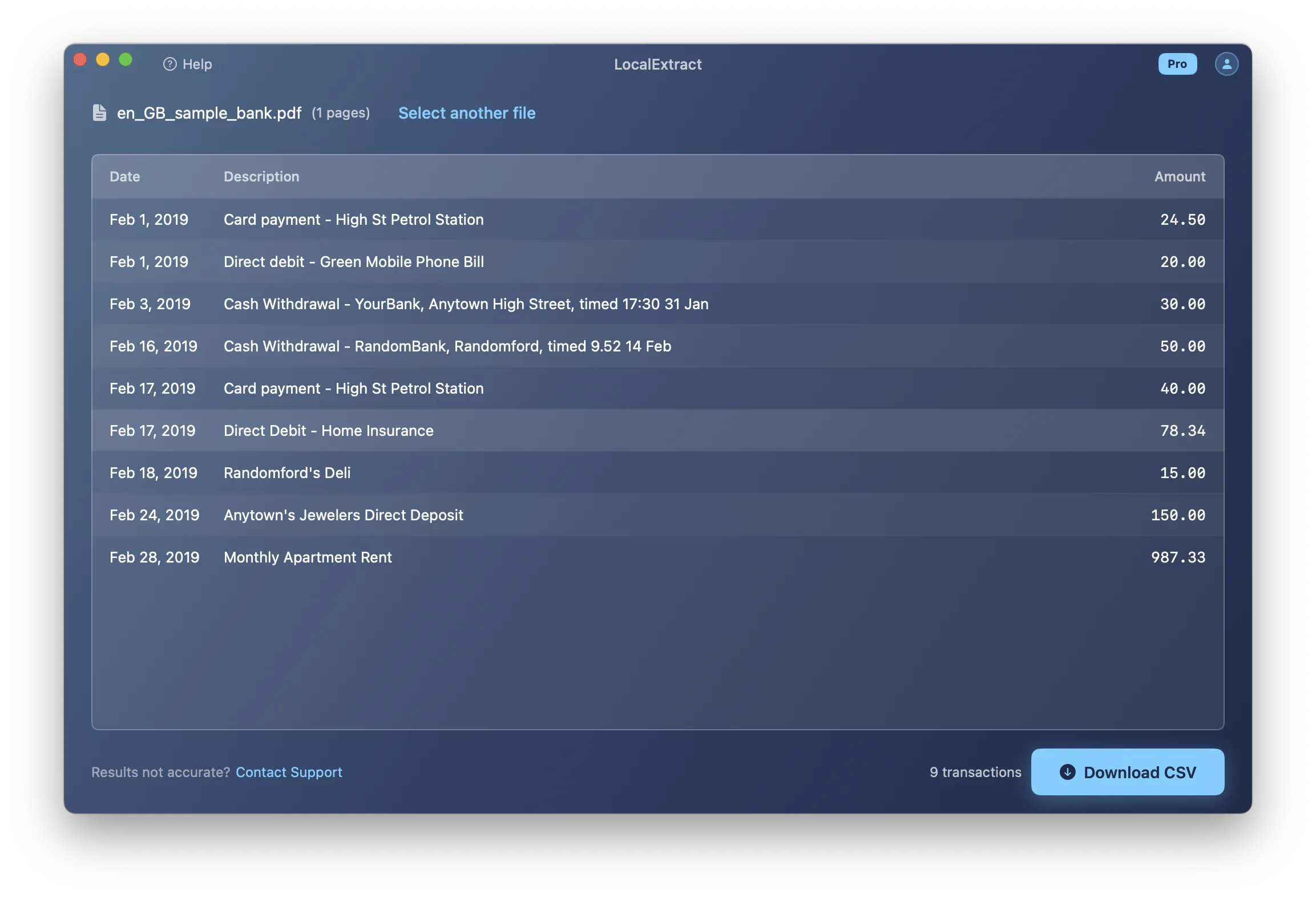
LocalExtract displays the extracted transactions in a preview table. Check that:
- The statement period dates are correct
- Transaction dates, descriptions, and amounts align properly
- For brokerage accounts: buy/sell transactions show correct quantities, prices, and amounts
- Dividends, interest, and reinvestments are correctly captured
- Portfolio holdings are separated from transaction data
- The account summary totals match your statement
Step 5: Export to Excel or CSV
Click "Export" and choose your format:
- CSV — universal format, works with any spreadsheet app or accounting software. Best for importing into portfolio tracking tools or tax software. See our guide on converting bank statement PDFs to CSV.
- Excel (.xlsx) — formatted spreadsheet with column headers. Best for manual review, pivot tables, or sharing with clients and advisors. See our guide on converting bank statement PDFs to Excel.
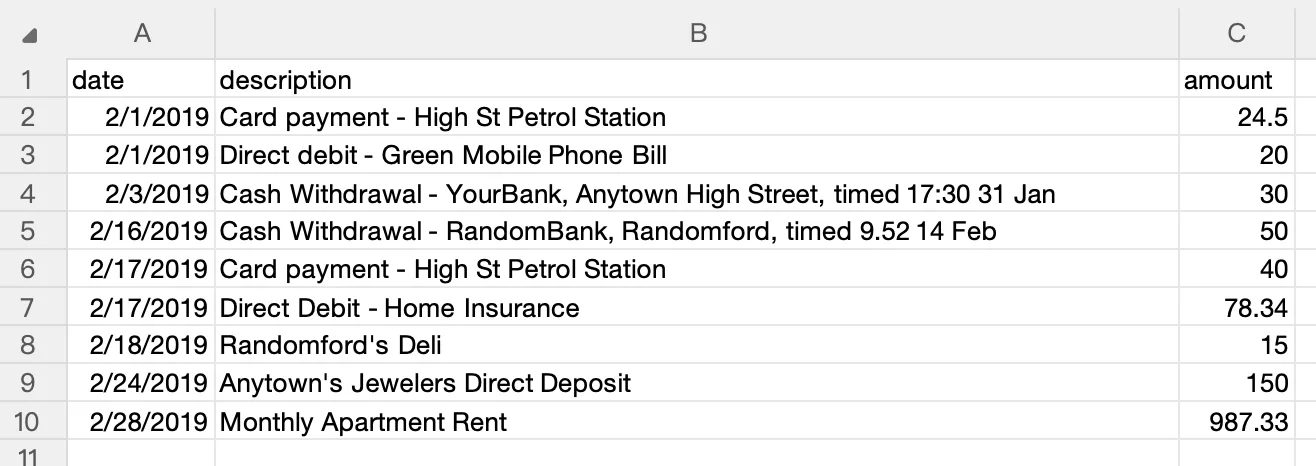
The entire process — from drag-and-drop to export — takes under 10 seconds for a typical Schwab statement.
What We Found in Testing
We converted 9 Charles Schwab statement PDFs spanning June 2024 through December 2025, covering individual brokerage accounts, a Roth IRA, and a Schwab Bank checking account. Here is what we observed:
- Accuracy: Schwab Bank checking statements were the most straightforward — dates, descriptions, and amounts matched without issues. Brokerage statements were significantly more challenging. Transaction types (buy, sell, qualified dividend, reinvest dividend, wire transfer) all use the columns differently, and the quantity and price fields are blank for non-trade transactions like dividends and interest.
- Format quirks: The biggest challenge with Schwab brokerage PDFs is the presence of portfolio position tables on the same pages as transaction tables. Both contain security names, numeric values, and similar column alignment. During development, early test runs conflated position rows (holdings with market values) with transaction rows (trades and income). Schwab also uses multi-line security descriptions — a single dividend reinvestment can span three lines with the trust name, fund name, and ticker symbol on separate lines.
- Processing time: Schwab Bank checking statements (2-3 pages) converted in under 2 seconds on a MacBook Air M2. Brokerage statements ranged from 6 to 14 pages, with a 12-page statement containing 38 transactions converting in about 5 seconds. The IRA statement had fewer transactions but included RMD information in the header that did not interfere with extraction.
One noteworthy finding: Schwab statements from accounts that were recently migrated from TD Ameritrade use Schwab's current format, so there is no special handling needed for migrated accounts. However, if you still have historical TD Ameritrade PDFs, those use a different layout entirely.
Alternative Methods
Schwab's Built-In Export Options
Charles Schwab provides several export and download features through its online platform.
Transaction History Download:
- Log in to your Schwab account and navigate to the account's transaction history (History tab)
- Select a date range
- Click "Export" and choose CSV format
- Download the file
Schwab's Reporting Tools:
- The Gains & Losses report provides realized gain/loss data for tax purposes
- The Income report summarizes dividends and interest by security
- The Transaction History provides a filterable list of all account activity
Limitations:
- Transaction history download covers activity only — not the full monthly statement with account summaries, portfolio positions, and cash balances
- Date range limitations — downloadable transaction history may not extend as far back as archived statement PDFs
- No statement-period alignment — the date-range download may not match a specific monthly statement exactly
- Separate from tax documents — 1099 forms and cost basis reports are available separately but are not the same as monthly statements
- Format limitations — the CSV download includes basic transaction fields but not the multi-column detail (quantity, price, amount) that appears on brokerage statements
Schwab's built-in transaction download works well for getting a quick list of recent trades, dividends, and deposits. But if you need to convert an archived monthly statement PDF with full account summaries and position details, this method does not provide the complete picture. You need a PDF conversion tool.
Manual Copy-Paste from PDF
Open the Schwab statement PDF, select the transaction table, copy, and paste into Excel or Google Sheets.
The problems:
- Column misalignment — brokerage statements have many columns (date, action, description, symbol, quantity, price, fees, amount). Copy-paste rarely preserves this alignment correctly
- Mixed section types — Schwab statements contain account summaries, portfolio positions, and transactions in different table formats. Copy-paste merges all sections indiscriminately
- Multi-line descriptions — transaction descriptions often include the security name, symbol, and additional details across multiple lines. These become separate rows in your spreadsheet
- Numeric parsing issues — quantities (shares), prices, and amounts paste as text rather than numbers, requiring manual conversion
- Time cost — a 10-page Schwab brokerage statement takes 30-60 minutes to manually clean up, with high error rates for complex transactions
For Schwab Bank checking statements with simple deposits and withdrawals, manual copy-paste is tedious but possible. For brokerage statements, it is impractical.
Tabula (Free, Open-Source)
Tabula is a free, open-source tool specifically designed to extract tables from PDF files. It runs locally on your computer (Java-based) and does not upload your data to any server.
How to use Tabula with Schwab statements:
- Download and install Tabula from tabula.technology
- Open Tabula in your browser (it runs a local web server at
localhost:8080) - Upload your Schwab statement PDF (the file stays on your machine — Tabula's server is local)
- Draw selection boxes around the transaction tables on each page — be careful to select only the transaction section, not portfolio positions or account summaries
- Click "Preview & Export Data" and choose CSV or TSV format
Strengths:
- Completely free and open-source (GitHub)
- Data never leaves your computer
- Good community support
- Works across Mac, Windows, and Linux
Limitations:
- Manual table selection — Schwab brokerage statements have multiple distinct table types (positions, transactions, income). You must carefully select only the transaction table on each page
- No Schwab-specific awareness — Tabula does not understand the difference between a portfolio position row and a transaction row. Both have similar column structures (description, quantity, amount)
- Wide table challenges — brokerage transaction tables with 7-8 columns (date, action, description, symbol, quantity, price, fees, amount) are harder for Tabula to parse than simple 3-column bank statements
- Multi-line descriptions — security names and transaction details that wrap create extra rows
- No batch processing — each PDF must be processed individually
- Requires Java
Tabula works for simple Schwab Bank checking statements but struggles with the complexity of brokerage statements.
Cloud-Based Converters
Cloud-based PDF converters let you upload a Schwab statement PDF to their server for processing:
- DocuClipper — specializes in bank statement conversion. Supports various financial institutions
- BankStatementConverter.com — focused on bank statement PDFs. Charges per page
- General PDF converters (Adobe Acrobat online, Smallpdf, etc.) — not bank-specific, but can extract tables from any PDF
Advantages:
- Automated extraction — some services handle brokerage statement formats
- No software installation required
- Cloud-based services may adapt to format changes server-side
- Some offer batch processing
Concerns:
- Data leaves your device — your Schwab statement is uploaded to a third-party server, including account numbers, holdings, transaction history, and portfolio values
- Brokerage data sensitivity — investment account statements reveal your complete portfolio, trading strategy, income sources, and net worth — more sensitive than a typical bank statement
- Retention policies vary — review each service's privacy policy before uploading financial documents
- Ongoing cost — per-page or subscription pricing, which can be significant for lengthy brokerage statements (often 8-15 pages)
Brokerage statements contain particularly sensitive information — your complete investment portfolio, trading activity, and account values. For financial advisors, trust officers, and tax professionals handling client Schwab statements, uploading this data to a third-party server creates regulatory considerations under the FTC Safeguards Rule, SEC regulations, and IRS guidelines (IRS Publication 4557). Review your compliance obligations carefully.
On-Device Converter
On-device converters run the PDF parsing engine entirely on your computer. The Schwab statement never leaves your machine, similar to Tabula, but with automated format detection rather than manual table selection.
| Factor | Cloud Converter | On-Device Converter |
|---|---|---|
| Where data is processed | Provider's servers | Your computer |
| Internet required | Yes | No |
| Data retained by third party | Depends on provider | None — data stays local |
| Format update speed | Provider can update server-side | Requires app update when formats change |
For a deeper comparison, see our guide on cloud vs. local bank statement converters.
What the Output Looks Like
A well-converted Schwab brokerage statement produces structured rows that capture the investment transaction detail:
Sample brokerage CSV output (data redacted):
Date,Action,Description,Symbol,Quantity,Price,Amount
03/01/2026,"Buy","VANGUARD S&P 500 ETF","VOO",10,485.50,-4855.00
03/03/2026,"Qualified Dividend","APPLE INC","AAPL",,, 24.50
03/05/2026,"Reinvest Dividend","SCHWAB US BROAD MKT ETF","SCHB",0.482,52.18,25.15
03/10/2026,"Sell","NVIDIA CORP","NVDA",25,890.00,22250.00
03/15/2026,"Wire Transfer","INCOMING WIRE",,,,10000.00
03/20/2026,"Interest","SCHWAB BANK INT",,,,12.35
For Schwab Bank checking statements, the output is simpler:
Date,Description,Amount
03/01/2026,"DIRECT DEPOSIT - PAYROLL",5200.00
03/03/2026,"DEBIT CARD PURCHASE - COSTCO",-156.78
03/05/2026,"SCHWAB BROKERAGE TRANSFER",-2000.00
03/10/2026,"ATM WITHDRAWAL - SCHWAB ATM",-300.00
03/15/2026,"INTEREST PAYMENT",3.45
The exact columns and formatting depend on the tool you use. For brokerage statements, a correct conversion should preserve the transaction type (buy, sell, dividend, etc.), security symbol, quantity, price, and total amount. For bank statements, each transaction should occupy a single line with date, description, and amount.
Tool Comparison Summary
| Method | Cost | Privacy | Schwab Accuracy | Effort | Best For |
|---|---|---|---|---|---|
| Schwab built-in export | Free | High (first-party) | N/A (not statement PDF) | Low | Recent transaction history |
| Manual copy-paste | Free | High | Low (brokerage), Medium (bank) | High | One-off, simple bank statements |
| Tabula (open-source) | Free | High (local) | Low (brokerage), Medium (bank) | Medium-High | Simple bank statements |
| Cloud converters | Per-page/subscription | Lower (data uploaded) | Varies | Low | Convenience (if privacy is not a concern) |
| On-device converter (LocalExtract) | Free tier (10 pages), Pro $10/month or $60/year | High (local) | High (for supported formats) | Low | Privacy-sensitive, recurring use |
No single tool is best for everyone. Your choice depends on the type of Schwab account (brokerage vs. bank), how many statements you process, your privacy requirements, and your budget. For accountants evaluating tools across multiple institutions, see our guide on bank statement converters for accountants.
Tips for Working with Schwab Statements
Schwab Brokerage Statement Parsing Challenges
Charles Schwab brokerage statements are among the most complex financial documents to convert, presenting challenges that go beyond typical bank statement conversion:
Multiple table types on the same page. A single Schwab brokerage statement page may contain a portfolio positions table (holdings with market values) above or below a transaction table (trades, dividends, transfers). Both tables have similar column structures — description, quantity, amount — but represent entirely different data. A converter must distinguish between positions and transactions.
Diverse transaction types. Schwab brokerage transactions include:
- Buys and Sells — with symbol, quantity, price, fees, and net amount
- Dividends — qualified, non-qualified, and return of capital distributions
- Reinvestments — automatic dividend reinvestment with fractional shares
- Interest — money market interest, bond interest, margin interest
- Transfers — wire transfers, ACH, journal entries between accounts
- Corporate actions — stock splits, mergers, spinoffs, name changes
- Options — assignments, exercises, expirations (if applicable)
Each type uses the columns differently. A "Buy" row has quantity and price; a "Dividend" row has neither. A correct parser must handle this variability.
Fractional shares and precise pricing. Reinvested dividends often result in fractional share quantities (e.g., 0.482 shares). Prices may have more than two decimal places. The converter must preserve this precision rather than rounding.
Multi-line security descriptions. Security names can be lengthy:
03/05  Reinvest Dividend
       SCHWAB STRATEGIC TR
       SCHWAB U.S. BROAD MARKET ETF
       SCHB                    0.482    52.18    25.15
A correct parser must merge these into a single row while extracting the symbol, quantity, price, and amount from the final line.
Post-Conversion Verification Checklist
Regardless of which method or tool you use, always verify the converted data against your original Schwab PDF:
- Beginning value/balance — matches the "Beginning Market Value" (brokerage) or "Beginning Balance" (bank) on the PDF
- Ending value/balance — matches the "Ending Market Value" or "Ending Balance"
- Total deposits — sum of all incoming transactions (deposits, dividends, interest, sale proceeds) matches the statement summary
- Total withdrawals — sum of all outgoing transactions (purchases, withdrawals, fees) matches the statement summary
- Transaction count — count the rows and compare to the PDF. Multi-line descriptions and mixed table types are the most common sources of errors
- Date range — confirm the first and last transaction dates fall within the statement period
- Spot-check — pick 3-5 transactions at random and verify all fields (date, type, description, symbol, quantity, price, amount)
For Schwab brokerage statements: Beginning Market Value + Net Deposits/Withdrawals + Change in Investment Value = Ending Market Value. If this does not hold using your converted data, check for missing or duplicate transactions.
Handling Multiple Schwab Accounts
Many Schwab clients have multiple accounts — a brokerage account, a Roth IRA, a traditional IRA, and a Schwab Bank checking account. Each generates its own monthly statement. When converting multiple accounts:
- Keep files organized by account type and statement period
- If merging CSVs, add a column identifying the account (e.g., "Brokerage," "Roth IRA," "Checking")
- Be aware that Schwab sometimes combines accounts into a single statement PDF — check whether your PDF covers one or multiple accounts
Former TD Ameritrade Account Holders
Following the Schwab-TD Ameritrade merger, former TD Ameritrade accounts have been migrated to the Schwab platform. If you have historical TD Ameritrade statement PDFs, those use a different format from Schwab statements. The conversion process is the same — drop the PDF into a converter — but be aware that TD Ameritrade and Schwab statements have different layouts, and not all tools support both formats.
Batch Processing Historical Statements
If you need to convert a full year of Schwab statements (12 PDFs per account), tools that support batch input will save significant time. Schwab brokerage statements can be 8-15 pages each, so a full year may be 100+ pages. LocalExtract accepts multiple files at once. Tabula requires individual processing with manual table selection. Cloud converters vary in batch support. For a comparison of tools, see free vs. paid bank statement converters.
Looking Ahead: Schwab's Data Access and Open Finance
Charles Schwab already provides more robust data export tools than most retail banks — including transaction history CSV downloads, portfolio reports, and tax document access. As the broader financial industry moves toward standardized API access under the CFPB's Section 1033 personal financial data rights rule, brokerage firms like Schwab may offer real-time data feeds that reduce the need for PDF conversion. However, brokerage statements are more complex than bank statements — they include position data, cost basis, income summaries, and realized gains that are unlikely to be replicated in simple API transaction feeds. For comprehensive portfolio documentation, tax preparation, and audit purposes, the official monthly statement PDF will remain the gold standard. The growing emphasis on local, on-device processing for financial data is particularly relevant for brokerage statements, which reveal far more about a client's financial position than a typical bank statement.
Privacy Considerations for Schwab Statements
Charles Schwab statements — especially brokerage statements — contain highly sensitive financial information:
- Account numbers — full or partial account identifiers
- Portfolio holdings — your complete investment portfolio with share counts and market values
- Transaction history — reveals trading strategy, investment decisions, and timing
- Income data — dividend and interest income, which is taxable
- Account values — beginning and ending market values reveal net worth
- Cash balances — settled cash and money market positions
Brokerage statements are arguably more sensitive than bank statements because they reveal not just spending patterns but investment strategy, portfolio composition, and total wealth.
When choosing a conversion method, consider where your data goes:
- Methods that keep data local (manual copy-paste, Tabula, on-device converters): your statement never leaves your computer
- Methods that upload data (cloud converters): review the provider's privacy policy carefully — brokerage data is particularly valuable to bad actors
For financial advisors and fiduciaries handling client Schwab statements, local processing eliminates the need to assess and document the security of third-party data handlers. See our guide on offline bank statement converters for more on privacy-first conversion.
FAQ
Can I download Schwab statements as CSV directly? Not exactly. Schwab provides a transaction history download feature that exports recent account activity as CSV. However, this is not the same as your official monthly statement — it covers transactions only, without the account summary, portfolio positions, income summaries, or cash balance details. Your official monthly statements are available only as PDF documents.
Does Schwab provide statements in Excel format? No. Schwab monthly statements are available only as PDF documents. The transaction history download and various reports (Gains & Losses, Income) can be exported to CSV, but these are subsets of the data on your full monthly statement.
Can Tabula handle Schwab brokerage statements? Tabula can extract data from Schwab brokerage PDFs, but the results are often poor for brokerage statements specifically. The main issues are: multiple table types on the same page (positions vs. transactions), wide tables with 7-8 columns that Tabula may misalign, and multi-line security descriptions. Tabula works better for Schwab Bank checking statements, which have a simpler three-column layout.
What about former TD Ameritrade statements? Historical TD Ameritrade statement PDFs use a different layout from Schwab statements. The conversion process is the same (drop the PDF into a converter), but verify that your chosen tool supports the TD Ameritrade format. As accounts complete migration to Schwab, new statements will use Schwab's format.
How far back can I convert Schwab statements? You can convert any Schwab statement PDF you have saved, regardless of age. Schwab typically provides extensive statement archives online for brokerage accounts. If you have older PDFs stored locally, those can also be converted. Statement format changes over the years may affect accuracy with some tools.
Is the converted data accurate enough for tax preparation? No converter is 100% accurate in all cases. For tax preparation, Schwab provides dedicated tax documents (Form 1099-B, 1099-DIV, 1099-INT) that are the authoritative source for tax reporting. Monthly statement conversions can supplement tax preparation by providing transaction-level detail, but always verify against the original PDF and cross-reference with official tax documents. See the verification checklist in the Tips section.
Getting Started
If you want to try converting a Charles Schwab statement yourself, here is how to get started with LocalExtract:
- Download LocalExtract — available for Mac and Windows. Free to start, no account required.
- Drop in a Schwab PDF — drag and drop any Schwab brokerage, bank, or IRA statement. The engine detects the format automatically.
- Review and export — check the preview against your original PDF, then export to CSV or Excel.
The free tier includes 10 pages (lifetime), which is enough to test with a few statements. The Pro plan ($10/month or $60/year) provides unlimited pages for ongoing use.
All processing happens on your device. Your Charles Schwab statements are never uploaded to any server.
For more on converting bank statements from other institutions, see our guides on converting bank statement PDFs to Excel and converting bank statement PDFs to CSV. To learn about CSV formatting requirements for accounting platforms, see our guide on bank statement CSV format for accounting.
Conclusion
Charles Schwab statement PDFs — particularly brokerage statements — are among the most complex financial documents to convert, with multiple table types, diverse transaction categories, and multi-line security descriptions creating challenges that go well beyond typical bank statement parsing. The method you choose should account for this complexity: simple copy-paste or generic tools may work for Schwab Bank checking statements, but brokerage statements demand a converter that can distinguish portfolio positions from transactions and handle the full range of investment activity types. For financial advisors, tax preparers, and individuals managing their own Schwab accounts, the ability to get clean, verified spreadsheet data from monthly statements saves substantial time during tax season and ongoing portfolio management. As Schwab continues integrating TD Ameritrade accounts and expanding its digital tools, data accessibility will improve — but for now, PDF conversion remains the most reliable way to get complete statement data into a workable format.
This article is published by the LocalExtract team. LocalExtract is one of several tools that can convert Charles Schwab statement PDFs to CSV and Excel. Competing products were not tested under identical conditions.

LocalExtract Team
We build LocalExtract, an on-device bank statement converter for macOS and Windows. Our team includes software engineers and financial workflows specialists focused on private, accurate PDF data extraction. Questions or corrections? Contact us or see our editorial policy.
Related Articles
Ready to convert your bank statements?
100% on-device. Your documents never leave your computer.
By downloading, you agree to our Terms and Privacy Policy.