
CIMB Singapore: card eStatements before changing delivery
Updated · 2 min read
The desktop apps export date, description, and amount as CSV. Open CSV in Excel to save an XLSX workbook. Statement support varies: verify the result against your own PDF.
Check the linked card before signing up
The published Clicks procedure specifies:
- Sign in to CIMB Clicks Singapore.
- If necessary, use Clicks Setting → Link My Credit Card.
- Open E-Statements → Credit Cards → View Statement Setting.
- Choose Sign up for E-Statement.
The currently served FAQ is marked V2022 JAN. It documents enrollment, rather than today's exact selection/save controls or OCTO app menus.
Separate enrollment history from current transactions
The same card FAQ limits online records to the past 12 months starting from registration. A period before registration is therefore a different request from a missing document within the visible archive. The statement is available on its statement date; Account Enquiry is the route described for current transactions before the monthly document exists.
| Needed result or situation | Bank route or condition | Decision |
|---|---|---|
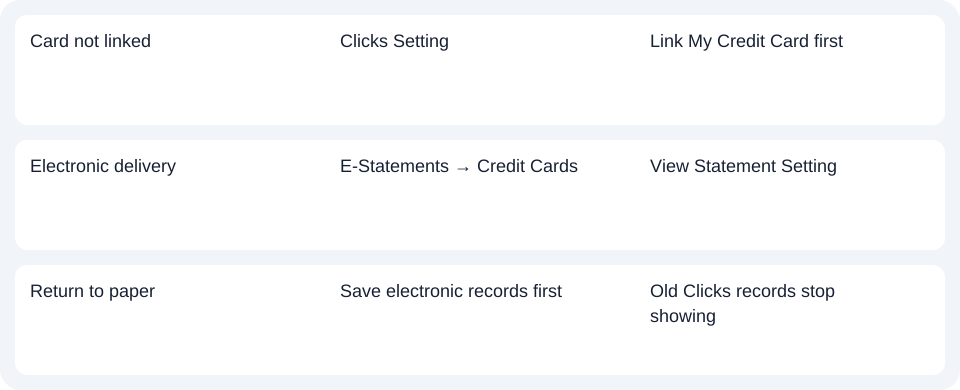
| Card not linked | Clicks Setting | Link My Credit Card first |
| Electronic delivery | E-Statements → Credit Cards | View Statement Setting |
| Return to paper | Save electronic records first | Old Clicks records stop showing |
Preserve records before returning to paper
Paper statements resume with the next statement cycle after the delivery change, and previously generated Clicks eStatements are no longer viewable, according to the paper-resumption answer. Download the records you can access before changing that setting.
For CIMB Singapore credit cards, complete linking and eStatement enrollment, then check which post-enrollment records remain accessible.
Use the record planner to record your chosen route and the outstanding document period.
The credit-card CSV (Comma-Separated Values) guide covers spreadsheet checks after you obtain a PDF (Portable Document Format). LocalExtract handles one PDF locally to date,description,amount CSV; XLSX (Excel workbook format) is saved in Excel. Review the rows against the original. Download choices.
Official source checked October 14, 2026.
LocalExtract Team
We build LocalExtract, a desktop bank statement converter. Questions or corrections? Contact · Editorial policy