
Barclays US: statements and transaction downloads
Updated · 2 min read
The desktop apps export date, description, and amount as CSV. Open CSV in Excel to save an XLSX workbook. Statement support varies: verify the result against your own PDF.
Open the monthly statement
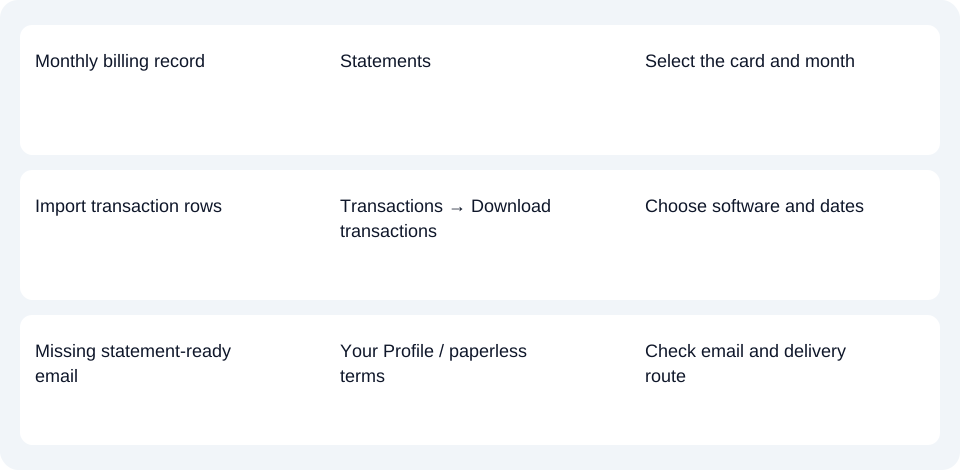
On the website, sign in to the card account and open Activity & Statements → Statements. In the Barclays US app, select the card account, open the hamburger menu, choose Statements, then select the required month. These are the separate website and app paths in the US statement FAQ.
The official mobile guide confirms statement viewing, printing and downloading. After opening the statement, use its available document controls; the guide does not establish a universal PDF-save button.
Barclays’ paperless terms allow HTML (a web page) and/or PDF (Portable Document Format). Check which is offered for your record. For a paper copy, those terms direct customers to Customer Service.
Download transactions for financial software
Barclays gives this website procedure in its transaction-download FAQ:
- Open Activity and Statements → Transactions.
- Choose Download transactions.
- Select your financial software from the offered list.
- Set the required dates.
- Choose Download.
The FAQ does not enumerate file extensions. Use the offered software choice before turning to PDF extraction for transaction rows.
If a connected app or paperless notice fails
Barclays’ online-registration FAQ says some financial aggregators cannot accommodate its security changes. An unknown device or IP address requires a one-time passcode. The bank offers manual data download for import as an alternative, naming Excel, Quicken and QuickBooks; check the file options in your own account.
For paperless delivery, distinguish enrollment confirmation from the monthly statement-ready email. Under the paperless terms, one more paper statement may arrive during the changeover. If notification emails fail for two consecutive months, Barclays resumes paper delivery. Update a changed address under Your Profile on the website rather than assuming that a missing email means no statement was issued.
If an expected paper statement has not arrived 7–10 days after the billing period closes, the US FAQ directs you to Customer Service using the number on the card. This delivery window is not an online archive limit.
Record-route planner · Credit-card CSV checks.
LocalExtract processes one PDF at a time locally into date,description,amount CSV; Excel can save that CSV as XLSX. Check extracted rows against the original. Download options and limits.
Official sources checked October 14, 2026.
LocalExtract Team
We build LocalExtract, a desktop bank statement converter. Questions or corrections? Contact · Editorial policy