
AVD clipboard for bank files: check route and task authority
Updated · 4 min read
Before pasting a bank file into Azure Virtual Desktop, distinguish a technically available transfer from an authorised destination for this engagement. A successful text paste cannot establish that PDF files may move in the same direction, or that a client approved that copy. Prepare the route and authority record before transferring sensitive material.
The desktop apps export date, description, and amount as CSV. Open CSV in Excel to save an XLSX workbook. Statement support varies: verify the result against your own PDF.
Identify the actual remote route
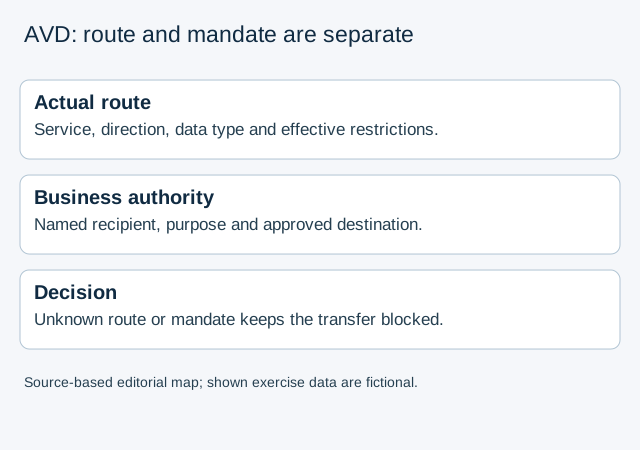
This guide concerns Azure Virtual Desktop (AVD), with a local client and a Windows session host. Do not borrow default settings from Windows 365 or Microsoft Dev Box: Microsoft documents them separately. Record the actual service, client application/platform, session host and intended destination, rather than writing only “remote desktop”.
Microsoft’s clipboard configuration guide describes newly created AVD host pools as having clipboard redirection disabled by default, although Windows itself does not block it by default. That does not establish the current effective setting of an existing host pool. A restrictive host or local-device setting can still block a transfer when the pool allows it.
For a bookkeeper, the result needed is administrator-supplied evidence for the actual route and business approval for the intended data and destination. An administrator’s configuration role alone is neither of those engagement approvals.
Separate direction, data type and platform prerequisites
The dedicated direction and data-type guide describes host-to-client and client-to-host restrictions separately. Its choices progress from blocking transfers to allowing text, images, Rich Text Format and HTML. Do not turn a text-only allowance into permission or evidence for copying a PDF file.
That direction guide lists Windows 11 Enterprise or Enterprise multi-session 22H2/23H2 with KB5039212 or later, 21H2 with KB5039213 or later, or Windows Server 2022 with KB5040437 or later as host prerequisites. It also requires host-pool clipboard allowance. The Group Policy settings’ availability in Windows 11 23H2 and later, with the required administrative templates, is a separate configuration prerequisite. These lists describe the captured documentation; ask the administrator to identify the applicable current platform rather than inferring support from a Windows version label alone.
The general clipboard page retains Windows Insider Preview wording for direction controls, while the dedicated page supplies those concrete prerequisites. Keep that source distinction in the record. Do not certify an installed build from the general page’s wording.
Microsoft also says that disabling drive redirection through Intune or Group Policy prevents clipboard file transfer while leaving other content such as text or images unaffected. A text test therefore cannot settle the file route. The RDP redirection overview explains that the most restrictive applicable configuration wins, including a stricter local-device setting.
Build a read-only transfer record
- Identify the proposed direction explicitly: local device to session host, or session host to local device. Name the file type and destination folder/account; a path alone does not identify who can access it.
- Obtain the authorised administrator’s evidence for service, host OS/update, client support, host-pool allowance and applicable host/user/local restrictions. Record who supplied it and when. Do not assume a nonadministrator has a universal screen displaying every effective policy.
- Record whether the evidence concerns text, images or files, and whether drive-redirection restrictions affect the intended file route. Unknown or conflicting evidence remains unresolved; do not change policy to make the worksheet pass.
- Separately identify the client/engagement authority, permitted recipient, data purpose and approved destination. Technical permission does not expand that mandate.
- Keep the decision blocked if either the route evidence or business authority is missing. Send the precise missing fact to the responsible administrator or engagement owner through the existing authorised channel.
This is an inspection and escalation workflow. It does not require editing Intune, Group Policy, the registry or host-pool settings, assigning roles, or testing the clipboard with a bank file.
A working clipboard is insufficient evidence
The fictional route worksheet shows three incomplete decisions, not observed AVD behaviour:
| Case | Technical evidence | Business authority | Result for this task |
|---|---|---|---|
| A | Text paste works; file direction unknown | Named PDF destination approved | File route unresolved |
| B | Administrator identifies allowed PDF route | Recipient and engagement grant unknown | Business authority unresolved |
| C | Pool allows clipboard; local restriction unknown | Named destination approved | Effective route unresolved |
None of these observations authorises a transfer. If a file has already been copied, record the known source, destination, time and owner for the responsible team. An empty clipboard is not proof that a destination copy, application history or backup has disappeared. Follow the engagement’s incident and retention process rather than deleting evidence or attempting to discover every copy through another transfer.
For bank-PDF extraction on an approved device, LocalExtract processes one PDF at a time locally into date,description,amount CSV. Local extraction does not establish that copying the PDF or CSV across an AVD boundary is authorised. Account, update and Pro verification services still need network access.
Documentation checked October 17, 2026.
LocalExtract Team
We build LocalExtract, a desktop bank statement converter. Questions or corrections? Contact · Editorial policy