
NatWest and RBS: account records and credit-card statements
Updated · 4 min read
The desktop apps export date, description, and amount as CSV. Open CSV in Excel to save an XLSX workbook. Statement support varies: verify the result against your own PDF.
Find the relevant bank's credit-card statement
Both banks publish card-specific instructions; use the service for the bank that issued the card:
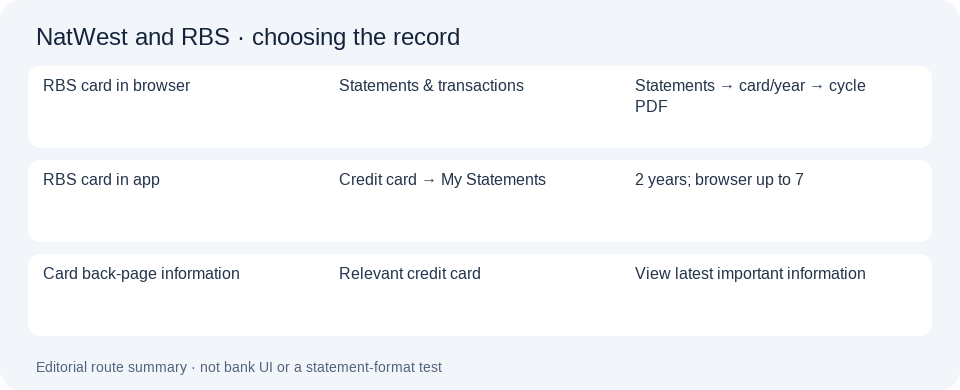
| Bank and channel | Card statement route | Published history |
|---|---|---|
| NatWest Online Banking | Your personal credit cards → Statements → issued PDF | Up to seven years |
| RBS Digital Banking | Statements & transactions → Your statements → Statements → card account/year → cycle PDF | Up to seven years |
| RBS app | Credit-card account → My Statements → year | Up to two years |
The NatWest existing-card guide and RBS copy-statement help support their own PDF routes. Save or print the selected cycle. RBS's card-history help distinguishes its seven-year Digital Banking view from the two-year app view. Use the browser for an older available RBS card period, rather than assuming the app's last year shown is the whole archive.
For the information normally printed on the back page, both banks separately document Statements & transactions → Statements → relevant credit card → View latest important information. Use that item for the additional information page rather than repeatedly downloading the activity PDF: NatWest back-page help, RBS back-page help. These card records remain separate from the filtered account transactions below.
Download the issued statement for the relevant bank
The NatWest copy-statement help and RBS statement-printing help independently describe this browser route:
- Open Statements & transactions in your bank’s online service.
- Under Your statements, select Statements.
- Choose the account and year.
- Select the required statement-cycle link to download its PDF, then save or print it.
NatWest additionally describes the app route account → three-dot menu → Statements, followed by the export icon at the top right. Its email notification tells you a new statement is available; it is not the downloaded file. These NatWest-specific app labels are not a substituted RBS app instruction.
Search NatWest transactions within the channel’s range
The NatWest transaction guide gives Statements → Search for a transaction → Search transactions in Online Banking. Set the criteria, run the search and export Excel or PDF. It does not promise a CSV (comma-separated values) or a particular Excel extension.
NatWest’s web search reaches seven years, while the app transaction calendar covers twelve months. For an older search within the web range, change channels. These are transaction-search intervals, not an additional guarantee about the entire statement archive.
Choose an RBS filtered file or one transaction
The RBS transaction-search help describes Statements & transactions → Your transactions → View transactions. Filter by transaction type, date, description or amount, then export Excel or PDF. Selected results do not represent a whole statement cycle unless your selection actually covers it.
RBS states that statements and searching extend up to seven years only if the account was open throughout. A recently opened account does not gain seven years of records from this limit. Its app also offers Create PDF on an individual transaction: use that for the single item, not as a replacement for the issued cycle document. No Excel extension, CSV route or post-closure access guarantee is established by these RBS sources.
Ask NatWest for a posted copy when printing is unavailable
NatWest’s copy-statement help directs users to Chat to Cora and the request Help with my statement. In the app, use Help → Chat to Cora. It also supplies Cora for customers unable to log in, without promising instant postal delivery. This is the verified NatWest assistance route; it is not a newly verified RBS postal-copy procedure.
| Task | NatWest | RBS |
|---|---|---|
| Issued cycle PDF | Your statements → Statements | Your statements → Statements |
| Filtered transactions | Search for a transaction | Your transactions → View transactions |
| Published limit in this guide | Web seven years; app twelve months | Seven years if account open throughout |
Use the Record-choice notes to select bank, document and channel. For subsequent spreadsheet work, consult the shared CSV guide.
Choose your bank’s issued-statement route for the complete cycle. For RBS, apply the account-open condition to the seven-year history and use Create PDF only for a single transaction.
LocalExtract processes one PDF locally into date,description,amount CSV. Excel can save that CSV as XLSX. Check the extracted rows against the source. Download options and limits.
New record-route guidance checked against the cited official sources on October 15, 2026. Earlier unchanged guidance retains the sources and scope noted in this article.
LocalExtract Team
We build LocalExtract, a desktop bank statement converter. Questions or corrections? Contact · Editorial policy