
Microsoft Store earnings: connect paymentId to the bank credit
Updated · 3 min read
For Microsoft Store revenue, use Earnings–Store and the associated payment, not Microsoft Marketplace rules or an Incentives remittance letter. The Store report’s paymentId links earning transactions to the payment report; the final bank observation is another stage.
The desktop apps export date, description, and amount as CSV. Open CSV in Excel to save an XLSX workbook. Statement support varies: verify the result against your own PDF.
Trace a payment without inventing an exchange rate
- Retain the Store earnings export with participant/program scope; group earning rows by their actual paymentId.
- Obtain the associated payment details separately. Read payment currency and amount there rather than substituting earningAmountUSD.
- Keep pending/unpaid earnings and blank last-payment fields outside a paid-bank total. Retain Sent as dispatched, pending independent receipt.
- Associate a bank observation only with additional payment reference and destination evidence. Two payments of the same amount remain two candidates until identity is resolved.
In Payments summary, distinguish By sent and By pending, then select the relevant Payment ID to filter earnings. Retain the associated Earnings–Payments details. Microsoft’s Earnings overview explains that payment orders aggregate by participant identity, program and earning type/payment method; not every earnings filter applies to Payments summary.
What the downloaded teaching files demonstrate
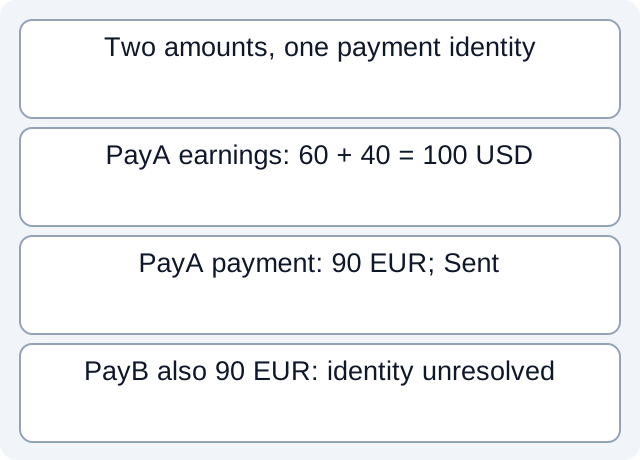
We read separate fictional earnings and payment CSVs. E1=60 USD and E2=40 USD share PayA, giving 100 USD of earnings. Its associated payment is 90 EUR. PayB also has 90 EUR, so an amount-only join produces two candidates. A third earning has empty last-payment currency/amount; those cells remain unknown. There is no bank receipt in this case and no implied exchange-rate calculation. The files use author-defined teaching columns, not a guaranteed Partner Center export schema.
Fictional CSV: tp-234-earning-membership · Fictional CSV: tp-234-last-payment-field · Fictional CSV: tp-234-payments
Executed worksheet results. These local checks read only constructed files. They do not test vendor accounts, bank receipt, actual fee rates, imports or native report formats.
Keep the currency and state explicit
earningAmountUSD is not necessarily the payment amount in its payment currency. earningAmountInLastPaymentCurrency and lastPaymentCurrency can be blank without a previous payment; blank is not zero or a default USD value. estimatedPaymentMonth is an estimate.
Sent means dispatched from Microsoft’s bank, with destination receipt still pending. Rejected, reversed or negative entries require their own interpretation. A remittance letter described for Incentives is not a universally available Store document.
Retain an unresolved bank reference
If a reference is truncated or absent on the bank record, preserve that limitation and seek the relevant payment details rather than matching on amount alone. This is a public-documentation workflow, not a claim that LocalExtract exports Partner Center earnings or performs account synchronization.
Review worksheet
| Synthetic object | Amount | State |
|---|---|---|
| Store earnings | 100 USD | Earning currency |
| Payment report | 90 EUR | Payment currency; Sent |
| Bank receipt | Unknown | Sent does not establish receipt |
For a bank source available only as PDF, download LocalExtract. It processes one PDF locally into date,description,amount CSV; check the extracted rows against the issued statement before using them.
Related guide: Bank statement reconciliation: balances, matches and exceptions.
Documentation for the added task checked October 17, 2026.
LocalExtract Team
We build LocalExtract, a desktop bank statement converter. Questions or corrections? Contact · Editorial policy