
How to Download Lloyds Bank Bank Statements as PDF
Updated · 7 min read
Lloyds’ published archive differs between online banking and the app. This guide covers the UK product and the task described below.
The desktop apps export date, description, and amount as CSV. Open CSV in Excel to save an XLSX workbook. Statement support varies: verify the result against your own PDF.
Choose the channel for the period you need
Lloyds’ download guide describes up to seven years in online banking and at least ten years in the app. These are published channel conditions, not a guarantee that your specific file is available. If an older current-account period is not in the browser, inspect the app’s offered archive before concluding it is unavailable.
In the app, select the account, open its three-dot menu and choose Download or print statement. Select the offered month/year and finish saving the file. In online banking, start from Statement options on the account page and select the offered download or print choice. Keep an ordered paper copy separate from an immediate electronic download: the guide describes up to ten working days for post.
| Task | Published route/condition | Completion check |
|---|---|---|
| Recent current-account copy | Relevant account’s statement controls | Saved and reopened document |
| Older period beyond the browser window | Check the app’s offered archive | Correct account and actual dates |
| Paper copy | Offered order option | Record requested versus received |
| Credit-card PDF | Card-specific app route or online-chat request | Actual card billing document |
Do not apply the current-account menu to a card
The same guide says a credit-card PDF in online banking needs to be requested through online chat, or downloaded through the app. It does not establish identical buttons for checking a current account and retrieving a card bill. Confirm product and statement title before collecting the document. A card repayment leaving a current account and the corresponding card payment belong to different account records.
If your task needs a full card cycle, do not substitute current-account debits showing payments to that card. If it needs current-account cash activity, do not use a card billing balance as its closing cash figure. The Lloyds spreadsheet guide keeps the chosen cash record separate.
Track the original and any outstanding order
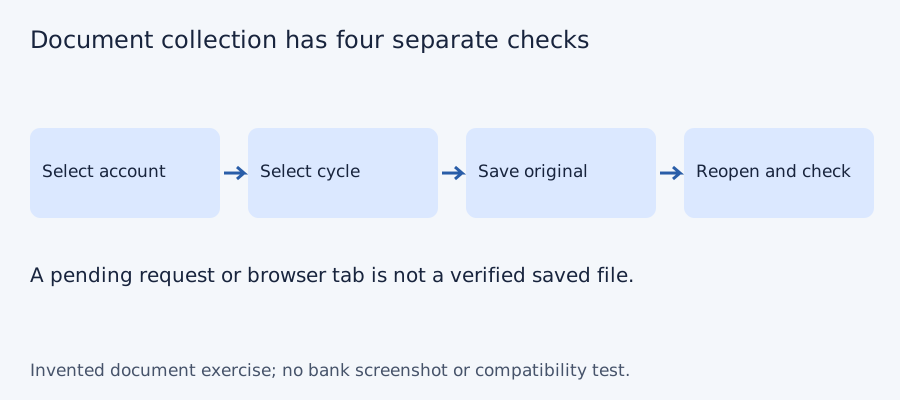
For each period, record an account alias, the actual statement dates and whether a file is requested, received and reopened. A pending paper order does not fill a gap in a digital collection. Use the original file’s information rather than a month guessed from its filename, and protect full account numbers from shared filenames.
Reopen the electronic copy outside the bank viewer. Check readable pages and the intended account/product. When several files cover overlapping periods, identify the overlap before counting coverage; downloading the same cycle twice does not obtain an absent cycle. Ask Lloyds about a still-unavailable specific record rather than fabricating an empty document or changing delivery preferences without considering their effect. The exercise below is a collection method, not a Lloyds archive test.
Separate the retrieval channel from the delivery state
This task is for a UK current-account holder collecting older records for a bookkeeper. A cycle is the interval printed inside the statement. A source register is a private record list; it is not a bank export or proof that an order arrived.
- Select the account and required period, then inspect the archive offered in the browser or app. The published history windows differ by channel.
- If the task is a card bill, follow the separately documented card route; a current-account payment to that card is a different record.
- Record an electronic file as received only after reopening it. Record a posted copy as ordered until it actually arrives.
- If a period remains unavailable, preserve the unresolved status and ask Lloyds about the specific account and document.
For an invented request with three periods, two reopened PDFs and one pending postal order mean two verified records and one outstanding item. There are three requests, not three received statements. This is collection logic, not a measured Lloyds delivery time or archive test.
Test the collection checklist with four invented periods
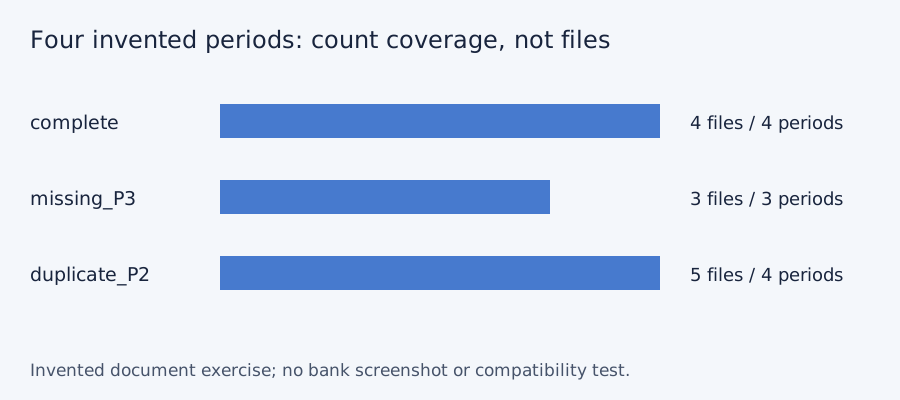
We checked set membership for three deliberately constructed document lists on October 11, 2026. The desired periods are P1, P2, P3 and P4; these aliases do not represent a bank’s actual monthly cadence or archive. A complete list has four files and four unique periods. Omitting P3 leaves three files and a gap. Downloading P2 twice gives five files but still only four unique periods. More files do not necessarily mean more coverage. No bank account, PDF, OCR output or LocalExtract result was tested.
| Invented case | File count | Unique periods | Missing period |
|---|---|---|---|
| Complete | 4 | 4 | None |
| P3 absent | 3 | 3 | P3 |
| P2 saved twice | 5 | 4 | None |
Blank document-collection checklist · constructed CSV results · inputs and method in JSON. Use aliases rather than full account numbers; adapt the actual period list to the documents your account issues.
Frequently Asked Questions
Are the browser and app archives identical?
The cited guide describes seven years online and at least ten in the app. Check what the relevant account actually offers.
Can I use the same route for a card PDF?
The guide describes a separate card app route or an online-chat request. Select the actual card document rather than a current-account statement.
Does ordering paper mean I have the statement?
No. Track requested and received separately. The guide describes a postal delay of up to ten working days.
What should I check after saving?
Reopen the copy and confirm product, account, actual period and readable complete pages. Do not count a duplicate period as a missing one.
If PDF is the relevant source
LocalExtract processes one PDF at a time on the device and exports CSV with date,description,amount. Parsing and OCR do not require uploading the statement. This is a working table that needs comparison with the original; no bank compatibility was validated here. There is no direct XLSX, QBO or OFX export, bulk queue or automatic accounting sync. To obtain XLSX, import the checked CSV and save from Excel.
The free evaluation covers ten pages in total. Pro is USD 10/month or USD 60/year. Account, subscription, update and periodic Pro checks need network access. See downloads and product scope.
Sources and verification scope
Public official guidance checked October 11, 2026. Account controls, document availability and bank layouts were not authenticated-tested. The method exercises use invented records, not actual bank samples or measured extraction results.
Updated October 11, 2026: Clarified the document route, product limits and file-coverage checks. No bank format or app output was validated.
Use the appropriate channel and product, then mark the period complete only after receiving and checking the actual record. Keep spreadsheet work in a separate copy.
LocalExtract Team
We build LocalExtract, a desktop bank statement converter. Questions or corrections? Contact · Editorial policy