
Ko-fi sales differ from the bank: follow PayPal or Stripe
Updated · 4 min read
Ko-fi does not hold a creator balance or run a Ko-fi payout schedule. Payments go to the chosen PayPal or Stripe account. When the bank credit differs from Ko-fi sales, inspect that processor’s payment and payout records; do not search for a fictional Ko-fi bank-payout export.
The desktop apps export date, description, and amount as CSV. Open CSV in Excel to save an XLSX workbook. Statement support varies: verify the result against your own PDF.
Follow the payment method before comparing a deposit
The creator’s sales/support history, the processor’s transaction history and the bank statement describe different stages. Preserve which processor received each payment. A payment method is a route to investigate, not proof that a particular bank credit contains that sale.
- In Ko-fi, open Payments and orders and use CSV to retain the payment history. Preserve the supplied method and identifiers; the export includes collected tax as well as payment amounts.
- For a Stripe automatic payout, use the Payout reconciliation report. Select the relevant estimated-arrival date range, open the payout and download its itemized CSV. Retain
automatic_payout_id,balance_transaction_id, currency and gross/fee/net information. - For PayPal, collect the appropriate Activity Download for the relevant dates. Keep Currency, Gross, Fee, Net, Transaction ID and Reference Txn ID. Inspect the actual withdrawal separately from the original customer payment.
- Link processor records to a supplied bank observation only where references, destination, currency and supporting documents establish the relationship. Leave other processor funds and unidentified members outside that confirmed bank total.
Ko-fi’s payment explanation establishes the direct processor route. Its current tax/export guidance documents Payments and orders; older instructions using a History label may no longer match the menu.
Separate Ko-fi fees, processor fees and other processor sales
Ko-fi’s fee explanation distinguishes its service fee from PayPal or Stripe processing fees. The Ko-fi service fee can appear as Stripe Application Fee or PayPal Partner Fee. These labels do not make all other deductions Ko-fi fees, and the amounts depend on the creator’s configuration and processor conditions.
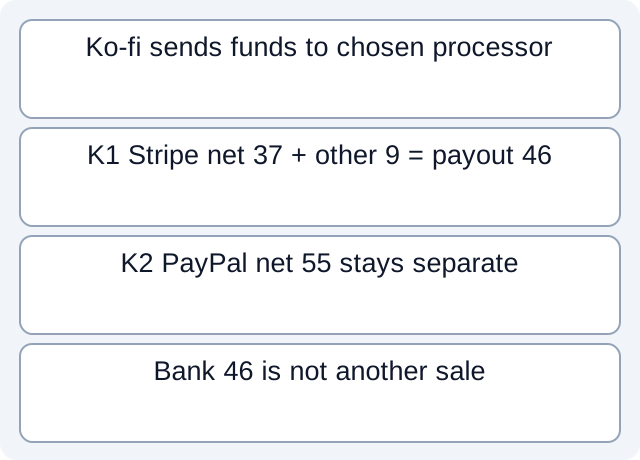
Our fictional data gives Ko-fi sale K1=40 EUR through Stripe, with stipulated platform fee 2 and processor fee 1: its net contribution is 37. The same Stripe automatic payout P1 also contains an unrelated sale netting 9. P1 therefore contains 46, and a separately stipulated bank observation B1 records that 46. Comparing it with K1’s 40 or all Ko-fi sales of 100 asks the wrong population question.
A second Ko-fi sale K2=60 went through PayPal. Its stipulated platform/processor fees are 3 and 2, leaving a 55 balance movement there. The case supplies no PayPal-to-bank receipt. That 55 is neither missing from Stripe P1 nor proven received at the bank. Within K1’s gross 40, the scenario separately identifies collected tax 4; this cash bridge does not decide how it should be recognized or reported.
| Fictional population | EUR | Bank evidence |
|---|---|---|
| K1 after stipulated Stripe fees | 37 | A member of P1, not all of P1 |
| Other Stripe sale after fee | 9 | Also a member of P1 |
| P1 / bank observation B1 | 46 / 46 | Relationship supplied by this scenario |
| K2 after stipulated PayPal fees | 55 | Downstream receipt unknown |
The two-processor CSV, bank and collected-tax observations and executed results use constructed teaching data. Sale membership is given explicitly; these checks do not demonstrate an automatic Ko-fi-to-processor join, native export format or live bank receipt. Sample fees are stipulated amounts, not current fee rates.
Keep processor-specific missing evidence open
Stripe’s automatic payout report does not establish the members of every manual or instant payout. Its estimated arrival and report availability also differ from observed bank posting. Retain the actual payout method before treating a missing itemized report as a failed payment.
PayPal’s optional Bank Reference ID is unselected by default and can be blank. Absence does not prove that no withdrawal occurred. Its documented report coverage is seven years, with at most twelve months per report; large CSV/TAB downloads can split into ZIP parts. Retain every part for the requested interval rather than concluding that the first file is complete. For the separate bank/PayPal double-counting problem, see PayPal balance-impact records.
Request the missing processor or bank record without initiating a new withdrawal to make totals agree. Do not treat another deposit record as another sale. Tax allocation and actual fee disputes require their own evidence and applicable professional judgment.
For a PDF-only bank record, download LocalExtract. It extracts one PDF locally into date,description,amount CSV for checking; it does not connect to Ko-fi, PayPal or Stripe.
Official documentation checked October 17, 2026.
LocalExtract Team
We build LocalExtract, a desktop bank statement converter. Questions or corrections? Contact · Editorial policy