
first direct: statement PDFs, card history and midata
Updated · 4 min read
The desktop apps export date, description, and amount as CSV. Open CSV in Excel to save an XLSX workbook. Statement support varies: verify the result against your own PDF.
Find a credit-card statement or request an unavailable record
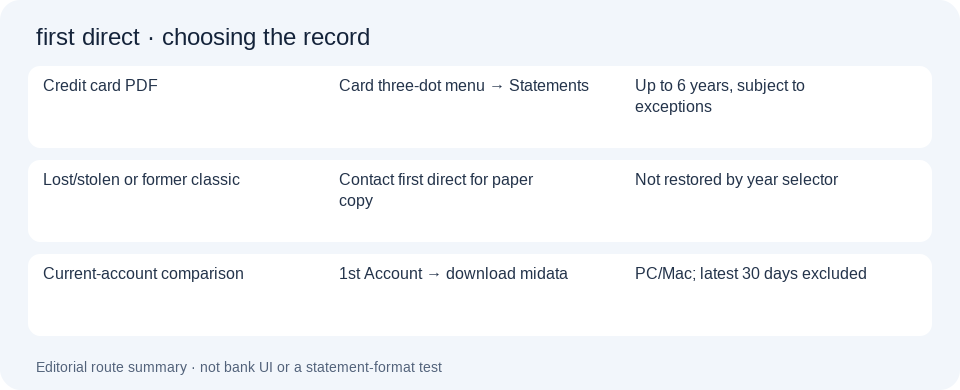
The credit-card help explicitly documents card statements for up to six years in the app and Online Banking. In the app, select the credit-card account's three-dot menu → Statements, then the required record. The statement-saving guidance explains the opened PDF's download icon for printing, sending or saving.
On the website, Online Banking help gives balances → card account → Transactions → Statements → selected statement; the browser downloads it. Check the card and period, rather than selecting the 1st Account's separate midata service.
There is an important exception to digital history: the card FAQ says statements for cards replaced because they were lost or stolen, or a former classic credit card, are no longer available digitally. Contact first direct for paper copies. This is not a claim that every routine replacement card loses its archive. Looking under a previous year cannot restore a record excluded by that card-history condition.
Obtain a midata comparison file on a PC or Mac
The first direct midata instructions give this route in Online Banking:
- Under My Accounts, select the 1st Account.
- Choose download at the bottom of the page.
- On the midata page, read the text and select the checkbox.
- Choose Download midata.
The bank describes a 12-month period excluding transactions from the 30 days immediately before download. An account open for less than 12 months can still provide a file if it has transactions in the eligible midata period. This is not a request for every recent movement or a choice of an unrestricted accounting date range.
First direct limits this service to personal current accounts and says the file is designed to download on a PC or Mac, rather than a phone or tablet. The midata page also explains that asterisks mask some transaction-description details.
Use this file only for the price-comparison purpose stated by the bank. Its guidance says not to amend the specific midata format before sending it to a comparison site; this article does not promise a CSV extension, arbitrary spreadsheet use or support by LocalExtract. You do not need to send it to a third party merely to follow the download instructions. The six-year PDF history described below is a separate statement archive, not an extension of midata's period.
Open and save the required statement
- On Balances, tap the required account's three-dot button.
- Select Statements.
- Choose a previous year below the three recent records when needed.
- Open the statement; its download icon offers print, send or save.
In Online Banking, statements appears at the top right of the transactions page.
Keep the record and view limits separate
Conditions in statement help:
| first direct view | Documented condition |
|---|---|
| Initial app statement list | Three recent statements; previous years below |
| Transactions and charges history | Up to six years through statement PDFs in app/Online Banking |
| Delivery preferences | Online Banking: my details → Statement Preferences |
| Available balance | Cleared funds; excludes upcoming payments such as Direct Debits and the arranged overdraft limit |
Available balance is not a historical closing figure.
The account help says the Online Banking archive also includes a Statement of Fees; distinguish it from the required transaction statement.
For account identification, the IBAN/BIC help places the International Bank Account Number (IBAN) and Bank Identifier Code (BIC) below the statement's account summary.
Transcribe readable PDF movements and check the original; CSV (comma-separated values) formatting.
LocalExtract processes one PDF locally to date,description,amount CSV; Excel saves XLSX (an Excel workbook). Downloads and limits.
Select previous year for an older available PDF; contact the bank for the specified lost/stolen or former classic-card records.
New record-route guidance checked against the cited official sources on October 15, 2026. Earlier unchanged guidance retains the sources and scope noted in this article.
LocalExtract Team
We build LocalExtract, a desktop bank statement converter. Questions or corrections? Contact · Editorial policy