
Chase UK: bank statements, card bills and custom records
Updated · 3 min read
The desktop apps export date, description, and amount as CSV. Open CSV in Excel to save an XLSX workbook. Statement support varies: verify the result against your own PDF.
Start from the Chase UK credit-card account
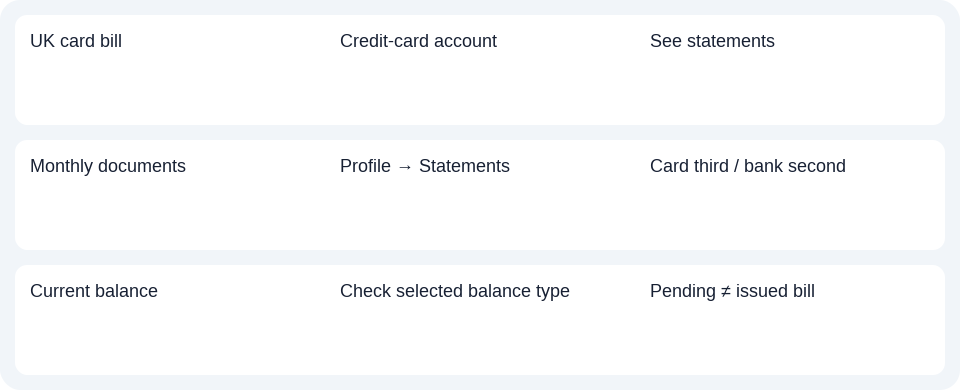
For the current Chase UK personal credit card, open its account in the app and choose See statements. The profile route Statements → Monthly statements is another documented entry. Use the card bill for its issued billing period rather than replacing it with current-account movements. Managing a Chase UK credit card.
The card's account shows available credit and statement balance as separate quantities; the Home balance excludes pending transactions. Those current figures are not a substitute for the issued month's bill. Chase's statements help puts card generation on the third and bank statements on the second of the month. Check which document is due before treating the one-day difference as a missing statement.
The general help names PDF/CSV and custom periods, but it does not establish a particular card CSV schema. Check the export actually offered for the selected card; the native data choices described below do not constitute verified card column or sign mapping.
Select the UK statement type first
The official Chase UK statements guide describes monthly bank statements on the second of the month, card statements on the third, and a statement when an account closes. Open the app’s profile icon, choose Statements, then Monthly statements for the completed period you need.
Check the bank/card generation day before treating a monthly record as missing; the card bill does not replace current-account movements.
Choose a custom period without changing transaction dates
The statements guide allows custom statements covering up to 90 days. Use that option for a selected interval rather than expecting a monthly document to adopt your own start and end dates. PDF means Portable Document Format; CSV means comma-separated values and is the direct spreadsheet option.
Chase records transactions on the date they are completed, which can differ from the date you first made them. When a transaction seems absent at the end of a selected range, check completion before assuming the export dropped it. Expanding the range changes which completed transactions are included; it does not rewrite their dates.
| Required record | Chase UK choice | Important boundary |
|---|---|---|
| Completed bank month | Monthly bank statement | Normally generated on the second |
| Card billing record | Card statement | Different document; generated on the third |
| Selected interval | Custom statement | Up to 90 days |
| Spreadsheet rows | CSV export | Dates reflect completion |
Retrieve records after leaving Chase
The same official help says former customers can still access statements in the app for up to six years from generation. Count from the statement’s generation date, not from the date you closed the account. A newly closed account does not restart six years for every older document.
When combining custom exports, compare their date boundaries to avoid counting an overlapping period twice.
Use the record planner to distinguish the card bill, monthly documents and the current balance. For native CSV, follow the shared CSV import and verification guide.
LocalExtract processes one PDF locally into date,description,amount CSV. Excel can save that CSV as XLSX. Check the extracted rows against the source. Download options and limits.
Official sources checked October 14, 2026.
LocalExtract Team
We build LocalExtract, a desktop bank statement converter. Questions or corrections? Contact · Editorial policy