
Upwork Available balance versus withdrawal and bank receipt
Updated · 4 min read
An Upwork freelancer’s Available balance is not the amount received at the bank. Review earnings and fee records, the actual withdrawal, any payment-provider transfer and the bank observation separately. A client’s spending report does not supply the freelancer’s withdrawal evidence.
The desktop apps export date, description, and amount as CSV. Open CSV in Excel to save an XLSX workbook. Statement support varies: verify the result against your own PDF.
Collect freelancer transactions before the downstream receipt
Here, an earnings record concerns money earned on a contract; a fee invoice supports a charge; available funds describe a balance state. Withdrawal and bank receipt are later events. Keep their identifiers and currencies rather than adding every displayed amount as income.
- In the freelancer account, open Manage finances → Transactions. Filter date, transaction type or contract and inspect the relevant earnings/fee transaction.
- Download a particular invoice through its invoice-column icon. For a group, apply the filters and Select download for a CSV summary or PDFs in a ZIP. Preserve the requested interval and every delivered file.
- Retain the Available balance and contract breakdown as balance evidence. Collect the separately recorded withdrawal, method and supplied reference; do not initiate another withdrawal as a reconciliation test.
- If the method is PayPal, obtain the provider activity and any onward bank-transfer evidence separately. Compare a bank observation only with supported transfer membership, destination and currency; record an unsupported link as unresolved.
Upwork’s freelancer invoice and report instructions document that collection route. Invoices are available for five years and then permanently deleted. Bulk exports can require processing and download links expire, so preserve received files rather than treating a link as a permanent archive.
Distinguish availability, reserve and a real withdrawal
Upwork’s getting-paid guidance makes availability depend on the contract and processing stage. A configured reserve is excluded from automatic withdrawal, but can be manually withdrawn. Neither the reserve nor the rest of Available proves that any payment was sent.
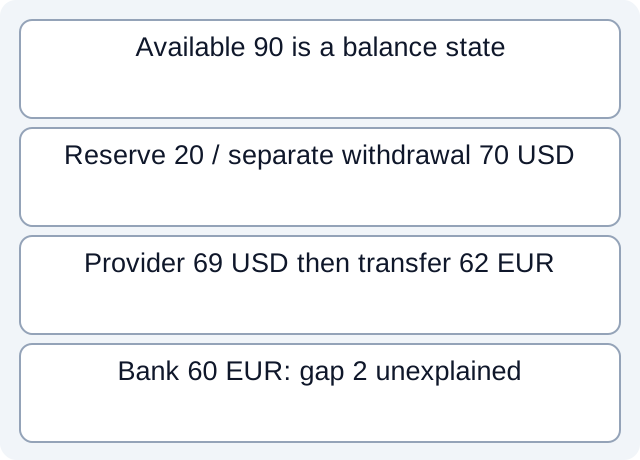
In the fictional teaching case, earnings 100 USD less an explicitly related fee 10 gives an available balance of 90. A reserve of 20 leaves 70 outside that reserve in a hypothetical automatic-withdrawal scope. The case separately supplies withdrawal W1 for 70; its existence is evidence given by the scenario, not a conclusion derived from the 90−20 calculation.
A stipulated Upwork withdrawal fee 1 leaves a provider receipt 69 USD. A separate processed provider transfer is recorded as 62 EUR, followed by an associated bank observation of 60 EUR. The same-currency downstream gap is 2 EUR and remains unexplained. None of these figures supplies an actual fee rate, exchange rate or universal withdrawal formula.
| Fictional evidence | Amount | What remains distinct |
|---|---|---|
| Earnings / related fee / available | 100 / −10 / 90 USD | Availability is a balance state |
| Reserve / separately supplied withdrawal W1 | 20 / 70 USD | The subtraction does not prove W1 happened |
| W1 / given fee / provider receipt | 70 / 1 / 69 USD | A provider stage, not bank arrival |
| Processed onward transfer / bank | 62 / 60 EUR | Unexplained difference 2 EUR |
Read the fictional stage register and executed arithmetic. Our local script reads constructed CSVs with explicitly stipulated relationships. It does not validate an Upwork CSV column, join fee invoices to withdrawals automatically, or execute a withdrawal, conversion or bank receipt.
Use the right product and method limits
Payment methods vary by country. Current Upwork documentation limits Payoneer to outside the US and M-Pesa to Kenya, and describes a three-calendar-day security hold when activating a new method. Those conditions help explain why a route may be unavailable; they are not reasons to change the method to force a match.
For the PayPal route, distinguish Upwork-to-PayPal from PayPal-to-bank. Both providers can charge fees, with country/currency variation and possible new-account verification restrictions. A statement about arrival in PayPal is not a guarantee of arrival in the bank.
The separate client Reports documentation concerns spending and freelancer hours, with plan-specific scope and UTC reporting. It does not establish freelancer withdrawal-export columns. When an identifier or invoice-to-withdrawal relationship is missing, request the relevant freelancer or provider record instead of borrowing a client report field.
For the PayPal balance/card duplication problem, see the separate PayPal guide. If the bank source is PDF-only, download LocalExtract to extract one PDF locally into date,description,amount CSV. Verify those rows against the source; the app does not connect to Upwork or execute transfers.
Official documentation checked October 17, 2026.
LocalExtract Team
We build LocalExtract, a desktop bank statement converter. Questions or corrections? Contact · Editorial policy