
UOB Singapore: card eStatement downloads and account records
Updated · 3 min read
The desktop apps export date, description, and amount as CSV. Open CSV in Excel to save an XLSX workbook. Statement support varies: verify the result against your own PDF.
Save the card statement in TMRW
- Select the respective card in UOB TMRW.
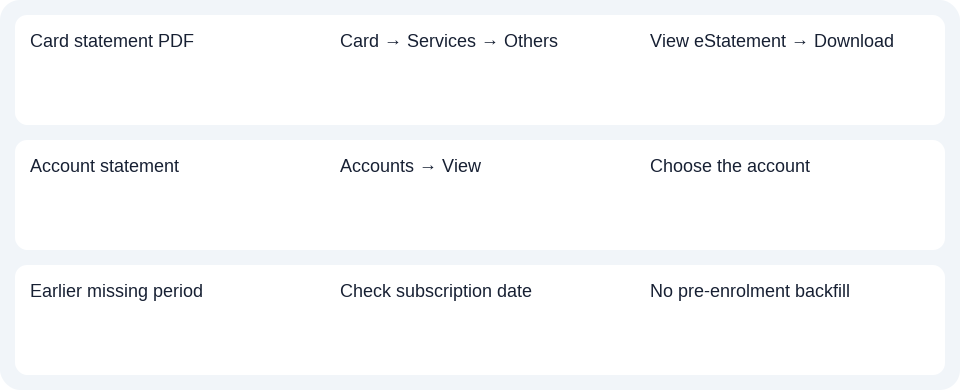
- Choose Services → Others → View eStatement.
- Select the statement month.
- Use Download at the top left to save the statement.
This is the card procedure in the banking-services FAQ. It completes a file-retrieval task; do not substitute the Save control used for subscription preferences. The FAQ describes eStatements as PDF (Portable Document Format) documents.
Online UOB credit-card applications are automatically enrolled in card eStatements. For other subscription changes, successful enrolment starts with the next statement cycle. First establish whether the card was enrolled for the month you need, rather than repeating a download search for a document outside that history. Enrolment and eligibility.
Use the account route for account records
The TMRW user guide gives Accounts → upper-right View → selected account, including combined accounts, for monthly account eStatements. That segment does not establish the final account month/save controls. The card's top-left Download should not be projected onto this different screen.
For Personal Internet Banking (PIB), the banking-services FAQ documents eStatement/eAdvice, the required one-time-password check, and selection of the monthly statement or advice to view/download. It says the opened PDF can be saved normally. The current PIB page announces a refreshed interface, so the FAQ's older sidebar description need not match every current account's layout.
| Needed result | Documented entry | Important distinction |
|---|---|---|
| Card PDF in TMRW | Card → Services → Others → View eStatement | Choose month → top-left Download |
| Monthly account record | Accounts → View → account | Final save control not established by that segment |
| Subscription preference | eStatements → Manage → Switch Now → product → Save | Saves preferences, not a statement file |
Explain the missing period before changing channels
UOB describes retention of up to five years accumulated from subscription. Statements and advices before enrolment are unavailable through backfill. This makes the subscription date material: a five-year retention label does not mean a newly enrolled card immediately receives five earlier years. History rules.
Eligible products include statement-based current/savings accounts, cards and CashPlus; Passbook Savings is excluded. An eAdvice can concern an event such as closure and is not itself the monthly transaction statement. The TMRW subscription path eStatements → Manage → Switch Now → product selection → Save changes delivery preferences, rather than retrieving a PDF.
The same FAQ distinguishes pending wallet descriptions from settled card records. Use the issued month's statement for its billed period instead of interpreting a wallet notification as proof that the charge has appeared on that statement. It also describes affected SMS notices moving to push/email from April 2025; one universal SMS notification is not a prerequisite for finding the file.
Prepare a spreadsheet only after choosing the record
The verified current card route here establishes PDF retrieval, not native CSV columns, Excel export or access after closure. Use the record planner to record your chosen route and the outstanding document period. Use the shared CSV guide for spreadsheet preparation. LocalExtract converts one PDF locally at a time into date,description,amount CSV; Excel can save XLSX. Review the extracted rows against the statement. Downloads and limits.
Official sources checked October 14, 2026.
LocalExtract Team
We build LocalExtract, a desktop bank statement converter. Questions or corrections? Contact · Editorial policy