
UOB Singapore Statements to Excel: Subscription Coverage and CSV Checks
Updated · 8 min read
Build a checked CSV only from received periods, keep pre-subscription gaps visible and import the verified working table into Excel. This guide covers the Singapore product and the task described below.
The desktop apps export date, description, and amount as CSV. Open CSV in Excel to save an XLSX workbook. Statement support varies: verify the result against your own PDF.
Confirm subscription and the source period
The Singapore personal banking FAQ describes subscribed eStatements/eAdvices as PDF, with five years of history from subscription. Pre-subscription documents are not backfilled by that service; delivery begins in the next cycle. Eligible statement-based current/savings accounts exclude Passbook Savings. The eStatement page provides the same subscription qualification.
A subscribed issued monthly statement and changing future paperless preferences are different tasks. The guide does not establish a current Singapore personal CSV/Excel export, and an older refreshed-PIB entry or business Infinity instructions must not be treated as proof.
Define available coverage before conversion
The five-year service wording is qualified by subscription. In an invented annual workbook whose source register starts in March, rows from the later records cannot establish January–February. Keep the coverage gap visible, even if the known movements and endpoints match for each received cycle. An account-confirmation letter or eAdvice does not reconstruct the omitted months.
Use a readable original actually obtained for the desired account/currency/interval. A current personal native CSV procedure was not verified in the current PIB information; that is an unknown, not proof that no suitable table can be offered. Inspect an appropriate file if your legitimate service offers one. Do not apply Thailand, Malaysia or Infinity business menus to this Singapore personal task.
| Coverage item | Working action | Limit |
|---|---|---|
| Received subscribed monthly statement | Build its own checked table | Use actual printed interval |
| Period before subscription | Keep missing-source status | No backfill promised by this service |
| Advice or regional/business export | Keep outside the monthly personal table | Different document or product scope |
Create a CSV from a PDF you have actually obtained
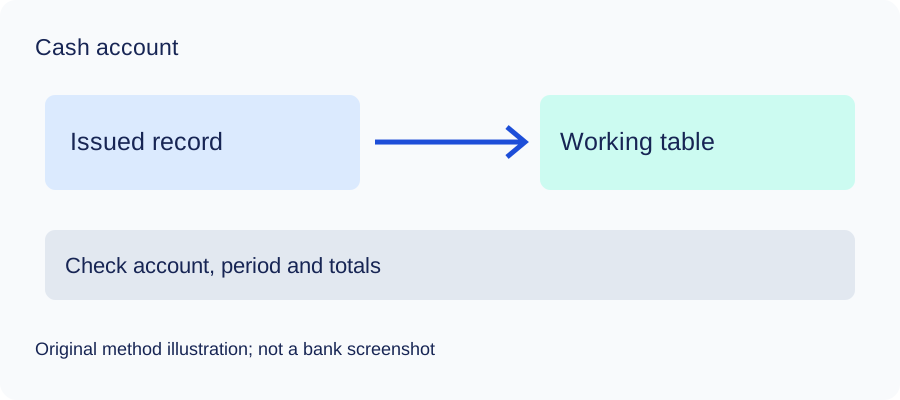
This step starts with a suitable original already in your possession. It does not establish an unverified bank download control. Keep that file unchanged and make a separate working table. A native export that already supplies the required account, dates and detail can bypass PDF conversion.
Manual route: build and check the table
- Open the original in a trusted local viewer. Record the account alias, currency, printed start/end and any page references in a private source register. Read the complete transaction section, including continuation pages.
- Decide what the source calls each date. Use the posted date when that is the chosen task; if another relevant date is present, retain it in an additional private worksheet column. Do not use the file's download date as a transaction date.
- Create a working sheet with
date,description,amount. Transcribe each included posted movement once. Join a description continuing onto another line only when it belongs to that same movement. Do not insert section headers, carried balances or summary totals as transactions. - For this deposit cash table, use positive inflows and negative outflows. Read the actual source's debit/credit or sign convention before mapping it. Do not assume a borrowing or card balance uses the same convention. Keep different accounts and currencies separate.
- Compare the worksheet with the original page by page. Mark each source movement checked once; inspect dates, description text, decimal points and signs. If text selection loses columns or joins unrelated lines, transcribe from the visible original instead. If a scanned or unclear page cannot be read reliably, obtain a clearer copy or leave the affected rows unresolved.
- Save a separate CSV working copy using your editor's CSV format. Inspect the actual delimiter and encoding; changing a file extension does not create a CSV. The small comma-delimited example below shows the chosen fields, not bank-export headers. Preserve any richer private worksheet columns separately if the three-field copy omits information you need.
Optional LocalExtract route: inspect output before importing
Open LocalExtract and select one PDF for the operation. Let the local parser/OCR process it, inspect the resulting transaction table against every relevant page, and export CSV. The current export contains date,description,amount; it does not supply a complete replica of every field in the original. Compare dates, signs, missing or duplicate movements and continued descriptions before relying on it. The original remains the authority for this check. No actual bank PDF or output was tested for this guide, so neither the public help route nor the invented exercise establishes extraction compatibility.
Keep any unresolved row out of a claimed complete reconciliation. A visually plausible table and an equal closing total can still hide offsetting errors. After the checks, import the actual CSV in Excel as described below, inspect the preview and save XLSX from Excel if a workbook is needed. LocalExtract does not export XLSX directly.
Choose dates and amounts, then inspect the Excel import
For a deposit cash account, use positive inflows and negative outflows after reading the original's actual convention. Keep another needed date, currency and source reference in additional private worksheet columns; the three-field CSV does not encode them automatically. One entirely invented comma-delimited example is:
date,description,amount
2026-09-01,Example receipt,250.00
2026-09-02,"Example purchase, supplies",-100.00
2026-09-03,Example fee,-10.00
These are chosen learning fields, not the bank's native headers or a tested statement layout. The comma in a description is protected by quotes, consistent with RFC4180. In Excel use Data → From Text/CSV, inspect delimiter, date types, decimal amounts and signs, then load. Microsoft's import help explains the preview. Save XLSX in Excel after checking.
When the source supplies comparable endpoints for the same complete account/currency/interval, compare opening plus signed movements with closing. A filtered subset, loaded fragment or different interval cannot be reconciled as that complete cycle. Without comparable balances, record that limit and check every row; an equal net total cannot prove each date or description.
Check the method with invented records
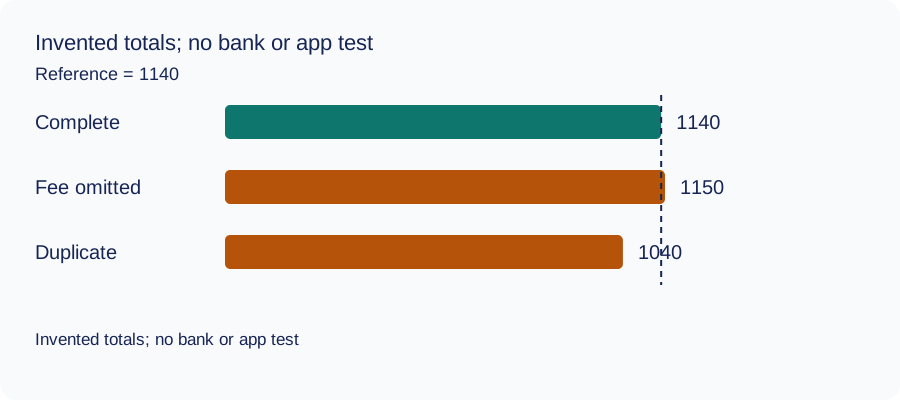
We recomputed three deliberately constructed cases on October 11, 2026 using decimal arithmetic: complete rows, an omitted fee and a duplicated movement. The reference total and every number are invented. This checks the reconciliation method only: no bank account, real PDF, OCR result or LocalExtract output was tested. The same learning aid is used across these guides.
| Case | Calculated closing total | Difference from reference |
|---|---|---|
| Complete rows | 1140 | 0 |
| Fee omitted | 1150 | 10 |
| Movement duplicated | 1040 | -100 |
Illustrative units, not a real account balance.
Download the blank document checklist or synthetic check data. CSV · JSON.
Frequently Asked Questions
Can an advice fill a missing month?
No. Preserve its actual narrower document purpose.
Do matched later balances prove annual completeness?
No. They do not supply missing earlier source periods.
Can I use Infinity CSV instructions?
Those are a different business product, not proof of the Singapore personal export.
Was a bank PDF extracted in this guide?
No. Only public instructions and invented method cases were checked.
If PDF is the relevant source
LocalExtract processes one PDF at a time on the device and exports CSV with date,description,amount. Parsing and OCR do not require uploading the statement. This is a working table that needs comparison with the original; no bank compatibility was validated here. There is no direct XLSX, QBO or OFX export, bulk queue or automatic accounting sync. To obtain XLSX, import the checked CSV and save from Excel.
The free evaluation covers ten pages in total. Pro is USD 10/month or USD 60/year. Account, subscription, update and periodic Pro checks need network access. See downloads and product scope.
Sources and verification scope
Public official guidance checked October 11, 2026. Account controls, document availability and bank layouts were not authenticated-tested. The method exercises use invented records, not actual bank samples or measured extraction results.
Updated October 11, 2026: Added task-specific source decisions, date/amount examples and CSV import checks. No bank format or app output was validated.
Keep the source task and product conditions explicit, preserve the original and leave missing records or rows unresolved. Check the actual file before using it.
For the next task, see the same bank’s document collection guide.
LocalExtract Team
We build LocalExtract, a desktop bank statement converter. Questions or corrections? Contact · Editorial policy