
Revolut Business UK: card expenses or account statement?
Updated · 4 min read
For Revolut Business in the UK, an expense-card holder’s visible card activity, an Expenses export and a currency-account statement are different evidence sets. An Expenses download needs View expenses; account statements need manage accounts. Seeing your own card does not establish either permission or prove that the report covers the whole business account.
For a PDF account statement, LocalExtract can prepare transaction rows locally. It does not grant Revolut permissions, retrieve receipts or turn an employee’s card view into a company-wide statement.
The desktop apps export date, description, and amount as CSV. Open CSV in Excel to save an XLSX workbook. Statement support varies: verify the result against your own PDF.
Choose the document before asking for access
Revolut’s Business expense-download guidance describes Expenses → Download in the Business web app. Select the period and filters before downloading CSV/PDF data or the receipt ZIP. The documented maximum is 100 days, so a longer review needs separate bounded exports rather than an assumed full-year file.
The Business account-statement guidance instead describes Home → … → Statements → Account statement, followed by the currency account, date range, file type and Generate. The range cannot begin before account opening. It documents PDF, CSV, XML(Camt.053) and TXT(MT940); these native Business options are separate from LocalExtract’s CSV output.
- State the question: employee receipts/expense review, or movements and balances of a particular currency account?
- Record the product Business, market UK, required currency account, period and relevant employee/card filters.
- For expenses, check the actual View expenses permission before assuming Download should appear. For a statement, request the correct currency-account record from somebody already authorised to manage accounts.
- Preserve the selected filters with the file. A successful download is not proof that a different card, account or period was included.
Revolut’s permissions guide distinguishes default roles, custom roles and currency-account restrictions. A Member’s own-card visibility cannot be used as a general account-export entitlement. Even a person able to manage team members cannot change their own role. Obtain evidence through an already authorised owner/admin instead of treating self-escalation as an export workaround.
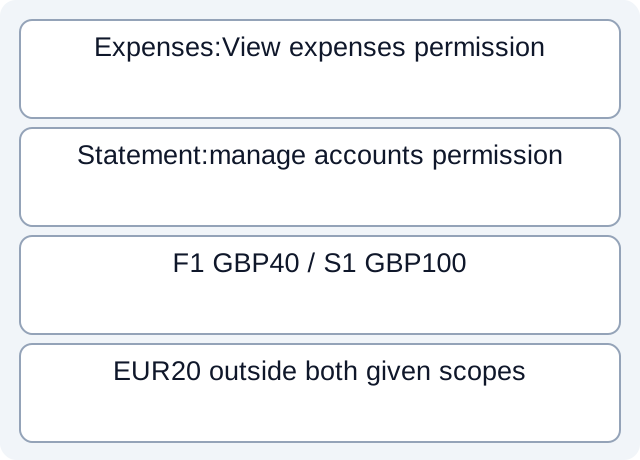
Review coverage using supplied report membership
This fictional example defines three company expenses in one review period. Their card identities and the membership of each received file are supplied, not discovered from a real Revolut download.
| Required event | Card | Received expense file | Currency-account statement |
|---|---|---|---|
| E1 / 40 GBP | Employee A | F1 explicitly includes E1 | S1 explicitly includes E1 |
| E2 / 60 GBP | Employee B | Absent from F1, which is filtered to A | S1 explicitly includes E2 |
| E3 / 20 EUR | Employee A | Outside F1’s supplied GBP scope | Outside S1’s GBP account |
F1 contains 40 GBP, while the separately supplied GBP statement movements total 100 GBP. The 60 GBP difference is explained here by the stipulated employee filter, not by a missing bank transfer. E3 remains outside both given scopes; converting its EUR amount into GBP would not establish that either file covers it.
The lesson is not that statement totals must equal expense exports. Card expenses can have a different review population, and statements also contain non-expense movements. First compare the selected membership and currencies. Only then investigate an absent record within an established scope.
If a year is split into several expense exports, preserve each actual start/end date. Four roughly quarterly files do not prove full coverage if gaps remain or the wrong employee filter persists. Refer overlapping CSV observations to the deduplication guide; do not delete same-amount card purchases merely to make a total agree.
The fictional worksheet and finite results preserve the supplied premises and calculations; they are not vendor exports or a reusable account-verification tool.
Keep timestamps and product boundaries visible
Business statements use UTC timestamps by default. The documentation describes optional local alongside UTC timestamps in CSV after local time is set. An expense-report period and a statement cutoff therefore need explicit interpretation; identical displayed calendar dates are not a universal proof of the same population.
Document language follows the Business app’s Appearance setting. That setting does not turn a personal-account tutorial into a Business workflow. Our Revolut UK/Ireland personal guide covers a different product and should not supply missing Business permissions or menus.
For handover, say “GBP statement received; EmployeeB expense evidence missing,” rather than “Revolut export incomplete.” That identifies which authorised source is needed without implying that one employee should see every company account.
LocalExtract processes one PDF locally into date,description,amount; it provides no automatic Revolut synchronisation or permission management. Download LocalExtract for PDF comparison work.
Official UK Revolut Business documentation checked on October 17, 2026. The membership table is fictional, not a native report schema or an account-access test.
LocalExtract Team
We build LocalExtract, a desktop bank statement converter. Questions or corrections? Contact · Editorial policy