
NAB: bank and card statements, archives and transaction files
Updated · 3 min read
Corrected October 12, 2026: transaction-history entry and distinct statement, spreadsheet and interest-report scopes.
The desktop apps export date, description, and amount as CSV. Open CSV in Excel to save an XLSX workbook. Statement support varies: verify the result against your own PDF.
Apply NAB's card cycle and current interface labels
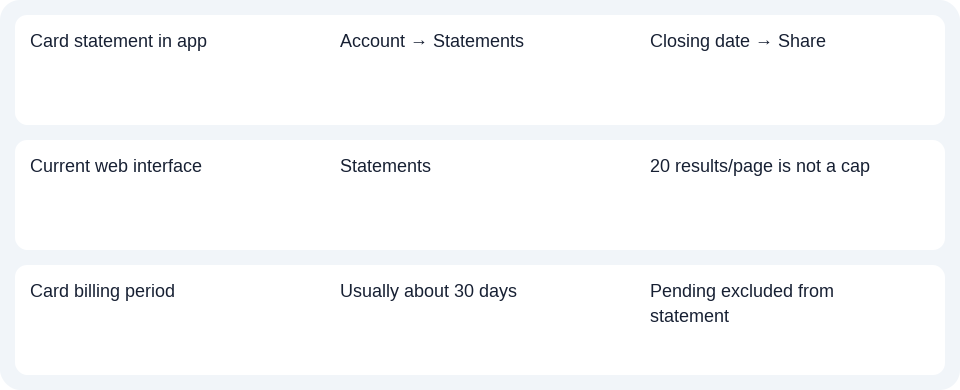
NAB's credit-card setup guide directs card customers to its online statement service. For a card, use the matching account in that statement list; the app path is account → Statements → closing date → security message → Share. The published web document guide below uses Accounts → Account statements, account/date search and Download.
NAB's Internet Banking updates describe a February 2026 rename to Statements and 20 results per page, followed by an August navigation rollout moving the main menu to the left. These are interface and pagination changes. Twenty results per page is not a 20-document download cap, nor does it replace the older guide's stated selection limit.
For personal credit cards, the card terms guide describes a statement period usually around 30 days, normally ending on the same date each month. Pending transactions do not appear on the issued statement; transaction details can show paid and processed dates separately. A default six-month cycle for other accounts is not the card's billing schedule. Use the issued card period rather than treating today's pending activity as missing statement rows.
Retrieve the statement in the appropriate channel
NAB's document guide describes the web route:
- Accounts → account statements.
- Choose the account/date range and search.
- Select up to twenty-five statements, then Download; individual viewing is separate.
The app route is account → Statements → closing date → security message → Share. Device save locations were not tested.
| NAB statement condition | Published scope |
|---|---|
| Web history | Up to seven years |
| App history | Up to two years |
| Typical deposit issuance | Most non-card accounts default to six-month cycles unless otherwise requested; card cycle is separate |
| Closed/hidden account search | Web; prior online enrollment before closure required |
For a non-card account, a missing monthly file may reflect its issued cycle, not an app error. For a current dated statement order, NAB distinguishes before/after 8pm Australian Eastern Daylight/Standard Time (AEDT/AEST): next business day versus the following business day. This is not instant historical retrieval.
Export selected transaction history separately
NAB's personal transaction-history guide gives Accounts → Transaction history → selected account, with sort/filter/search before Export of all or some transactions as spreadsheet, Quicken Interchange Format (QIF) or PDF (Portable Document Format). Its initial view is thirty days; available personal history reaches up to 731 days. The spreadsheet extension and file columns are not established here.
The document guide separately offers interest reports as CSV (comma-separated values) or PDF, and recent-activity PDF reports. Neither proves a full transaction CSV or an issued cycle statement. Use the actual offered format for your required task.
Use the record planner to record your chosen route and the outstanding document period.
Prepare the analysis copy
See CSV formatting and checks when preparing an Excel copy.
LocalExtract processes one PDF locally to date,description,amount CSV; Excel can save that CSV as an XLSX workbook. Downloads and limits.
Use the web archive for periods outside the app’s two-year view; a filtered spreadsheet or interest report is a separate record.
Official sources checked October 14, 2026.
LocalExtract Team
We build LocalExtract, a desktop bank statement converter. Questions or corrections? Contact · Editorial policy