
How to Download Monzo Bank Statements as PDF
Updated · 6 min read
Choose the original PDF or the native transaction file for the purpose you actually have. This guide covers the UK product and the task described below.
The desktop apps export date, description, and amount as CSV. Open CSV in Excel to save an XLSX workbook. Statement support varies: verify the result against your own PDF.
Collect a PDF without discarding the export choices
Monzo’s statement help describes Home → the three dots beneath the card → Bank statements. Choose your required dates and select the offered PDF, CSV or QIF format. PDF preserves the document presentation; CSV is a comma-separated transaction table; QIF is another financial-data format. A file extension does not establish that a recipient will accept the record.
This guide is for a UK account holder collecting their own statement. Monzo’s guidance includes Pots, so check which account and Pot activity the selected output actually contains. Do not assume a list labelled Bank statements is limited to the main account, or treat a transfer into a Pot as a purchase simply because money left the main balance.
| Purpose | First choice | Check before keeping it |
|---|---|---|
| Preserve the issued document | Offered PDF | Account, actual period and complete readable pages |
| Analyse transactions | Offered CSV covering the dates | Actual fields and account/Pot coverage |
| Supply evidence to another organisation | Document that organisation requests | Ask about its requirements; a recreated CSV is not the original |
Keep a period register, not just a download folder
Write the start and end shown in each saved document beside an account alias. Give the PDF and any CSV for the same range the same source alias, with different extensions. The alias links the two records; it does not prove they contain identical fields. Reopen the PDF outside the app viewer and compare its first and last pages with the selected range. If a CSV has additional columns, keep an untouched copy before creating a smaller working table.
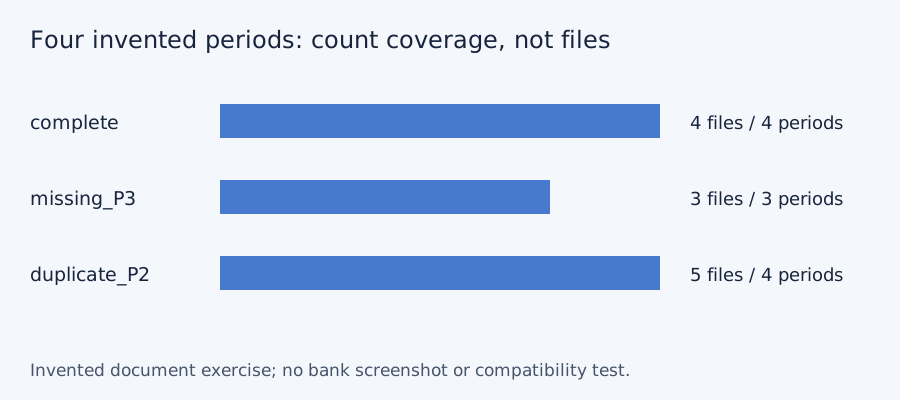
For a quarterly collection, four filenames do not necessarily mean four different periods. A saved copy and a second download can cover the same dates. Conversely, a document with a custom range may cover parts of two months. Compare the periods requested with those actually received rather than renaming every file as a monthly statement.
If the account has closed
Monzo’s public help describes an emailed full payment-history attachment after closure, protected by a password sent separately by text. Keep that protection and avoid putting the password into the same shared folder as the file. The attachment is not proof of current app access or a guarantee of a particular CSV. For another history copy, use the bank’s linked closed-account help route. Never send a banking login code to a supposed conversion service.
If you need spreadsheet rows after collecting the record, follow the separate Monzo CSV and Excel method. That article handles transaction meaning; this one checks that the right source document was collected.
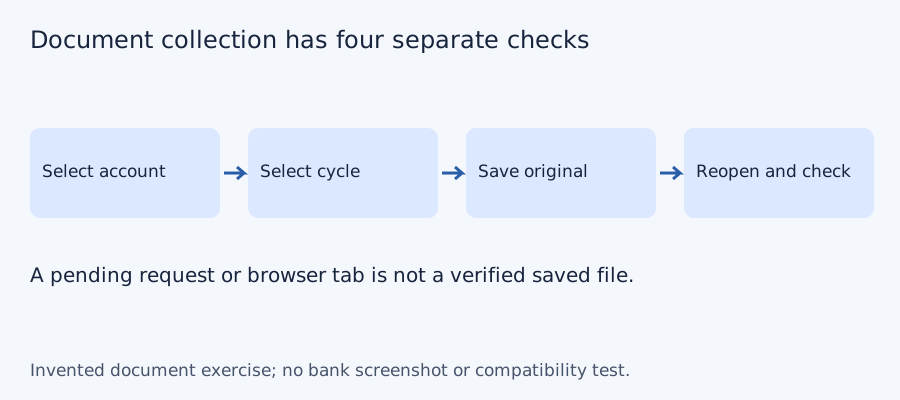
Test the collection checklist with four invented periods
We checked set membership for three deliberately constructed document lists on October 11, 2026. The desired periods are P1, P2, P3 and P4; these aliases do not represent a bank’s actual monthly cadence or archive. A complete list has four files and four unique periods. Omitting P3 leaves three files and a gap. Downloading P2 twice gives five files but still only four unique periods. More files do not necessarily mean more coverage. No bank account, PDF, OCR output or LocalExtract result was tested.
| Invented case | File count | Unique periods | Missing period |
|---|---|---|---|
| Complete | 4 | 4 | None |
| P3 absent | 3 | 3 | P3 |
| P2 saved twice | 5 | 4 | None |
Blank document-collection checklist · constructed CSV results · inputs and method in JSON. Use aliases rather than full account numbers; adapt the actual period list to the documents your account issues.
Frequently Asked Questions
Which app menu does the public guide describe?
Home, the three dots below the card, then Bank statements. Set the dates and choose among the formats actually offered.
Should I convert a PDF when Monzo offers CSV?
Usually inspect the bank’s native CSV first for transaction analysis. Keep the PDF for its presentation and original document information.
Does the statement include Pots?
Monzo’s guidance explicitly includes Pots. Inspect your output’s coverage and distinguish transfers from spending rather than assuming every row is a main-account purchase.
What should I keep for a closed account?
Preserve the bank’s protected history attachment and the separately supplied password securely. Ask Monzo for a missing copy through its official support route.
If PDF is the relevant source
LocalExtract processes one PDF at a time on the device and exports CSV with date,description,amount. Parsing and OCR do not require uploading the statement. This is a working table that needs comparison with the original; no bank compatibility was validated here. There is no direct XLSX, QBO or OFX export, bulk queue or automatic accounting sync. To obtain XLSX, import the checked CSV and save from Excel.
The free evaluation covers ten pages in total. Pro is USD 10/month or USD 60/year. Account, subscription, update and periodic Pro checks need network access. See downloads and product scope.
Sources and verification scope
Public official guidance checked October 11, 2026. Account controls, document availability and bank layouts were not authenticated-tested. The method exercises use invented records, not actual bank samples or measured extraction results.
Updated October 11, 2026: Clarified the document route, product limits and file-coverage checks. No bank format or app output was validated.
Choose the right format and dates, reopen the saved record and document what it covers. Download LocalExtract only if a PDF is the source you need to turn into a checked table.
LocalExtract Team
We build LocalExtract, a desktop bank statement converter. Questions or corrections? Contact · Editorial policy