
ING Australia: Orange One card and account statements
Updated · 3 min read
The desktop apps export date, description, and amount as CSV. Open CSV in Excel to save an XLSX workbook. Statement support varies: verify the result against your own PDF.
Retrieve the Orange One credit-card statement on the web
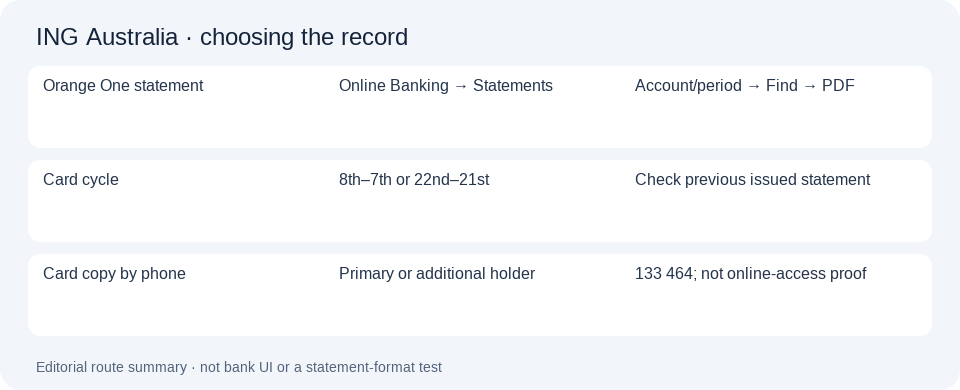
The current statement walkthrough gives Online Banking → Statements → View statements → account and period → Find. Select the available statement PDF, then open or save it. Choose the Orange One account when the request is for its card bill.
ING's Orange One terms dated June 22, 2026, section 14, describe a monthly statement where there has been account activity or an outstanding balance, unless the law does not require one. They provide electronic/Online Banking delivery and notification. A transaction list is not the issued statement.
The card-cycle FAQ lists two Orange One cycles: 8th to 7th, with the ready email on the 8th, or 22nd to 21st, with email on the 22nd. The first cycle can vary with approval timing. Use a previous statement to identify which cycle applies, rather than assuming calendar months.
Section 14.3 permits the primary or additional cardholder to request a statement copy by calling 133 464. A right to request by phone does not prove independent Online Banking access for every additional holder. For digital access, use the account actually available in your profile.
ING's new-app update page lists complete Orange One management as coming soon. Start with Online Banking for the card; do not assume deposit-account app controls are available for Orange One in the new app. Likewise, Orange Everyday's qualified post-closure access below is not a card-retention guarantee.
Retrieve the issued period or an interim record
Sign in on ING's website, open Statements, choose the account and period, click Find, then select an available statement. Open the download to view or print it.
For later activity, the app's Statements area offers an Interim statement. ING generally directs balance-letter requests to this interim PDF instead. Confirm that the recipient accepts that record; a bank's alternative document does not determine an external recipient's requirements. Statement and interim instructions.
Check the separate deposit-account and older-record conditions
The app requires a web switch for documents older than two years or closed accounts. Former Orange Everyday customers with no other ING accounts may still be able to log in for statements for seven years from closure. That qualified condition is not a promise for every closed product.
| Needed result or situation | Bank route or condition | Decision |
|---|---|---|
| Issued statement | Statements → account/period | Find, select and download |
| Older/closed record | Use the ING website | App has a different scope |
| Recent balance/activity | Interim statement | Check recipient requirements |
Check the product exclusion
Personal Term Deposit statements are unavailable in the app or online banking, according to the same ING FAQ. Do not keep applying the ordinary digital path to that product.
For ING Australia, try web banking for an older or closed-account record; request an interim statement only for a period not yet issued.
Use the Record-choice notes to record your chosen route and the outstanding document period.
For analysis of a PDF (Portable Document Format), see the CSV (Comma-Separated Values) guide. LocalExtract processes one PDF locally to date,description,amount CSV; Excel saves XLSX (Excel workbook format). Check the rows. Downloads.
New record-route guidance checked against the cited official sources on October 15, 2026. Earlier unchanged guidance retains the sources and scope noted in this article.
LocalExtract Team
We build LocalExtract, a desktop bank statement converter. Questions or corrections? Contact · Editorial policy