
ICBC Singapore: account statements and credit-card bills
Updated · 4 min read
The desktop apps export date, description, and amount as CSV. Open CSV in Excel to save an XLSX workbook. Statement support varies: verify the result against your own PDF.
Choose the desktop or mobile statement route
The two interfaces begin in different places. In personal online banking, open My Account, then Account Enquiry, then Monthly Statement. In the mobile app, open All Services, then Finance Assistant, then Statement Management. Select the record relevant to your account; the notice does not specify a universal final save control or historical availability for every account.
ICBC's earlier personal e-statement announcement confirms viewing and downloading through personal banking. It establishes the function, while the newer fee notice corroborates the local access routes. Neither notice promises an unlimited archive or a particular downloaded extension. A PDF (Portable Document Format) received through banking access should be checked for the account and period before spreadsheet work.
Check the paper charge and exemption before changing delivery
From October 1, 2025, the stated paper-statement charge changed from S$2 to S$10 per month. Customers 65 and above are exempt. The digital routes are offered without this fee. These are monthly paper-delivery terms; do not treat S$10 as a universal price for an individual historical replacement or for all credit-card services. Current paper-statement notice.
If you do not have digital banking access, the notice directs enrollment to an ICBC Singapore branch. It does not provide an app-only activation shortcut. Contact the bank through its published channel to clarify delivery preferences or a record unavailable in the statement area, rather than assuming that opening the screen cancels paper service.
| Needed result | Bank route | Decision |
|---|---|---|
| Desktop monthly statement | My Account → Account Enquiry | Monthly Statement |
| Mobile statement area | All Services → Finance Assistant | Statement Management |
| Paper delivery decision | S$10 per month from Oct 2025 | Customers aged 65+ exempt |
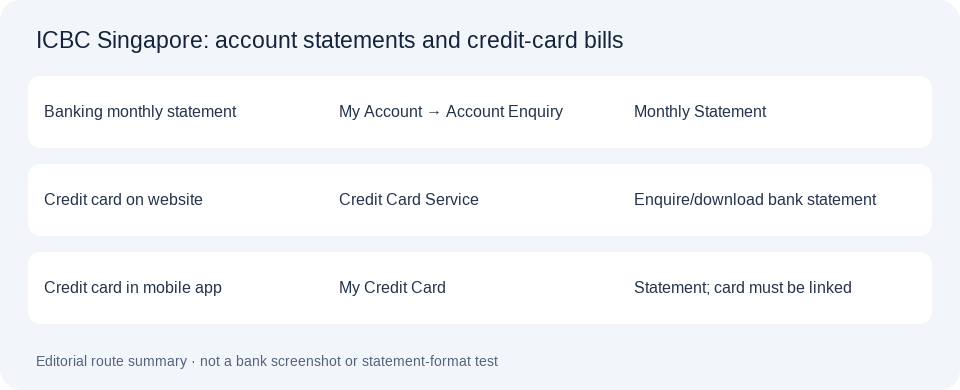
Open the linked credit card's own statement area
For an ICBC Singapore credit card, the bank's dedicated eStatement notice gives different menus from the banking-account route above:
- Make sure the credit-card account is linked to electronic banking. The notice makes this a condition of viewing the card eStatement.
- On Internet Banking, open Credit Card Service → Enquire/download bank statement.
- In Mobile Banking, use My Credit Card → Statement instead.
Use the channel you have available; these are alternative card routes, not three screens to follow in sequence. A current-account payment to the card does not provide the card's itemised bill. If the card is not linked, changing the period in Monthly Statement will not establish card access.
The Credit Card E-Statement FAQ, marked correct as at April 2, 2021, describes the electronic service as free and says card statements are generated on the first day of each month. That is its published generation schedule, not a guarantee of immediate availability on every device. It describes purchases, payments, other debits and credits within the billing cycle; it does not supply a current universal archive window, file extension or native CSV column layout.
The FAQ's April 25, 2021 deadline for retaining paper delivery belongs to that historical switch. Do not use it as a present-day opt-in deadline. For today's card paper-delivery choices or a missing bill, ask ICBC through its Singapore card service centre. The separate October 2025 banking paper-fee notice above does not establish the fee for this card service.
Choose the banking or linked-card menu first, then check the relevant statement period and delivery terms. Use the record planner to compare the banking route with the two card routes; its notes column is blank for your own use. For an available PDF, the CSV preparation guide covers the next step. LocalExtract processes one PDF locally to date,description,amount CSV (Comma-Separated Values). Excel saves XLSX; compare the result with the original record. Downloads.
Official sources checked October 14, 2026.
LocalExtract Team
We build LocalExtract, a desktop bank statement converter. Questions or corrections? Contact · Editorial policy