
FastSpring negative Payment: trace portal transfers to the bank
Updated · 4 min read
A negative Payment in FastSpring’s Account Transactions means money left the FastSpring balance. It does not describe a negative sale or prove that the seller’s bank received the money. Reconcile the payout receipt, the separate payout-portal transfer and the bank event as three records.
The desktop apps export date, description, and amount as CSV. Open CSV in Excel to save an XLSX workbook. Statement support varies: verify the result against your own PDF.
Collect the five records at their original levels
For the seller reviewing a payout, retain sales and adjustments, the statement period, the payout receipt, the Hyperwallet portal transfer and the bank observation. These are five evidence objects, rather than five amounts to add together.
- In FastSpring, select the store name at the top right, then Account Summary. Under Payout History, open the date in Payout Cycle to retain the particular payout receipt.
- For the balance-period record, choose Generate Statements, Yearly or Monthly, the period and View Statement. Record currency and opening/closing balances. A monthly statement need not represent one bank deposit.
- Select the balance amount to open Account Transactions. Choose Create Data Export, month/year and Create; retrieve the resulting filename under Data Exports. Preserve the available date coverage.
- For order detail, use
Orders and Returns → Options → Export Product Summaryor Export Line Item Detail. Keep type, reference, product, currency and signed adjustments at their original levels. - Obtain the relevant portal transfer and bank record from the authorized owner. Record the evidence supporting each relationship; leave a missing transfer or bank link open instead of using the payout receipt as its substitute.
These report paths and field distinctions come from FastSpring’s transaction reports and statements. They describe collection; no payout setting needs to change for the comparison.
Repeated order references are not duplicate rows
A multi-product order can produce several line-item rows with the same Reference. FastSpring also documents split-payment adjustments, including negative Income entries. Product Summary excludes affiliate adjustments, so it is not a universal replacement for the detailed adjustment population. Retain the row type and its underlying item before deciding that anything is duplicated.
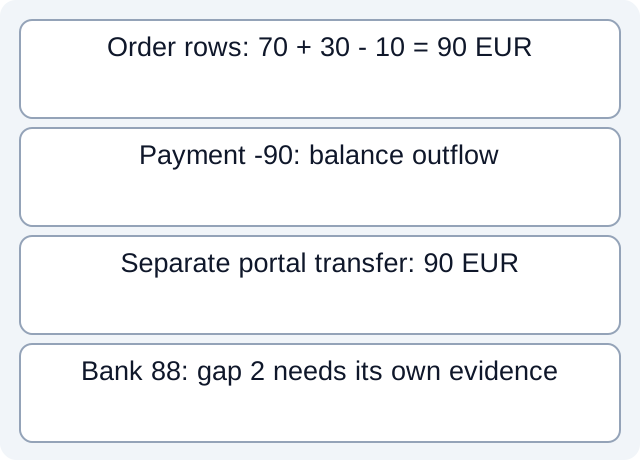
In our fictional EUR case, order O1 has product lines L1=70 and L2=30, followed by return R1=−10. All share O1. The order population nets to 90. Keeping only the first O1 row would lose a genuine product and the return. The separate Payment P1=−90 records an outflow from the FastSpring balance; adding it to sales would turn the 90 order result into zero.
With a stipulated opening balance of 10 and no other movements, the complete balance record closes at 10: opening 10, order income 100, return −10 and Payment −90. That balance equation answers a different question from the order result. The files deliberately use author-defined columns, not a downloaded FastSpring schema.
| Fictional object | EUR | What it establishes |
|---|---|---|
| O1 product lines and return | 90 net | Order-level composition |
| Payment P1 | −90 | FastSpring balance outflow |
| P1 receipt / portal transfer T1 | 90 / 90 | Given relationship in this case |
| Bank B1 | 88 | A separate observation; gap 2 initially unexplained |
Read the fictional balance records, separate stage evidence and executed calculations. The local checks actually read these constructed CSVs. They do not open a seller account, validate native export columns or establish a universal portal-to-bank join.
Explain the portal-to-bank difference only with its own evidence
Our scenario explicitly associates receipt P1 with transfer T1 and bank B1. The observed bank amount 88 differs from transfer 90 by 2. At that point the reason remains unknown. Only the later, separately supplied fee evidence of 2 explains the difference within this case. The arithmetic alone cannot establish that a real shortfall is a fee, conversion or missing payment.
FastSpring’s portal overview separates funds reaching the portal from their onward transfer. Automatic onward movement requires the appropriate Auto Transfer setup; a portal balance is not itself a bank receipt. Its payout guidance also describes activation, monitoring holds, settlement, schedule and threshold conditions. Use the seller’s actual configuration rather than promising a common arrival date.
When a bridge is unsupported, request the missing receipt or transfer record and retain the unresolved state. Do not fabricate a portal CSV field or join order Reference directly to a bank description. For duplicate bank exports, use the separate overlapping CSV guide; order-line identity is the issue here.
If the bank side is available only as PDF, download LocalExtract to extract one PDF locally into date,description,amount CSV. Check those rows against the issued statement; the app does not retrieve FastSpring or Hyperwallet records.
Official documentation checked October 17, 2026.
LocalExtract Team
We build LocalExtract, a desktop bank statement converter. Questions or corrections? Contact · Editorial policy