
DBS/POSB eStatements: Download PDFs and Check Issuance Exceptions
Updated · 6 min read
Use eDocuments, select the statement type/year and download the offered PDF; check the product-specific issuance and enrollment conditions. This guide covers the Singapore product and the task described below.
The desktop apps export date, description, and amount as CSV. Open CSV in Excel to save an XLSX workbook. Statement support varies: verify the result against your own PDF.
Separate eStatements, eAdvices and eLetters
DBS's eDocuments guide identifies all three document classes as PDF. Its live FAQ qualifies the storage windows by enrollment or October2026, whichever is earlier: eStatements seven years; eAdvices/eLetters one year. This is not proof of a particular older file or pre-enrollment backfill. A payment advice or letter is not the statement's full movement list.
The viewing help excludes POSB Passbook Savings account statements. The eDocuments guide separately makes debit-card eStatements eligible when the primary linked account is POSB Passbook Savings. Those are different document/product conditions, so do not extend either rule to every document linked to the account.
Download the correct type and year
- In personal digibank Online, open eDocuments from the home area; use Show All to reach more documents if needed.
- Choose the relevant statement type and year, then download the offered PDF.
- In the mobile route use More → eDocuments → eStatement, select type/year and open the document with its download icon. An exact device-level final save/share label was not tested; use the actual offered controls to keep a copy.
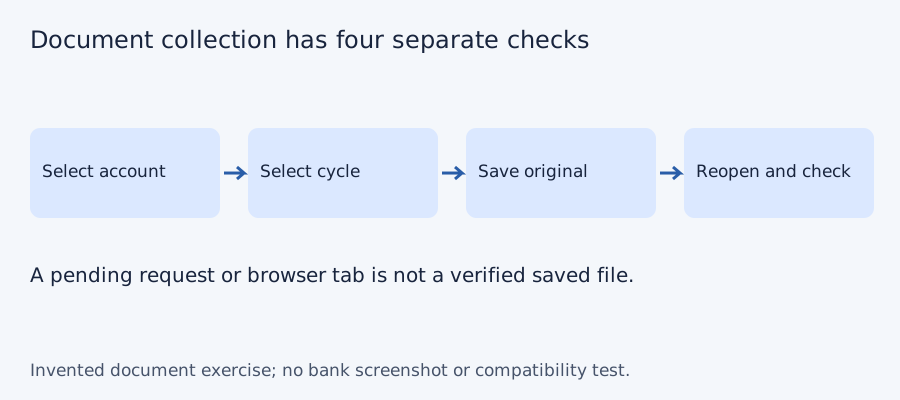
- Reopen the saved original and check the account, document type and printed cycle.
Diagnose a missing cycle using the right issuance condition
The official eDocuments FAQ distinguishes no-activity cases. A credit-card/Cashline statement can be absent when there is no activity and no prior outstanding balance; debit and POSB Savings have their own no-activity conditions, with POSB Savings year-end exceptions and MySavings quarter/year-end conditions. Do not manufacture a zero-activity monthly file or use a debit-card rule for an account statement. Inspect the actual product and ask DBS about the specific unavailable record. Prior statements for a closed account can remain viewable under the cited service, but that does not establish every individual copy.
| Record found | Collection decision | Limit |
|---|---|---|
| eStatement for the intended account/cycle | Save and check its complete original | Actual availability matters |
| eAdvice or eLetter | Keep as a separate document type | Does not supply the whole cycle |
| No expected record | Check product-specific issuance/enrollment | A missing assumed month is not automatically failure |
Finish collection before making a worksheet
Reopen the actual saved file outside the banking viewer. Compare the document title, account alias, printed start/end and readable complete pages with the request. Preserve the original unchanged; record the date collected separately from its printed period. Keep a request pending or a file not located until the record is actually received and checked. Two copies of one cycle do not collect a second period, and the filename alone does not prove coverage.
Use the blank private checklist below to record expected account-period identities, received files and unresolved questions. Do not put full account numbers into shared filenames. A working table is a separate analysis; a third party requesting the issued statement can require information the table omits.
Test the collection checklist with four invented periods
We checked set membership for three deliberately constructed document lists on October 11, 2026. The desired periods are P1, P2, P3 and P4; these aliases do not represent a bank’s actual monthly cadence or archive. A complete list has four files and four unique periods. Omitting P3 leaves three files and a gap. Downloading P2 twice gives five files but still only four unique periods. More files do not necessarily mean more coverage. No bank account, PDF, OCR output or LocalExtract result was tested.
| Invented case | File count | Unique periods | Missing period |
|---|---|---|---|
| Complete | 4 | 4 | None |
| P3 absent | 3 | 3 | P3 |
| P2 saved twice | 5 | 4 | None |
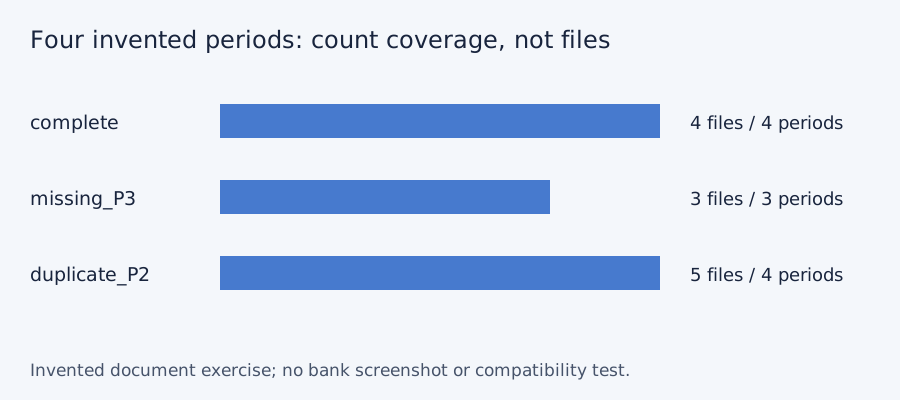
Blank document-collection checklist · constructed CSV results · inputs and method in JSON. Use aliases rather than full account numbers; adapt the actual period list to the documents your account issues.
Frequently Asked Questions
Are all eDocuments the same statement?
No. eStatements, eAdvices and eLetters are different document classes with different purposes and storage conditions.
Does Passbook Savings exclude every linked debit-card document?
No. The account-statement exclusion and the primary-linked debit-card eligibility are distinct rules.
Does no monthly file always mean a failure?
No. The published product-specific no-activity conditions must be checked.
Was the mobile save control tested?
No. The public download icon opens the document; device-level saving was not tested.
If PDF is the relevant source
LocalExtract processes one PDF at a time on the device and exports CSV with date,description,amount. Parsing and OCR do not require uploading the statement. This is a working table that needs comparison with the original; no bank compatibility was validated here. There is no direct XLSX, QBO or OFX export, bulk queue or automatic accounting sync. To obtain XLSX, import the checked CSV and save from Excel.
The free evaluation covers ten pages in total. Pro is USD 10/month or USD 60/year. Account, subscription, update and periodic Pro checks need network access. See downloads and product scope.
Sources and verification scope
Public official guidance checked October 11, 2026. Account controls, document availability and bank layouts were not authenticated-tested. The method exercises use invented records, not actual bank samples or measured extraction results.
Updated October 11, 2026: Clarified the document route, product limits and file-coverage checks. No bank format or app output was validated.
Keep the source task and product conditions explicit, preserve the original and leave missing records or rows unresolved. Check the actual file before using it.
For the next task, see the same bank’s working-table guide.
LocalExtract Team
We build LocalExtract, a desktop bank statement converter. Questions or corrections? Contact · Editorial policy