
UK Bank Records for Excel: Native Formats, History and Original PDFs
Updated · 5 min read
For UK personal-account holders choosing a source for their own Excel work, HSBC offers searched transactions as XLS/CSV and NatWest offers Excel/PDF from transaction search. CSV is a text table; XLS and XLSX are Excel workbook formats; PDF preserves document pages. Santander's documented midata CSV is masked comparison data. These sources serve different tasks from an issued statement.
The desktop apps export date, description, and amount as CSV. Open CSV in Excel to save an XLSX workbook. Statement support varies: verify the result against your own PDF.
Pick a source for the task before choosing a format
| UK personal product | Native source established here | Boundary that changes the choice |
|---|---|---|
| HSBC | XLS/CSV from transaction search | Search conditions determine the rows; six-year statement history is a separate fact |
| NatWest | Excel/PDF from online transaction search | Online search up to seven years differs from twelve-month app search |
| Santander current account | Twelve-month midata CSV | Identity and sensitive transactions are masked for account comparison |
| Barclays | Current personal CSV route not established | Active/closed statement access has its own conditions |
| Lloyds | Current personal CSV route not established | Statement access differs between web, app and card products |
These options were read from UK personal help, not commercial banking or another country's similarly named service. Unknown CSV availability is not proof that a bank cannot provide a suitable table.
Use the documented native route where it fits
For HSBC, the official statements and downloads page specifies:
- Open the account → Search and filter.
- Set the dates and other conditions, then choose Search.
- Use Download below the results, select XLS/CSV, then Continue.
A merchant-only result can be useful without containing the complete monthly cycle. The issued PDF instead comes from Statements quick links, account and statement date.
NatWest's transaction-search help uses Statements → Search for a transaction → Search transactions, with type/date/description/amount criteria and offered export options. It names Excel and PDF, without establishing a universal CSV or XLSX extension. Compare its online and app time windows before assuming an app search can provide the same older activity.
Santander's midata procedure is My Accounts and Transactions → current account → Download transactions → midata(CSV) → Download → confirm → Continue. Its twelve-month masked file is designed for account comparison. It may not answer a task requiring full merchant details or an original issued document. Do not extrapolate it to every savings or card product.
Obtain issued originals when the table cannot answer the request
For Barclays, the earlier official-source review records Profile → My Barclays documents → statement → PDF. The archive conditions distinguish up to seven years for an open account from up to five after closure while another Barclays relationship remains. This refresh did not authenticate the menu or successfully reopen the live page; ask the bank about an unavailable account-specific file.
Lloyds' current help uses an account's Statement options online or its three-dot menu's Download or print statement in the app. Web history is up to seven years; app history is described as at least ten. For credit cards, the web route uses chat to request a PDF or the card's app download. A current-account route therefore should not be relabelled as a card procedure.
NatWest's original-statement route selects Statements & transactions → Statements under Your statements → account/year → cycle PDF link. Its search-generated PDF remains a different source. For Santander, the statement guide describes a current-account cycle based on opening/transfer date and typically annual savings records. Calendar-month analysis should not be presented as that issued cycle.
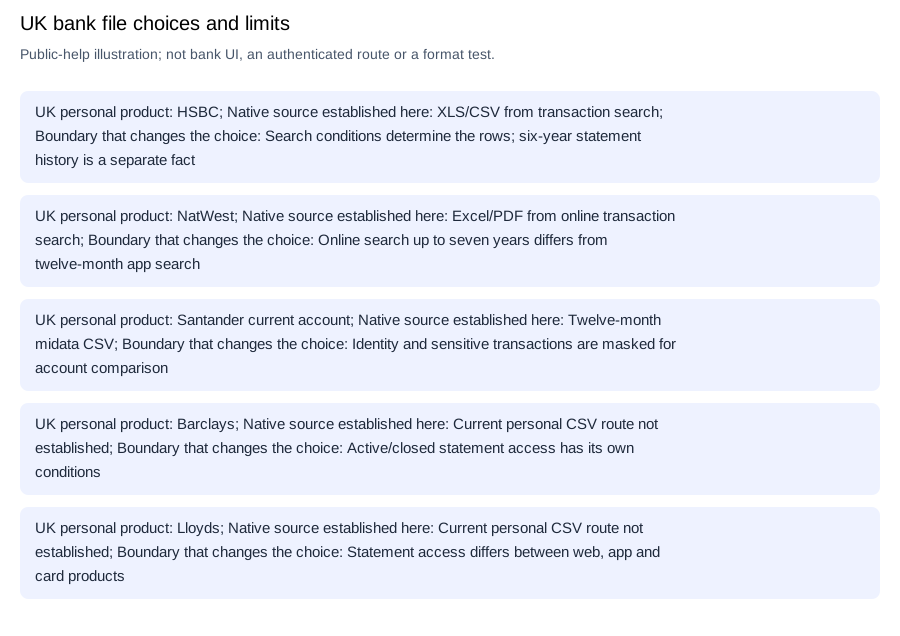
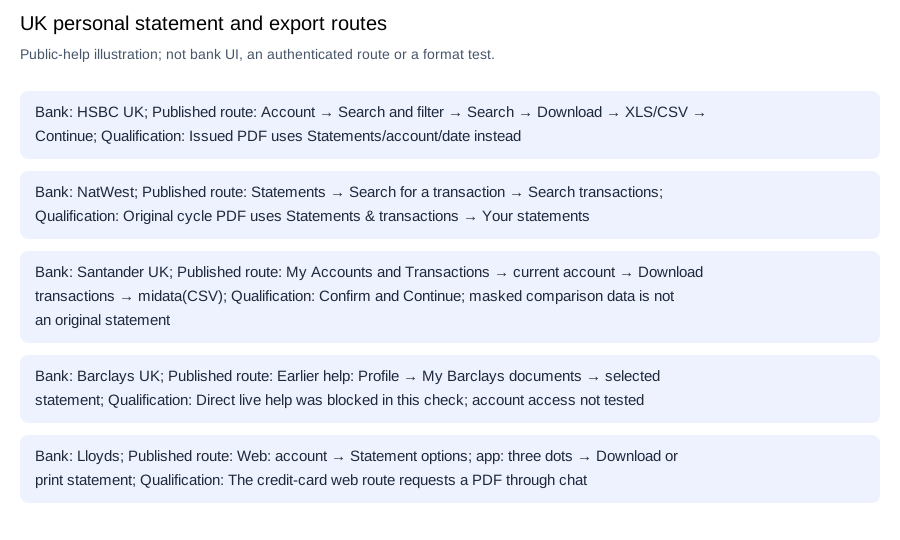
Editable source-choice checklist.
Finish Excel without inventing bank fields
Identify HSBC's actual XLS/CSV choice and NatWest's offered Excel file; Santander's masked midata cannot recover omitted merchant details.
For a readable issued PDF, transcribe its dated movement rows into a worksheet, retain signed amounts and check against the original before saving XLSX. Keep summary totals outside the movement list. Microsoft's CSV-import help covers separator preview and date interpretation; RFC 4180 explains quoted comma fields. The CSV-format reference adds formatting context, without guaranteeing a UK bank layout.
LocalExtract converts one PDF locally to date,description,amount CSV; Excel creates XLSX. Downloads and limits.
Frequently Asked Questions
Does a seven-year statement archive give me seven years in every UK app?
No single window applies here: NatWest's online transaction search and app search have different limits, while Lloyds describes different web/app statement histories. Barclays' closed-account condition also requires a remaining relationship. Choose the bank, channel and document type before interpreting an unavailable year.
Revision note
Updated October 11, 2026: removed unsupported layout and date-parsing guarantees; qualified UK native formats, history windows and the live Barclays verification gap.
Sources and check method
The linked public pages were checked separately for UK personal products, document access, native formats and history limits. Indexed-only and blocked sources remain qualified above. No customer login or real bank file was tested; the bank routes are documentation evidence, not compatibility results.
Microsoft: import or export text/CSV · RFC 4180: common CSV format
Choose HSBC or NatWest's searched table when its selection answers the task; keep Santander's masked midata purpose explicit. For an issued original, use the separate bank-specific statement route and history conditions. Save that source before checking its Excel analysis copy.
Official sources checked October 11, 2026.
LocalExtract Team
We build LocalExtract, a desktop bank statement converter. Questions or corrections? Contact · Editorial policy