
Canadian Bank Records for Excel: Native Files and Statement Routes
Updated · 6 min read
For Canadian personal-account holders preparing their own Excel records, check the bank's native transaction file before converting an issued statement PDF. Native means bank-offered; PDF preserves document pages, CSV is a text table, and XLSX is an Excel workbook. BMO documents CSV for a two-month window; the other Canadian banks below offer different or incompletely verified transaction sources.
The desktop apps export date, description, and amount as CSV. Open CSV in Excel to save an XLSX workbook. Statement support varies: verify the result against your own PDF.
Choose the source by bank and task
| Canadian bank | Personal transaction source established here | Decision for Excel |
|---|---|---|
| RBC | Current native CSV procedure not verified | Inspect the file actually offered; otherwise obtain the relevant statement |
| TD Canada Trust | Official indexed FAQ names CSV and software downloads; direct FAQ access was blocked | Do not rely on an unverified old export menu or exact window |
| Scotiabank | QuickBooks download with a loading condition | Load the entire selected period; CSV availability remains unverified |
| BMO Bank of Montreal | CSV and financial-software formats; two-month transaction window | Use suitable native CSV for that window; older records need another source |
| CIBC | Download Transactions procedure; actual software choices | Inspect offered format; do not promise universal CSV or a thirteen-month window |
RBC: select each account's document
The RBC tutorial gives this web route:
- Start at Accounts Summary → Statements/Documents.
- On the Account Documents page, follow the instructions to view and download the available document. Use the period dropdown for a different statement period.
The app route is More → Services → Statements → account.
RBC's eStatement help says each account has its own statement and describes up to seven years. The app lists only electronic-delivery accounts and initially shows the latest six statements. Check delivery eligibility and the period selector before concluding an older document is missing. RBC Express or Caribbean export instructions do not establish a Canadian personal CSV workflow.
TD Canada Trust: preserve the enrollment qualification
In TD's Canadian EasyWeb tutorial, open the account-name area, choose Statements and Documents, select the account and Filter by year, then open and save the PDF. This is TD Canada Trust, with its own route, rather than TD Bank US.
TD's delivery conditions describe up to seven years from electronic enrollment/consent. They do not guarantee pre-enrollment backfill or online delivery for every account and document. The export FAQ was readable only through its official search index during this check; exact current export controls and periods remain unverified.
Scotiabank: load the selected period before a software download
Current statement help uses Accounts → bank account → Documents → statement, with up to seven years of statements. The QuickBooks procedure instead selects an account and statement period, loads more transactions until Current statement period total appears, then uses the download icon and Download as QuickBooks.
An export of only the loaded portion can be incomplete for the chosen period. That loading condition does not prove a current retail CSV format or an all-history download window. The guide also describes a changing interface; follow the controls applicable to your account.
BMO Canada: distinguish the two-month table from the statement
The Canadian download FAQ uses Accounts → account → DOWNLOAD beside Transactions, then a download form. It explicitly names CSV and other software formats with a two-month transaction window. Check that the actual selection answers the requested period before importing it.
For an issued original, the separate eStatement FAQ selects account → Statements → month and opens a PDF. Changing statement options controls eligible future delivery. A current universal seven-year personal archive was not confirmed in the live page reviewed here; BMO US and commercial instructions cannot supply that missing guarantee.
CIBC: use the current My Documents route
The current CIBC tutorial uses My Documents → Account statements → account → statement date → PDF download. In the app, start at More → My documents. Older references to Message Centre should not override the current tutorial.
CIBC's account help separately uses More → Download Transactions, then account, period and offered financial software. Bank/card eStatements can extend up to seven years; the listed investment-document enrollment conditions are different. Inspect the offered transaction format: Canadian personal CSV columns and a universal export window were not established by these sources.
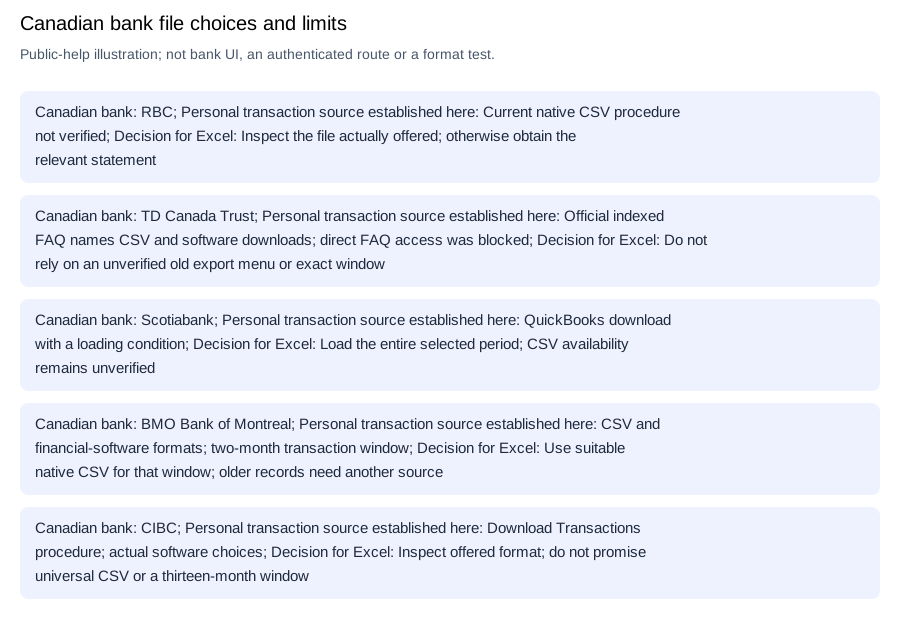
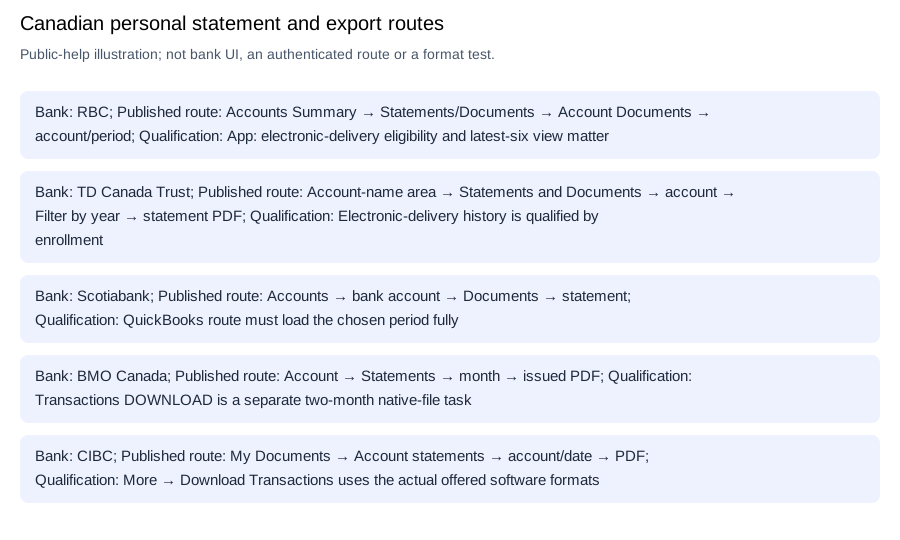
Editable source-choice checklist.
Import the source you actually obtained
For BMO's suitable two-month CSV, inspect the actual columns. Scotiabank's QuickBooks download and CIBC's offered software files are not automatically CSV.
If you have only a readable PDF, transcribe its dated movement rows into a worksheet, preserve signed amounts, exclude summary totals and check against the original before saving XLSX. For CSV, Microsoft's import help covers delimiter preview and column interpretation. RFC 4180 explains comma-field quoting. The CSV-format reference covers formatting; these steps do not establish Canadian parser compatibility.
LocalExtract processes one PDF locally to CSV (date,description,amount); Excel creates XLSX. Download options and limits.
Frequently Asked Questions
What if my Canadian statement period is older than the native export?
BMO's documented two-month transaction window does not establish an older CSV archive. Use its separate statement route for the available original. TD's seven-year electronic history is qualified by enrollment; it does not establish pre-enrollment backfill. For an unresolved period, give the bank the exact account and dates rather than requesting a universal “CSV conversion.”
Revision note
Updated October 11, 2026: corrected the TD country link, replaced unsupported layout claims with qualified bank procedures, and added the BMO transaction-window distinction.
Sources and check method
The linked public pages were checked separately for Canadian personal products, document access, native formats and history limits. Indexed-only and blocked sources remain qualified above. No customer login or real bank file was tested; the bank routes are documentation evidence, not compatibility results.
Microsoft: import or export text/CSV · RFC 4180: common CSV format
Choose BMO's suitable two-month CSV for recent activity, or the relevant bank's issued document for another task. For TD, preserve the enrollment condition; for Scotiabank, load the selected period fully. Save that source before checking its Excel analysis copy.
Official sources checked October 11, 2026.
LocalExtract Team
We build LocalExtract, a desktop bank statement converter. Questions or corrections? Contact · Editorial policy