
BMO US: bank and card statements or native transaction files
Updated · 4 min read
Corrected October 12, 2026: bank record choices and limits.
The desktop apps export date, description, and amount as CSV. Open CSV in Excel to save an XLSX workbook. Statement support varies: verify the result against your own PDF.
Use the BMO US credit-card route for card records
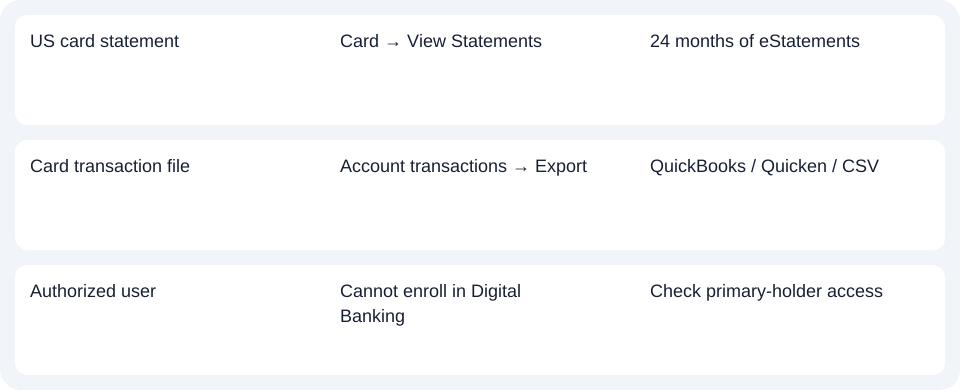
BMO's card-management help provides an account-specific path: Account Summary → credit card → View Statements → statement selection. An alternative is Accounts → Statements → credit card, followed by the required statement. The card service lists 24 months of eStatements; the deposit Document center demonstration below is not proof of that card archive.
For native card data, use Account Summary → credit card → Account transactions → Export, then choose QuickBooks, Quicken or CSV from the offered options. Prefer that direct file when card transaction rows meet the task. The source does not establish exact CSV columns, amount signs or a universal export range. Card statements and transaction exports.
BMO says authorized users cannot enroll in BMO Digital Banking. If an additional card user cannot see the statement, resolve the primary-cardholder access issue rather than assuming the dates are missing. This US card branch does not apply Canadian BMO menus or combine multiple cards into one claimed export.
Export the selected account's transactions on the website
| Task | BMO record and account scope |
|---|---|
| Analyze selected transaction dates | Website CSV export; one account per file |
| Retain the issued statement | Document center PDF; individual or combined accounts |
BMO’s May 11, 2026 Digital Banking Agreement, section III.A lists CSV, Quicken and QuickBooks transaction downloads under Online Banking Only. Use the website for the following export steps; they are not mobile-app instructions.
BMO's Exporting Data FAQ gives:
- Select the account whose transactions are needed.
- Open Filter.
- Choose transaction type and/or the date range.
- Apply the filter.
- Choose Export, then the offered format.
Only one account per export file is supported; multiple accounts cannot be exported together into one file. The public help names CSV, Quicken and QuickBooks, but not the software-file extensions, output columns or maximum export period.
Retrieve the issued statement instead
The bank's US personal statement demonstration describes:
- Accounts → Document center.
- Statements.
- Select the account and year.
- Open the required statement.
The PDF opens in a new browser tab for viewing, saving or printing. The demo does not establish a particular current PDF-viewer icon.
Distinguish a combined statement from an export
The demonstration supports individual and combined-account statements. Select the needed account when several appear; a combined statement can contain more than the account represented in one transaction export. It does not mean every customer's statements are combined.
Tax Forms is a separate tab. The two displayed tax years do not define statement retention. For these deposit-account sources, statement archive age, closed-account access and available export dates remain unconfirmed; the separate card branch has its own 24-month statement description.
Request a paper copy without confusing delivery settings
BMO's E-Sign disclosure, section 7 gives Service Requests → Request Documents for requesting a paperless statement on paper, or 888-340-2265. Requests must follow within a reasonable time of electronic provision; account-specific fees may apply. This is not a promise that expired statements can be recovered.
Sections 2 and 5 of the E-Sign disclosure distinguish general electronic-communications consent from separately choosing paperless statements. For a combined statement, withdrawing electronic-communications consent requires changing each included account's delivery preference. Withdrawing that broader consent ends Digital Banking access. For a paper-copy task, use the copy-request route.
The May 11, 2026 Digital Banking Agreement, section III.J says statement availability may be announced by email, a mobile-device notice or Secure Message. Paperless preferences suppress mailed statements for selected eligible accounts; changing those preferences may change product fees.
On BMO’s website, use Filter → Apply → Export for one account’s transaction file. For the issued PDF, use Document center → Statements and select the account and year. For a paper copy, use Service Requests → Request Documents or call the bank; changing electronic consent is a separate decision with access and fee consequences.
Planner and analysis
Use the record planner to record your chosen route and the outstanding document period. CSV formatting and checks.
LocalExtract processes one PDF locally to date,description,amount CSV; Excel can save that CSV as an XLSX workbook. Downloads and limits.
Official sources checked October 14, 2026.
LocalExtract Team
We build LocalExtract, a desktop bank statement converter. Questions or corrections? Contact · Editorial policy