
Chase UK Statements to Excel: CSV Dates and Range Checks
Updated · 6 min read
Choose Chase UK’s native CSV when the offered dates cover the task. This guide covers the UK product and the task described below.
The desktop apps export date, description, and amount as CSV. Open CSV in Excel to save an XLSX workbook. Statement support varies: verify the result against your own PDF.
Choose the UK export and record its boundaries
Chase UK’s public help offers PDF and CSV, with monthly statements and custom ranges of up to 90 days. Use the offered CSV first for tabular analysis; keep the relevant issued PDF for original presentation and totals. This is the UK product, not the Chase US statement-conversion procedure. No real CSV headers, statement layout or LocalExtract output were tested here.
Write down whether the file is a monthly record or a custom range, its account, currency and actual start/end dates. A custom file beginning halfway through a month cannot automatically reconcile against the change across the full month. Do not invent missing rows or an adjustment to make those different ranges agree. Retrieve the relevant coverage or compare only the common portion deliberately.
Keep initiation, completion and export dates distinct
Chase UK explains that the activity screen orders payments by when they were made, while statements use completion after merchant confirmation. Its example describes payments appearing in a later statement month. The following teaching timeline is invented; it is not a bank transaction or proof of the CSV’s actual column names.
| Invented date | Meaning | Treatment |
|---|---|---|
| 30 August 2026 | Payment initiated | Keep as a separate attribute if supplied |
| 2 September 2026 | Payment completed | Use in a completed-date working view when that matches the source |
| 5 September 2026 | File downloaded | Source-register information, not the payment date |
For a manually prepared cash table, document which source date fills date. If another date matters, keep it in a separate worksheet column. Do not overwrite completion with initiation merely because the budget was planned in August. A three-field CSV cannot preserve every source attribute, so keep the untouched bank export and original document.
Make a typed working table for one account
For deposit cash, inflows are positive and outflows negative. For a card liability, purchases and payments have a different meaning; keep that product separate. The source may provide another sign convention, which must be interpreted before making your chosen view. This synthetic example illustrates a deposit table only:
date,description,amount
2026-09-01,Example receipt,250.00
2026-09-02,"Example completed payment, supplies",-100.00
2026-09-03,Example fee,-10.00
Choose Data → From Text/CSV in Excel. Inspect the comma delimiter, dates and numeric decimal amounts in the preview, then load. Use Microsoft’s text/CSV instructions; quoted descriptions follow RFC 4180. Save XLSX in Excel after verifying rows. LocalExtract itself exports CSV, not XLSX.
Check custom-range overlap before combining files
Suppose two invented exports cover 1–15 September and 10–30 September. The overlap must be identified before adding their rows. A matching description or amount is not enough to delete a row: compare source account, date, meaning and any identifiers the bank actually supplies. Keep provenance in your manual worksheet. Reconcile only comparable opening/closing figures for the same account, currency and period; otherwise verify rows and state that a balance check was not available. The UK download guide helps establish the original record.
Check the method with invented records
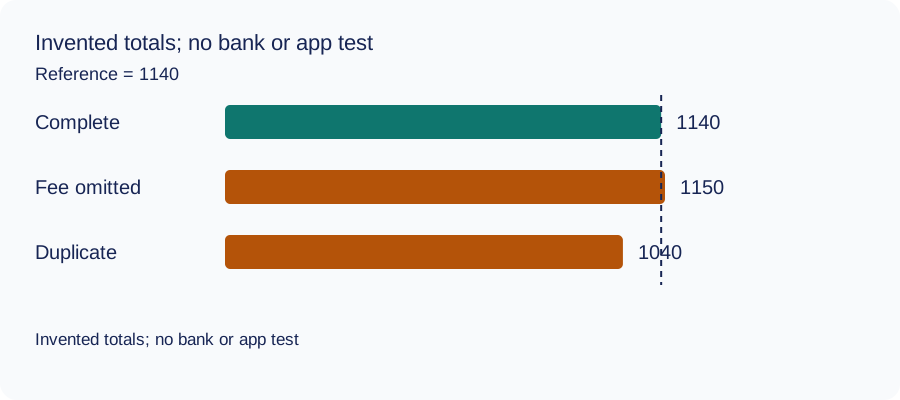
We recomputed three deliberately constructed cases on October 11, 2026 using decimal arithmetic: complete rows, an omitted fee and a duplicated movement. The reference total and every number are invented. This checks the reconciliation method only: no bank account, real PDF, OCR result or LocalExtract output was tested. The same learning aid is used across these guides.
| Case | Calculated closing total | Difference from reference |
|---|---|---|
| Complete rows | 1140 | 0 |
| Fee omitted | 1150 | 10 |
| Movement duplicated | 1040 | -100 |
Illustrative units, not a real account balance.
Download the blank document checklist or synthetic check data. CSV · JSON.
Frequently Asked Questions
Can I use the download date as a transaction date?
No. It describes when the file was obtained. Preserve the transaction date meaning from the actual record.
Should I move September completions back to August?
Not in a completed-date reconciliation. Keep initiation separately if needed for another analysis, preserving the original source dates.
Does a 90-day custom file equal three monthly statements?
No. It is a chosen range. Inspect its actual coverage and compare it with the specific periods you need.
Does this validate Chase UK compatibility?
No. The rows and exercises are synthetic methods. Compare any extraction with your own original; no bank format or app result was verified here.
If PDF is the relevant source
LocalExtract processes one PDF at a time on the device and exports CSV with date,description,amount. Parsing and OCR do not require uploading the statement. This is a working table that needs comparison with the original; no bank compatibility was validated here. There is no direct XLSX, QBO or OFX export, bulk queue or automatic accounting sync. To obtain XLSX, import the checked CSV and save from Excel.
The free evaluation covers ten pages in total. Pro is USD 10/month or USD 60/year. Account, subscription, update and periodic Pro checks need network access. See downloads and product scope.
Sources and verification scope
Public official guidance checked October 11, 2026. Account controls, document availability and bank layouts were not authenticated-tested. The method exercises use invented records, not actual bank samples or measured extraction results.
Updated October 11, 2026: Added task-specific source decisions, date/amount examples and CSV import checks. No bank format or app output was validated.
Prefer native CSV, preserve the completed-date basis and check each range before combining it. If PDF is your only relevant source, trial a local extraction and verify the resulting working rows.
LocalExtract Team
We build LocalExtract, a desktop bank statement converter. Questions or corrections? Contact · Editorial policy