
Bluevine primary and sub-account statements: which month is missing?
Updated · 5 min read
For a US Bluevine Business Checking month-end collection, select the primary account and each required sub-account separately. A downloaded primary-account statement is not evidence that every sub-account’s statement has been collected. Keep the selected account identity and month with each document, then investigate any Bluevine-versus-Sweep balance difference using the statement footnotes rather than adding the two balances together.
If a statement is only available as PDF, LocalExtract can prepare a local CSV comparison copy. The issued PDF remains the evidence of account identity, period and balance; three extracted transaction fields cannot replace that cover information.
The desktop apps export date, description, and amount as CSV. Open CSV in Excel to save an XLSX workbook. Statement support varies: verify the result against your own PDF.
Collect an account-month set, not one generic Bluevine file
Bluevine’s dedicated statement instructions describe Documents & Reports → Banking Statements → account and year → month. Its sub-account guide separately uses Documents → Statements → Account → month. Both require an account selection. If your navigation differs, use the applicable statement area and confirm the selected identity; the two published menu descriptions should not be presented as a single verified interface.
- Establish which primary/sub-accounts are required for the month from an authorised account inventory. Record an account identifier that distinguishes them; a nickname alone can change.
- Open the statement area, select one identified account and year, then the required month. Check the document’s account and period before marking that inventory row received.
- Repeat for each required sub-account. Bluevine documents distinct account numbers for sub-accounts, even though they form part of the same business relationship.
- Keep a missing account-month row open. A combined cash total, screenshot of the Checking tab or another account’s statement does not fill that row.
The Checking tab can help an authorised user inspect individual account details and nicknames. It is not a substitute for the selected monthly statements. Bluevine says interest earned across the primary account and sub-accounts is deposited into the primary account; that does not mean all movements or monthly documents belong to that one account.
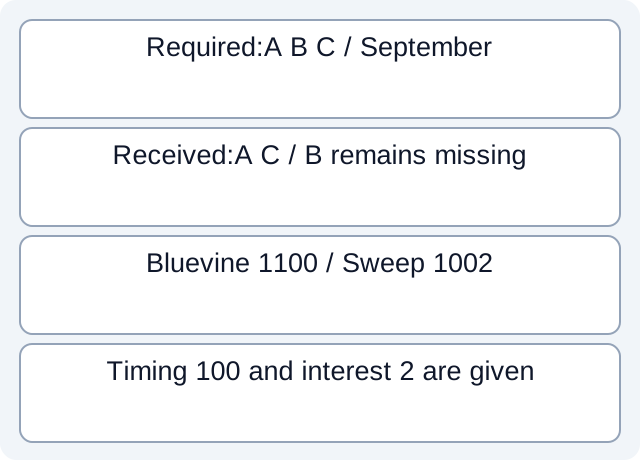
In the fictional collection below, the required inventory and received documents are explicitly supplied. The labels A, B and C are teaching identifiers, not a native Bluevine export schema.
| Required account-month | Received document | Collection result |
|---|---|---|
| A / September | D1 explicitly identifies A / September | Received |
| B / September | None in the supplied document set | Missing |
| C / September | D2 explicitly identifies C / September | Received |
Two documents leave B / September outstanding. Receiving A twice would still leave B missing. Removing C’s file from the received set would make both B and C outstanding; it would not remove C from the independently supplied required inventory. The worksheet therefore distinguishes what is required from what happens to be present. It cannot discover accounts omitted from the inventory itself.
Read Bluevine and Sweep balances on their own dates
A Bluevine statement can contain a first-page balance and a Sweep Program Monthly Statement balance. The official statement article explains two relevant differences: Bluevine uses the ending balance on the last business day of the month, while the Sweep page uses the preceding day; Intrafi includes interest earned but not yet paid, while Bluevine waits until payment at the start of the following month.
These are different observations of a related balance, not two cash accounts to add together. Read the actual footnotes and cutoff dates before deciding that the difference is an omitted transaction. Bluevine says those footnotes also appear when there is no discrepancy or no transaction activity.
For a second explicitly fictional example, suppose the source supplies a preceding-day balance of 1,000.00 USD, a last-business-day external credit of 100.00 USD and separately documented accrued interest of 2.00 USD. The teaching observations are Bluevine 1,100.00 USD and Sweep 1,002.00 USD: the 98.00 USD difference combines timing and interest treatment. It is not a 98.00 USD fee. Those inputs are stipulated for the exercise; a real pair of totals alone would not establish either cause.
Keep a separate comparison row for each page, with its issuer, account, date basis and interest treatment. If the necessary movement or interest evidence is absent, record the difference as unexplained. Do not manufacture an interest adjustment merely because the official footnote describes a possible cause.
The fictional worksheet and finite results preserve the supplied premises and calculations; they are not vendor exports or a reusable account-verification tool.
Keep transfers separate from collection completeness
Sub-accounts can send and receive payments directly. A debit on A and a credit on B with the same amount are not automatically a proven internal transfer. Establish the source/destination identities and a reliable link from the actual records before treating them as two legs of one event.
A received statement can also be incomplete for your review period, and a complete statement collection can still contain unresolved transfers. Maintain those as separate findings: document received, period covered, movement explained. This prevents an apparently balanced account total from closing a missing-document task.
Use the bank reconciliation guide for the later comparison with bookkeeping records. LocalExtract processes one PDF at a time locally into date,description,amount; it does not enumerate Bluevine accounts, retrieve missing statements or reconcile transfers automatically. Download LocalExtract for a PDF comparison copy.
Official Bluevine statement and sub-account documentation checked on October 17, 2026. The account inventory and balance examples are fictional and do not establish compatibility with any particular Bluevine PDF layout.
LocalExtract Team
We build LocalExtract, a desktop bank statement converter. Questions or corrections? Contact · Editorial policy