
Barclaycard UK: save statements and find older card bills
Updated · 2 min read
The desktop apps export date, description, and amount as CSV. Open CSV in Excel to save an XLSX workbook. Statement support varies: verify the result against your own PDF.
Save the bill for the correct card account
- Open the statements area in Barclaycard online servicing.
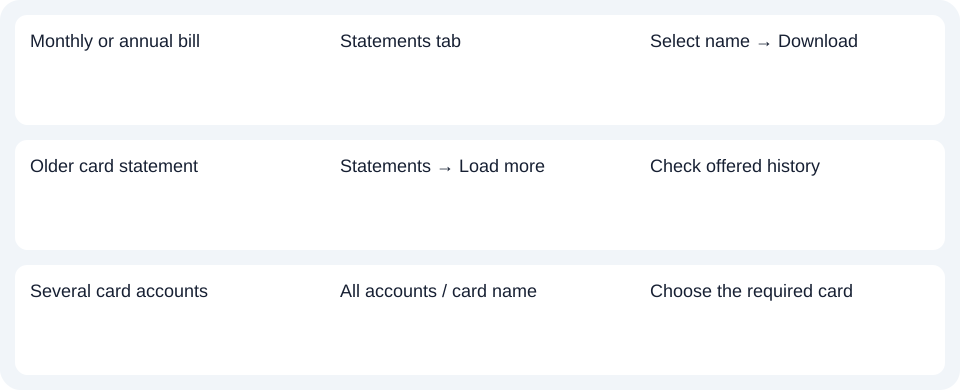
- Choose the Statements tab for monthly or annual bills. Use Load more if the required item is older than the initial list.
- Select the statement name; it opens in another tab.
- Use Download for the PDF (Portable Document Format).
With several card accounts, use All accounts or the card-name selector to move to the account you need. The separate documents list can display correspondence together; select the card deliberately before using the bill for reconciliation. The servicing instructions distinguish statement records from other documents, such as changed terms. Some correspondence still arrives by post.
Check the available history rather than one universal limit
The servicing upgrade page says history expanded from one year to up to seven years. The digital-statement terms still describe twelve months online. Keep that source difference visible: use the upgraded service's actual offered dates, and ask Barclaycard about a missing period rather than assuming every historical bill must appear.
Those terms recommend keeping local copies before account closure; they do not guarantee continued closed-card access. A downloaded record is more dependable for a future document request than a plan to recover it after the account is closed.
Save from the app when that is your channel
The app saving instructions begin with Statements → selected statement. Open it, then download it. On Android, the bank describes the download icon saving to My files; subsequent printing is a separate action. Do not combine Android's folder location with a supposed identical destination on every phone.
Choose a statement or a transaction-data file
Barclaycard's servicing page provides information about alternate transaction downloads through the information control beside Action, without naming a universal CSV schema. Check the offered file rather than treating an unspecified format as a verified Excel workbook.
Use the record planner to record your chosen route and the outstanding document period. Prefer an available native transaction file when its rows meet the task; keep the issued PDF when the bill itself is needed. The credit-card CSV guide covers common spreadsheet checks. LocalExtract processes one PDF locally at a time into date,description,amount CSV; save XLSX in Excel and compare the rows with the original. Downloads.
Official sources checked October 14, 2026.
LocalExtract Team
We build LocalExtract, a desktop bank statement converter. Questions or corrections? Contact · Editorial policy