
Chase Credit-Card Statements: Download and Check a Billing Cycle
Updated · 7 min read
To find a Chase US card statement, use the main menu’s Statements & documents area, choose the card account and year, and open the required cycle. Reconcile that card document as an amount owed: purchases and fees increase it, while payments and credits reduce it. This guide is for card billing records; it does not validate a particular PDF layout or native CSV screen.
This guide is for account holders preparing their own records; it does not retrieve records for someone else.
PDF preserves the document’s pages. CSV is a text table of separated values; XLSX is an Excel workbook. A working table is your analysis copy, not the issued bank record.
The desktop apps export date, description, and amount as CSV. Open CSV in Excel to save an XLSX workbook. Statement support varies: verify the result against your own PDF.
Find the card document in Chase’s US service
Chase’s official paperless guide documents the following account-document routes. This article concerns Chase US; the UK app’s transaction-export controls are different. Use your own authorised account and select the card, rather than a similarly named checking account.
In a browser
- Sign in to Chase and open the main menu.
- Open Statements & documents.
- Choose the required card account and year.
- Open the available statement for the required cycle and save the PDF.
In the Chase app
- Open Profile & Settings.
- Choose Document manager, then Statements & documents.
- Choose Statements, then the required account and year.
- Open the available cycle document. Use the actual viewer’s save/share control when offered; this guide does not assert one identical final control across app versions.
The official guide describes up to seven years of statements depending on account type. That is not a promise that every card/account has seven years, and this guide does not test your signed-in archive. If the cycle is unavailable, check the account/year first and ask Chase about that specific card record rather than applying another country’s instructions.
Check the billing cycle before saving the final copy
A card’s billing cycle need not match a calendar month. Chase’s spending guide discusses credit-card statements as a way to review card spending. Read the actual start and end dates on your statement, and distinguish the cycle’s closing date from a payment due date. A transaction search for September 1–30 can omit or include different rows from a cycle running across those boundaries.
| Check on the actual PDF | Why it matters | Action if it fails |
|---|---|---|
| The intended card account | Checking and another card are different records | Re-select the card |
| Printed cycle start and end | A month label alone is insufficient | Find the requested cycle |
| Complete readable pages | A partial copy can omit movements | Save the full document again |
| Opening and closing amounts owed | A card liability differs from cash balance | Keep card reconciliation separate |
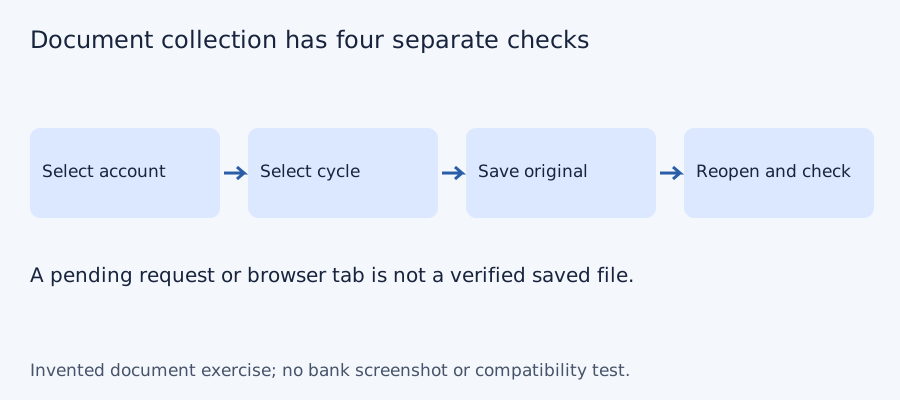
Preserve the issued PDF unchanged. Use an account alias and cycle boundaries in your private filename, without the full card number. Reopen the saved file locally before assuming the download succeeded. If the viewer only opened a document tab, finish saving through its available controls; an open tab is not a stored copy.
Keep document collection separate from transaction conversion
For several cycles, record the printed period of each saved statement in the downloadable checklist. Mark unavailable cycles explicitly rather than treating a duplicate download as a missing period. Two documents can have the same filename yet contain different periods, or different filenames yet contain the same cycle: use the actual account and dates to decide.
If you later make a CSV, purchases and fees increase amount owed, while credited payments and refunds reduce it. Do not use the checking-account cash convention without saying what the signs mean. Detailed row classification belongs in the Chase date, payment and refund guide. It is a separate task from acquiring the original billing document.
Test the collection checklist with four invented periods
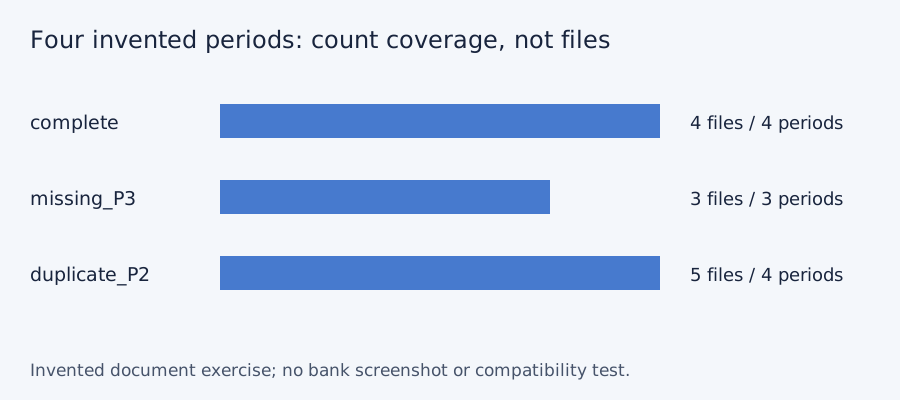
We checked set membership for three deliberately constructed document lists on October 11, 2026. The desired periods are P1, P2, P3 and P4; these aliases do not represent a bank’s actual monthly cadence or archive. A complete list has four files and four unique periods. Omitting P3 leaves three files and a gap. Downloading P2 twice gives five files but still only four unique periods. More files do not necessarily mean more coverage. No bank account, PDF, OCR output or LocalExtract result was tested.
| Invented case | File count | Unique periods | Missing period |
|---|---|---|---|
| Complete | 4 | 4 | None |
| P3 absent | 3 | 3 | P3 |
| P2 saved twice | 5 | 4 | None |
Blank document-collection checklist · constructed CSV results · inputs and method in JSON. Use aliases rather than full account numbers; adapt the actual period list to the documents your account issues.
Frequently Asked Questions
Is the calendar month the billing cycle?
Not always. Read the printed cycle boundaries. A payment due date is also a different date and does not define all transactions included in the cycle.
Where do I start in the app?
Profile & Settings → Document manager → Statements & documents → Statements, then select the actual card account and year. Final viewer controls can vary.
Does the seven-year statement guide guarantee my card archive?
No. Chase qualifies history by account type. Check what the specific card provides and ask Chase for an unavailable cycle.
Is a CSV a replacement for the downloaded statement?
No. Keep the issued PDF. A CSV is a working table without the original page layout or all possible fields; confirm what a recipient requires.
If your source is a PDF
If you later need spreadsheet rows from the PDF, LocalExtract can process one PDF at a time locally and export CSV with date,description,amount. This is separate from downloading an issued statement. There is no direct XLSX export; use Excel to save a checked CSV as XLSX. The free evaluation covers ten pages in total; Pro is USD 10/month or USD 60/year. Account, subscription, update and periodic Pro checks need network access. No real bank sample was validated for this guide. Product scope and downloads.
Sources and verification scope
Public official guidance checked on October 11, 2026. Account screens were not tested. Follow the current product-specific interface; this guide does not guarantee extraction accuracy or bank acceptance.
Updated October 11, 2026: clarified the card-specific document route and archive limits, added an invented document-coverage exercise, and linked to the separate card CSV guide. No real bank format or extraction was validated.
Finish by reopening the saved card PDF and checking its identity, full cycle and page completeness. Keep that original before moving to the card-specific CSV dates, payments and refunds guide.
LocalExtract Team
We build LocalExtract, a desktop bank statement converter. Questions or corrections? Contact · Editorial policy