
How to Download Bank of America Bank Statements as PDF
Updated · 7 min read
In Bank of America Online Banking, find Statements & Documents for the account and select an available statement. Use Request statements for an older copy rather than extending a recent transaction filter. This US guide distinguishes an immediately available PDF from an ordered copy and explains what to check before keeping or sharing it.
This guide is for account holders preparing their own records; it does not retrieve records for someone else.
PDF preserves the document’s pages. CSV is a text table of separated values; XLSX is an Excel workbook. A working table is your analysis copy, not the issued bank record.
The desktop apps export date, description, and amount as CSV. Open CSV in Excel to save an XLSX workbook. Statement support varies: verify the result against your own PDF.
Choose the available statement or request an older copy
Bank of America’s official US digital-banking guide separates immediately available documents from older requested copies. Start in the signed-in account’s statement area, not a budgeting tool’s transaction list.
- Sign in and open the Accounts area.
- Find Statements & Documents for the account you need.
- Select the available statement and download its PDF.
- If the older document is not available there, use Request statements for eligible older copies.
- After the requested copy becomes available, save it and check its actual period.
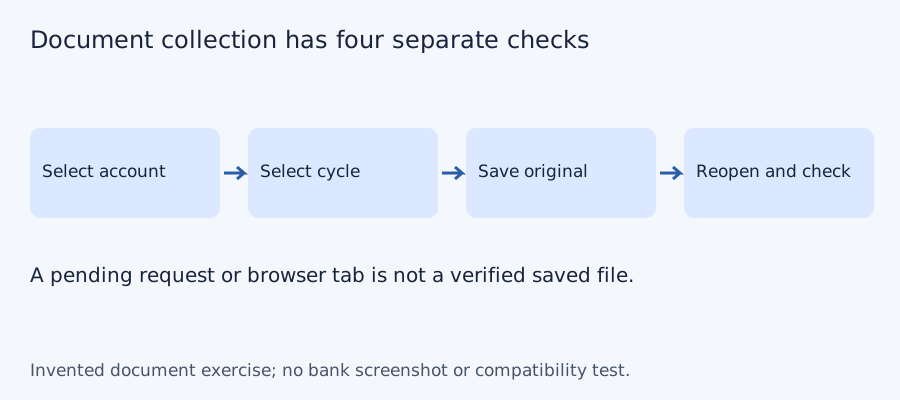
The guide describes immediately viewable statements with check images for up to 18 months, and older eligible copies that can be ordered up to seven years back. A request can take 24–36 hours, and an ordered copy remains available for seven days. Submitting a request is not the same as obtaining a file. Track the requested period, request status and saved-copy status separately. Do not mark the period complete until you have reopened its saved document.
| Situation | Appropriate next step | What not to infer |
|---|---|---|
| The needed cycle is immediately listed | Open and save that statement | The filename proves its account/period |
| An eligible older cycle is absent | Request the copy and allow the documented delay | Extending an activity filter retrieves the PDF |
| A requested copy is ready | Save it within its availability window | It will stay available indefinitely |
| The cycle still cannot be obtained | Ask Bank of America about that account/period | Another product’s archive applies |
These are public guide conditions, not a signed-in account test or a guarantee of your account’s eligibility. No universal mobile menu is asserted here; the verified procedure is the web account-document route.
Do not confuse My Financial Picture with the PDF archive
The separate My Financial Picture FAQ describes initially importing up to 90 days of transaction history and downloading filtered activity. That view serves financial management; it does not establish the complete statement archive or guarantee CSV for every account. A 90-day initial view is not equivalent to three exact calendar months, and a transaction download is not automatically an issued statement.
For a proof-of-record request, start with the actual issued statement required by the recipient. For analysis over selected dates, an activity download may be useful, but check its first and last included dates and actual format. Keep those two files labelled differently so an activity table is not mistakenly supplied as the requested monthly document.
Verify and retain the received PDF
Reopen the file you saved. Check the intended account, printed cycle boundaries, readable pages and completeness. Use an account alias in filenames; avoid exposing full account numbers in a shared directory. Retain the original without editing it. A request confirmation, an empty browser tab or a download icon alone does not prove that the usable statement was stored.
When collecting several periods, use the checklist to distinguish requested, received and verified. Record actual dates rather than only a month label. If two files appear to duplicate a cycle, inspect account and period before counting them as two completed periods. If a download expires before saving, consult the bank about another request rather than inventing a permanent link.
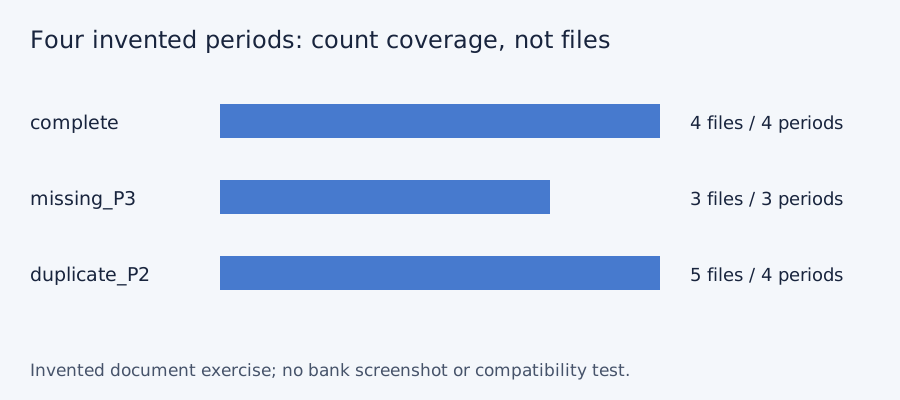
Test the collection checklist with four invented periods
We checked set membership for three deliberately constructed document lists on October 11, 2026. The desired periods are P1, P2, P3 and P4; these aliases do not represent a bank’s actual monthly cadence or archive. A complete list has four files and four unique periods. Omitting P3 leaves three files and a gap. Downloading P2 twice gives five files but still only four unique periods. More files do not necessarily mean more coverage. No bank account, PDF, OCR output or LocalExtract result was tested.
| Invented case | File count | Unique periods | Missing period |
|---|---|---|---|
| Complete | 4 | 4 | None |
| P3 absent | 3 | 3 | P3 |
| P2 saved twice | 5 | 4 | None |
Blank document-collection checklist · constructed CSV results · inputs and method in JSON. Use aliases rather than full account numbers; adapt the actual period list to the documents your account issues.
Frequently Asked Questions
Why can I see a recent statement but not an older one?
The guide distinguishes an immediate window from older eligible copies obtained through Request statements. It does not promise identical availability for all products.
How long should I allow for an ordered copy?
The public guide says 24–36 hours, and a ready requested copy remains available for seven days. Check the actual request and save it promptly.
Can My Financial Picture replace my statement?
Its downloaded activity is a separate record with its own covered dates. Use the issued statement when the recipient or reconciliation task needs that document.
What should I check after download?
Open the saved file and inspect account, printed period, readable pages and completeness. Do not count a pending request or duplicate file as a collected missing cycle.
If your source is a PDF
If you later need spreadsheet rows from the PDF, LocalExtract can process one PDF at a time locally and export CSV with date,description,amount. This is separate from downloading an issued statement. There is no direct XLSX export; use Excel to save a checked CSV as XLSX. The free evaluation covers ten pages in total; Pro is USD 10/month or USD 60/year. Account, subscription, update and periodic Pro checks need network access. No real bank sample was validated for this guide. Product scope and downloads.
Sources and verification scope
Public official guidance checked on October 11, 2026. Account screens were not tested. Follow the current product-specific interface; this guide does not guarantee extraction accuracy or bank acceptance.
Updated October 11, 2026: replaced shared general instructions with account-specific source decisions, explicit working-row examples and task-specific questions. No real bank format or extraction was validated.
Obtain the actual available or requested PDF, save it promptly and verify it locally. Only then move to Bank of America CSV and Excel checks.
LocalExtract Team
We build LocalExtract, a desktop bank statement converter. Questions or corrections? Contact · Editorial policy